
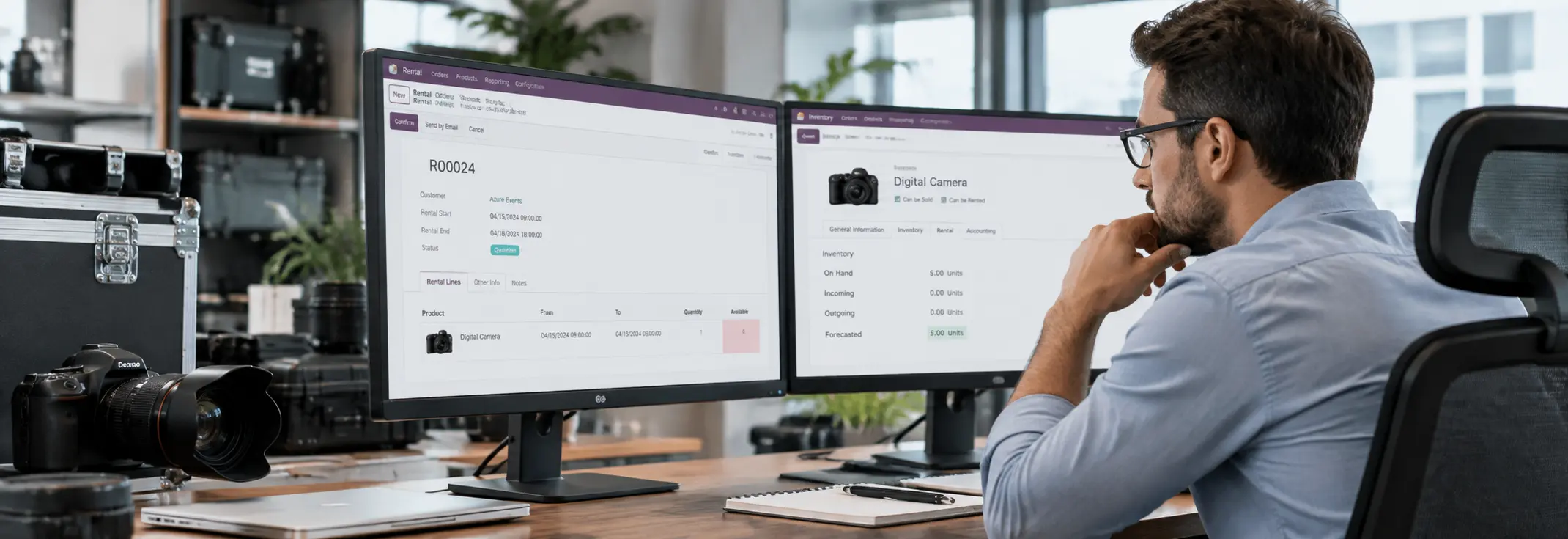
Odoo 19 says your rental product is unavailable—but your inventory says you have stock.
That mismatch can stop a rental order from being confirmed even when the product appears available. The issue is not necessarily the stock quantity itself; Odoo Rental evaluates availability against the rental period and the connected inventory workflow.
The real question is:
What is making Odoo 19 mark the product unavailable when stock is still showing as available?
This article explains the technical conditions behind the mismatch and how to identify where the availability calculation is going wrong.
What Does Odoo 19 Check Before Showing Rental Availability?
Odoo 19 Rental does not determine availability from the product’s On Hand quantity alone. For physical rental products, Rental works with Inventory to track stock movements and rental periods. When Rental Transfers is enabled, Odoo creates delivery and return operations and uses the Customer/Rental location while the product is out on rent.
The availability shown on a rental order can therefore depend on the relationship between:
- the requested rental period
- existing rental commitments
- stock movements
- the product’s rental configuration
- the time reserved between rental orders
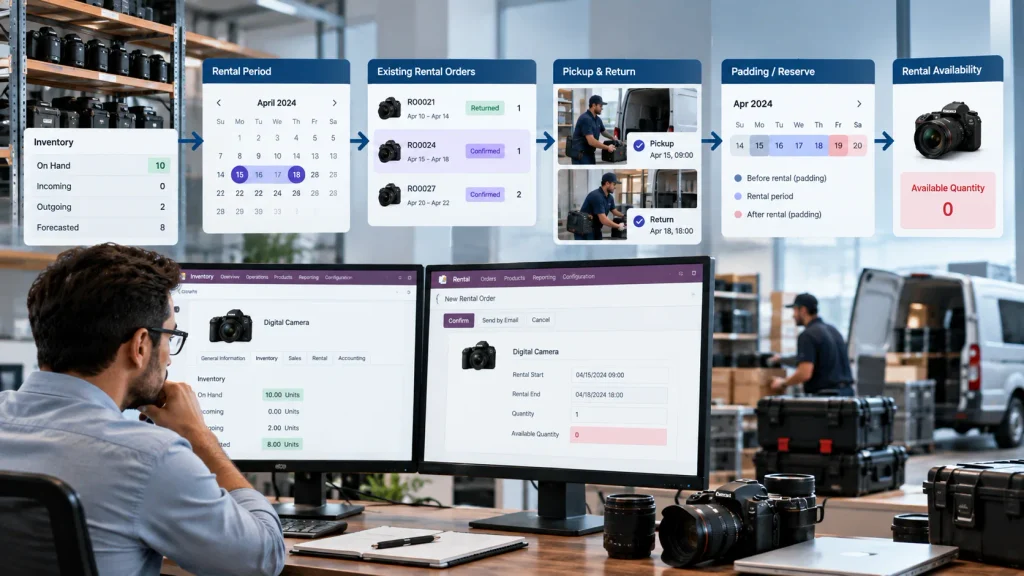
Odoo 19 also provides Reserve product and padding settings that can intentionally make a product unavailable between rental orders, even when the item has already returned to stock.
The important point is that available stock and available rental capacity are not always the same thing. The next step is to identify which rental or inventory condition is preventing Odoo from treating the product as available.
What Can Make Odoo 19 Rental Show Zero Availability?
Odoo 19 Rental does not determine availability from the On Hand quantity alone. For physical rental products, availability is affected by the rental period, existing rental commitments, inventory movements, and the product’s rental configuration.
Confirmed Rental Orders and the Requested Rental Period
Start by checking whether another confirmed rental order already covers the requested period.
Review the:
- Pickup date and time
- Return date and time
- Requested quantity
- Rental order status
- Existing rental commitments
A confirmed rental order can reserve the product for its rental period. Therefore, a positive On Hand quantity does not automatically mean that the same quantity is available for another rental period.
The key check is whether the requested rental period overlaps with an existing confirmed rental.
Pickup, Return, and Rental Transfers
For physical rental products, the rental workflow is connected to Inventory. When Rental Transfers is enabled, Odoo creates the inventory operations required for pickup and return.
The stock flow can be:
Warehouse → Pickup → Customer/Rental → Return
A product that has already been picked up may no longer be available in its original warehouse location. Likewise, an incomplete return can affect the stock available for another rental.
Check the related delivery and return operations instead of relying only on the quantity displayed on the product.
Padding and Reserve Product Settings
Rental availability can also be restricted by the time configured between rental orders.
Odoo 19 provides padding and Reserve product settings that can keep a product unavailable for a defined period between rentals. This can happen even when the physical product has returned to stock.
Check the rental settings and the product’s Reservations configuration when the availability issue occurs between two rental periods.
Verify the Product and Rental Configuration
For a physical item that should be managed through rental inventory, verify that the product is configured as a rental Goods product rather than a service.
Also review whether the Rental and Inventory configuration matches the intended stock movement workflow.
If the product configuration, rental dates, confirmed orders, transfers, and reserve settings all appear correct but Odoo 19 still shows zero availability, the issue should be investigated further instead of changing the inventory quantity simply to make the product appear available.
Use the Forecasted Report to Verify Inventory Availability
When Odoo 19 Rental shows zero availability, open the product’s Forecasted Report and check the inventory position for the relevant period.
The report provides:
- On Hand — current stock
- Incoming — expected incoming quantities
- Outgoing — quantities already allocated to outgoing operations
- Forecasted — projected stock after relevant operations
It also shows the operations affecting the forecast, including what is using the stock and when the movement is scheduled.
For this Rental problem, the report should be used to verify the inventory-side explanation for the zero availability result.
Check the requested rental period against the relevant outgoing movements, reservations, returns, and incoming stock. If the forecast supports the required quantity, but the Rental order still reports zero availability, continue the investigation rather than changing the stock quantity.
When Inventory Is Available but Rental Still Shows Zero
If the product is correctly configured, the rental period is valid, active rental commitments have been checked, reserve time does not explain the restriction, and the Forecasted Report still supports availability, the problem may require a deeper technical investigation.
At this point, compare the Rental result with the underlying inventory data and review:
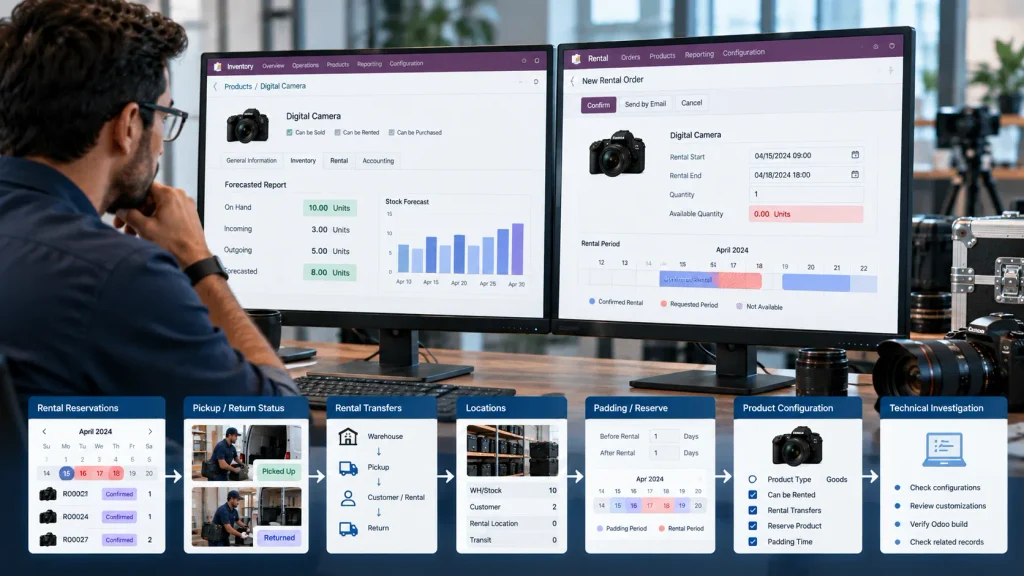
- rental reservation state
- stock movement state
- affected locations
- customizations or automated logic
- the exact Odoo 19 build or environment
The goal is to identify where the availability result stops matching the underlying data.
A current Odoo 19 community report describes this type of discrepancy, with the Rental availability indicator showing zero while the reported inventory and forecast did not support zero availability. The report should be treated as a user-reported issue, not proof that the behavior is a general Odoo bug.
Do Not Correct the Problem by Changing Stock Quantities
Do not create an inventory adjustment simply to make the Rental availability indicator show as available.
If the physical inventory is already correct, changing the quantity only masks the actual problem and can introduce an inaccurate stock record.
First identify why Odoo is calculating zero.
Correct the underlying rental, inventory, reservation, location, or configuration issue. If those checks do not explain the result, treat the discrepancy as a technical issue requiring further investigation.
Odoo 19 Rental Availability: A Practical Diagnostic Flow
When Odoo 19 Rental shows zero availability even though stock appears available, check the issue in this order:
1. Check the rental period and active rental orders
Verify the pickup and return date and time, then check whether a confirmed rental already covers the requested period.
2. Check pickup and return status
Review the related rental transfers to confirm whether the product has been picked up, remains in the Customer/Rental location, or is still awaiting return.
3. Check padding and reserve settings
Review the configured availability padding and the product’s reservation settings to determine whether Odoo is intentionally blocking the next rental period.
4. Verify the inventory state
Open the product’s Forecasted Report and compare On Hand, Incoming, Outgoing, and Forecasted quantities with the requested rental period.
5. Compare the inventory result with Rental availability
If the inventory data supports the required quantity but the Rental order still shows zero, record the difference instead of changing the stock quantity.
6. Investigate technically when the mismatch remains
If the product, rental schedule, transfers, reservations, and inventory state are correct, reproduce the issue in a controlled environment and review the Odoo version, configuration, customizations, and affected records before escalating the issue.
When Does Odoo 19 Rental Require Technical Investigation?
Technical investigation is appropriate when the normal Rental and Inventory checks do not explain the zero-availability result.
Escalation is warranted when:
- the Forecasted Report supports the required quantity but the Rental order still shows zero availability
- no confirmed rental overlaps the requested period
- pickup and return transfers are correct
- padding or reserve time does not explain the restriction
- the product and Rental configuration are correct
At this stage, review the Rental reservation state, inventory locations and movements, customizations, affected records, and the specific Odoo 19 environment or build.
The objective is to identify where the Rental availability result stops matching the underlying inventory and rental data.
Do not change stock quantities simply to make the availability indicator appear correct. When configuration and inventory data are already valid, the mismatch should be investigated at the workflow or technical level.
For businesses facing configuration, customization, or cross-module Odoo issues, Odoo ERP implementation support can help trace the issue across the connected workflow.
When Odoo 19 Rental Availability Is a Configuration Problem
When stock, rental dates, confirmed orders, transfers, and reservation settings appear correct but Odoo 19 still shows zero availability, the issue may extend beyond the Rental order itself.
Physical Rental products depend on connected Inventory workflows, stock locations, movements, and rental configuration. A mismatch in one part of that workflow can affect the availability result shown in another.
The important point is that the visible availability value should be treated as the result of a connected workflow, not as an isolated field.
If the standard Rental and Inventory checks do not explain the result, the next step is to review the configuration and workflow across the Odoo environment rather than changing stock quantities simply to remove the warning.
For businesses dealing with cross-module configuration, customization, or workflow issues, Odoo ERP implementation can help identify the underlying configuration and process issues affecting the system.
Frequently Asked Questions
Because Rental availability depends on more than On Hand stock. Odoo also considers the rental period, existing rental commitments, stock movements, and reservation settings.
Yes. Physical rental products use Inventory for stock movements, pickup and return operations, and related location tracking.
Check the rental period, confirmed rental orders, pickup and return status, reservation settings, and inventory forecast. If these do not explain the result, the issue may require technical investigation.
Conclusion
When Odoo 19 Rental shows zero availability while stock is available, the issue may not be the On Hand quantity. Check the rental period, existing reservations, pickup and return status, reserve settings, product configuration, and related inventory movements.
If these are correct but Rental still shows zero, the problem may require technical investigation rather than an inventory adjustment.
For connected Odoo configuration and workflow issues, Odoo ERP implementation can help identify the underlying problem.

