

Odoo 19 scheduled actions may fail to execute because of configuration errors, custom Python exceptions, cron worker problems or infrastructure constraints. These failures can leave automated tasks incomplete and interrupt dependent business operations.
An overdue Next Execution Date is an important symptom to investigate. A failure affecting one scheduled action may require checking its configuration and execution logs. Multiple scheduled actions stopping together may indicate a shared problem involving workers, database connectivity or infrastructure.
This guide covers the essential diagnostic checks, explains how to investigate execution failures and identifies situations that require developer or infrastructure-level intervention.
Identify What Is Actually Failing
Start by determining whether one scheduled action has failed or multiple scheduled actions have stopped executing. Check the action’s status, Next Execution Date and available execution logs before changing its configuration or restarting the server.
| Observed symptom | Possible explanation | What to investigate |
| One scheduled action repeatedly fails | Configuration error, Python exception or problem with specific records | Execution logs, affected records and custom code |
| Multiple scheduled actions stop progressing | Shared worker, database or infrastructure problem | Odoo logs, worker activity, database connectivity and server health |
| Next Execution Date remains overdue | The action may not be progressing as expected | Execution history, action status and worker activity |
| A task executes but produces no expected result | Business logic, transaction handling or dependency problem | Method execution, exceptions and affected records |
| A task executes inconsistently | Resource constraints, execution limits or external dependencies | Execution duration, worker availability and integration behaviour |
These symptoms indicate where to investigate, not a confirmed root cause. The same symptom can arise from different issues depending on the Odoo deployment and implementation.
Diagnostic priority: Establish whether the action is not being executed, failing during execution or completing without producing the expected business result.
That distinction determines the next troubleshooting step.
Check Scheduled Action Configuration
Inspect the scheduled action’s status, execution interval, associated model, and configured method. Incorrect settings can prevent a task from running according to its intended schedule.
Odoo stores scheduled actions in the ir.cron model, which defines when and how the associated operation is scheduled for execution.
Open the relevant scheduled action through the technical settings available in your Odoo environment. Menu names and access permissions may vary.
Review these settings:
- Active status: Confirm that the scheduled action is enabled.
- Execution interval: Verify that the frequency matches the intended schedule.
- Next Execution Date: Check whether the next planned execution time is appropriate or unexpectedly overdue.
- Associated model and method: For developer-defined actions, confirm that the configured model and method correspond to the intended operation.
- Execution history: Review available logs or error messages to identify failed attempts.
Also inspect the execution limits. An action with a finite number of remaining calls may stop running after those calls have been used.
Check for automatic deactivation. Odoo 19 can skip scheduled actions after three consecutive errors or timeouts. Five consecutive failures over a period of at least seven days can lead to deactivation and notification to the database administrator. Verify these conditions against the behaviour of your Odoo 19 environment before taking corrective action.
An inactive action requires investigation before reactivation. Determine whether repeated failures, timeouts, or an intentional configuration change caused the status.
Do not change the execution interval simply to force a task to run. Correct the configuration only when evidence identifies a configuration problem. Investigate execution errors separately.
Investigate Cron Worker and Infrastructure Problems
Multiple scheduled actions stopping at approximately the same time may indicate a shared execution problem rather than separate configuration errors. Investigate cron workers, database connectivity, resource constraints and infrastructure events.
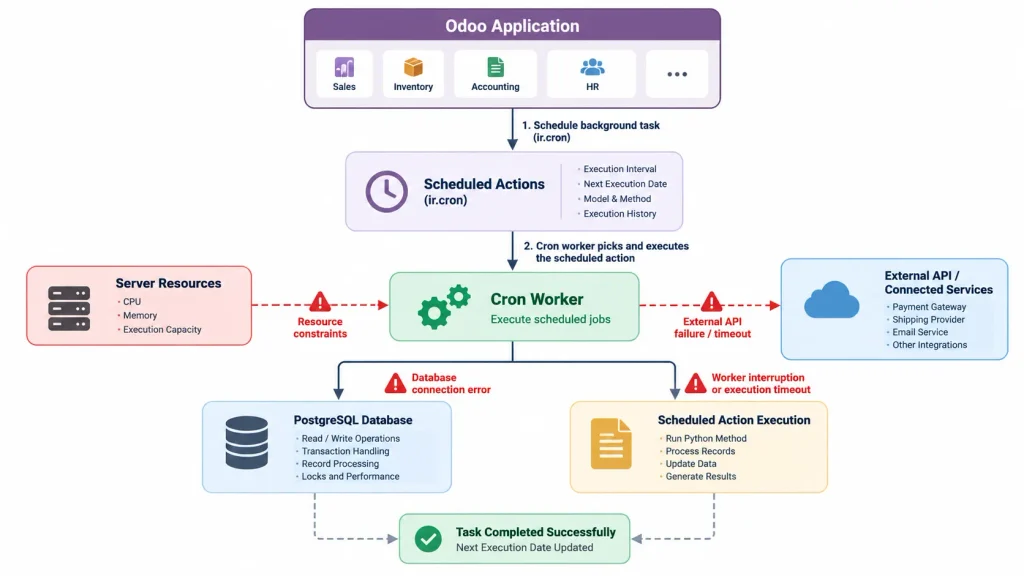
Potential causes include:
- Cron workers that have stopped or become unresponsive.
- Long-running jobs occupying available execution capacity.
- Database connection failures or query timeouts.
- Worker termination caused by resource constraints.
- External API calls that time out or remain incomplete.
- Server or container restarts that interrupt processing.
A reported Odoo forum discussion describes scheduled actions stopping until the Odoo container is restarted, with the Next Execution Date remaining unchanged. The report concerns Odoo 16, so it illustrates a possible failure pattern rather than confirming an Odoo 19 defect.
Check application and infrastructure logs
Review Odoo application logs around the time execution stopped. If you manage the underlying infrastructure, examine the corresponding system, container and PostgreSQL logs.
Look for:
- Worker termination or unexpected restart events.
- Out-of-memory errors or resource-limit violations.
- Database disconnections and connection failures.
- Query timeouts, lock-related errors or unusually long operations.
- Repeated exceptions associated with scheduled tasks.
- Container restarts that coincide with the failure.
Correlate timestamps across the available logs to determine whether the failure originated in a scheduled action, the application worker, the database or the hosting environment.
Do not treat a restart as the root-cause fix. Restarting Odoo may temporarily restore execution, but the underlying problem can return if the cause remains unresolved. Preserve relevant logs and timestamps before restarting whenever operational conditions permit, and follow the deployment’s recovery procedures.
Check Custom Python Code and Long-Running Jobs
Custom scheduled actions can fail because of Python exceptions, inefficient record processing, slow database operations, or unresponsive external services. Review custom modules and recent code changes if the problem affects a particular scheduled action.
Investigate these areas:
Python exceptions: Check application logs for exceptions raised by the scheduled method. Determine whether the failure occurs for particular records, invalid data, or a specific processing step.
External API calls: Verify connection and response timeouts. A remote service that responds slowly or becomes unavailable can delay the scheduled task.
Large record sets: Check whether the method processes too many records in a single execution. Large workloads may require batch processing to reduce execution time and resource consumption.
Database operations: Investigate slow queries, database locks, and expensive operations performed by the scheduled method. Identify the specific operation responsible before changing database settings.
Custom module changes: Review recent deployments and verify that the scheduled method, associated model, and required dependencies remain valid.
Use batch processing where appropriate. Odoo 19 supports processing scheduled work in manageable batches rather than occupying a worker for an extended period. The developer documentation also describes _commit_progress() for reporting progress in supported scheduled-action implementations. Verify the appropriate implementation for your scheduled action before making code changes.
Each batch should make measurable progress and handle failures appropriately. Avoid repeatedly processing the entire workload when only a subset of records requires attention.
Identify the failing operation before changing the code. Determine whether the problem originates from a Python exception, excessive data volume, an external dependency, or an expensive database operation. Rewriting the method or increasing execution limits without evidence can leave the underlying problem unresolved.
Check Execution Limits and Hosting Behaviour
Odoo scheduled-action behaviour depends on the hosting environment. Self-hosted installations and Odoo.sh have different execution constraints.
For self-hosted Odoo
Review worker configuration, cron execution capacity, resource limits and timeout settings. Compare these settings with the workload and available server resources before changing the configuration.
For Odoo.sh
Odoo.sh uses platform-specific execution constraints. Odoo documentation describes scheduled-action execution as best-effort, meaning exact execution times are not guaranteed. Scheduled actions should use appropriate batch processing, progress tracking and idempotent implementations.
A delayed task does not automatically indicate a scheduler defect. Persistent failures, overdue actions and missing business results still require investigation.
Investigate database performance
Slow queries, database locks and expensive operations can delay scheduled tasks, particularly when custom methods process large datasets.
Review application logs and available database evidence to identify the cause. Avoid changing indexes, SQL queries or database settings without evidence of a specific bottleneck.
Follow a Structured Troubleshooting Process
Follow this sequence to identify why Odoo scheduled actions are failing and verify whether the problem has been resolved.
- Identify affected actions: Determine whether one scheduled action or several actions have stopped working.
- Verify configuration: Check the active status, execution interval and Next Execution Date.
- Review logs: Examine relevant errors, timeouts, worker events and database connection problems.
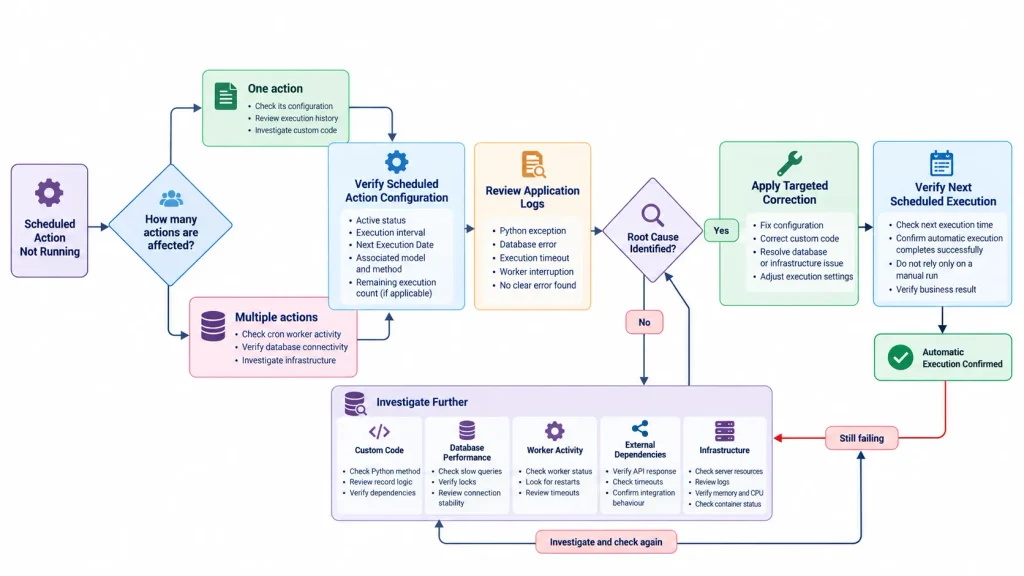
- Investigate the cause: Check custom Python code, record processing, external dependencies or infrastructure, depending on the symptoms.
- Apply a targeted correction: Change the configuration or code only after identifying the likely cause.
- Verify automatic execution: Confirm that subsequent scheduled runs complete successfully and produce the expected business result.
A successful manual execution does not prove that automatic scheduling works correctly. Verify subsequent scheduled runs as well.
Avoid modifying cron records directly in the database without an appropriate recovery procedure and qualified technical assessment.
When to seek technical assistance
Seek technical assistance if scheduled actions repeatedly fail despite correct configuration, several actions stop together, custom code produces recurring exceptions or the problem persists after the initial investigation.
Collect relevant logs, error messages and timestamps before escalating the issue. This evidence helps developers distinguish configuration problems from code, database or infrastructure failures.
Businesses that need assistance with persistent Odoo implementation or customization issues can contact the Odoobots team through its Odoo ERP Implementation Company page.
Frequently Asked Questions
Possible causes include incorrect configuration, Python exceptions, long-running jobs, worker problems or database connectivity issues. Check whether one action or multiple actions are affected before investigating the likely cause.
An unchanged Next Execution Date indicates that the action’s scheduling progress needs investigation, but it does not establish the root cause. Check its active status, execution logs and worker activity for relevant errors.
A restart may restore execution temporarily, but it does not identify the underlying cause. Preserve relevant logs and investigate execution failures, worker problems and resource constraints before treating a restart as the solution.
Conclusion
Odoo 19 scheduled-action failures require identifying the underlying cause rather than repeatedly changing settings or restarting the server.
Check the affected action’s configuration and execution logs first. Investigate cron workers, database connectivity and infrastructure if multiple actions stop together. For isolated failures, examine custom code, processing volume and external dependencies.
Identifying the actual failure point helps restore reliable background processing and reduces the risk of recurring problems.

