

Slow Odoo performance can delay sales processing, inventory operations, accounting reports, and manufacturing workflows. In customized systems, the cause may be inefficient Python code, excessive ORM queries, slow report generation, external API delays, or infrastructure constraints.
Before increasing server resources or modifying code, identify the operation causing the delay and collect evidence to determine its root cause.
This guide explains how to investigate Odoo performance issues, identify code-level and database bottlenecks, and determine when developer intervention is necessary.
Identify Where the Odoo Performance Problem Occurs
Before changing code or server settings, identify whether the slowdown affects the entire Odoo system, a specific operation, larger datasets, or periods of high activity.
System-wide slowdown
When multiple Odoo applications respond slowly, investigate shared resources and database activity.
Check:
- CPU and memory utilization.
- Slow queries and database contention.
- Concurrent requests and long-running transactions.
- Scheduled actions that overlap with peak usage.
Compare application response times with server metrics, database activity, and application logs to identify patterns.
A specific screen, report, or workflow is slow
If other applications work normally, investigate the affected functionality.
Check for inefficient custom methods, repeated ORM queries, expensive computed fields, and complex report-generation logic. Reproduce the operation with comparable data and examine its execution time and related queries.
Performance deteriorates as data increases
If an operation becomes slower as products, invoices, or stock movements accumulate, investigate whether the implementation scales efficiently.
Look for repeated searches inside loops, unnecessary record retrieval, and operations that process records individually instead of using appropriate batch processing. Compare execution time and query counts across representative dataset sizes.
Slowdown during peak usage
If response times increase when multiple employees use Odoo simultaneously, investigate resource contention, database locks, competing transactions, and resource-intensive scheduled jobs.
Compare busy and quiet periods using monitoring data and logs. A slowdown under concurrent usage may require investigating both application code and infrastructure.
Investigate Custom Code and ORM Inefficiencies
Custom Odoo modules can introduce performance bottlenecks when they execute unnecessary database queries, repeatedly process records, or trigger expensive computations.
Repeated ORM queries inside loops
Executing a database query for every record can increase query counts as the dataset grows.
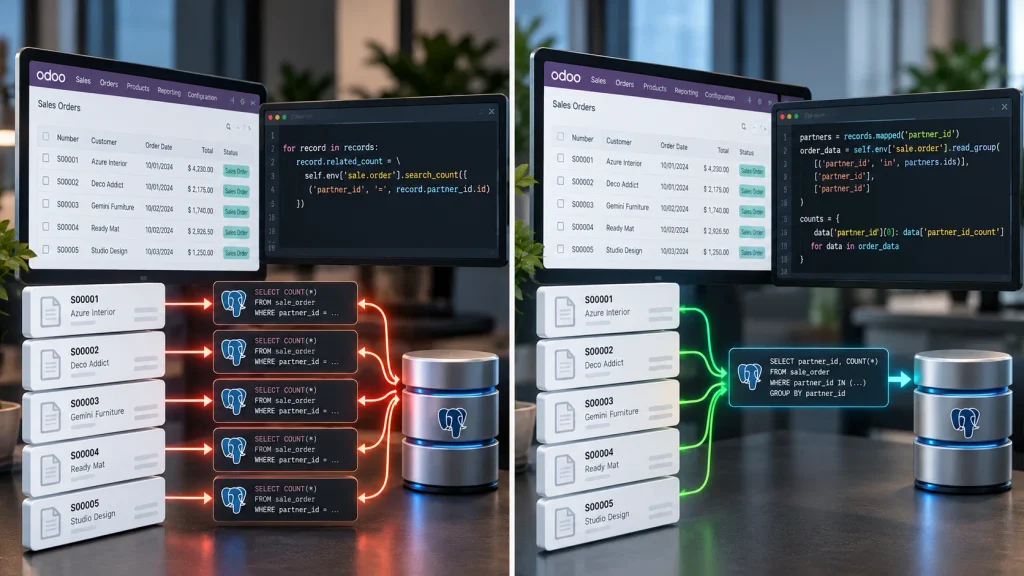
for record in records:
record.related_count = self.env[‘sale.order’].search_count([
(‘partner_id’, ‘=’, record.partner_id.id)
])
This example performs a separate search_count() call for each record. Depending on the requirements, a grouped query or batched operation may reduce database round trips.
Odoo’s performance guidance recommends batching operations instead of repeatedly querying the database inside record loops.
What to investigate: ORM searches inside loops, repeated retrieval of related records, and opportunities to process recordsets in batches.
Inefficient computed fields
Computed fields can slow forms, lists, and record updates when their calculations repeatedly query the database or process unnecessary data. Frequent recomputation can increase the cost further.
What to investigate: Expensive calculations, unnecessary dependencies, repeated database access, and computation methods that do not handle larger recordsets efficiently.
Unnecessary record retrieval
Custom methods may retrieve more records than required or filter large datasets after fetching them. This increases processing and database workload.
What to investigate: Search domains that retrieve excessive records, repeated searches for records already available, and opportunities to use ORM batching and prefetching appropriately.
Optimization should address a measured bottleneck without changing business logic, compromising access controls, or introducing incorrect results.
Diagnose Database and SQL Performance Problems
Odoo uses PostgreSQL to store and retrieve business data. Slow queries, excessive database calls, and transaction contention can delay forms, reports, and business workflows. However, a slow screen does not necessarily indicate a database problem; application code may also generate unnecessary queries or spend excessive time processing results.
Identify slow or excessive queries
Use Odoo’s profiler to examine SQL queries and execution traces associated with the affected operation.
Investigate:
- Queries with unusually long execution times.
- Repeated queries for individual records.
- Excessive database calls during one operation.
- Queries that retrieve more data than necessary.
Determine whether database activity accounts for a significant portion of the delay before deciding what to optimize.
Review database indexes
Indexes can improve query performance when they support the relevant search conditions, but unnecessary indexes consume storage and increase the cost of data modifications.
Before adding an index:
- Identify the slow query and examine its filtering conditions.
- Review its execution plan.
- Check whether existing indexes support the query.
- Test the proposed change against representative data and measure the result.
Investigate locks and long-running transactions
If an operation slows down while other transactions are running, investigate database locks, competing queries, and long-running transactions. Check whether scheduled jobs or concurrent updates coincide with the slowdown.
Avoid changing database settings or transaction behavior without evidence. Changes must preserve data consistency and correct business operations.
Use Odoo’s Profiler to Find the Bottleneck
When basic checks do not identify the cause of slow performance, Odoo’s profiler can help developers investigate application execution and SQL queries.
What the profiler helps identify
Depending on the profiling configuration, developers can investigate:
- Time spent executing Python code.
- Slow or repeated SQL queries.
- Frequently executed code paths.
- Expensive QWeb template rendering.
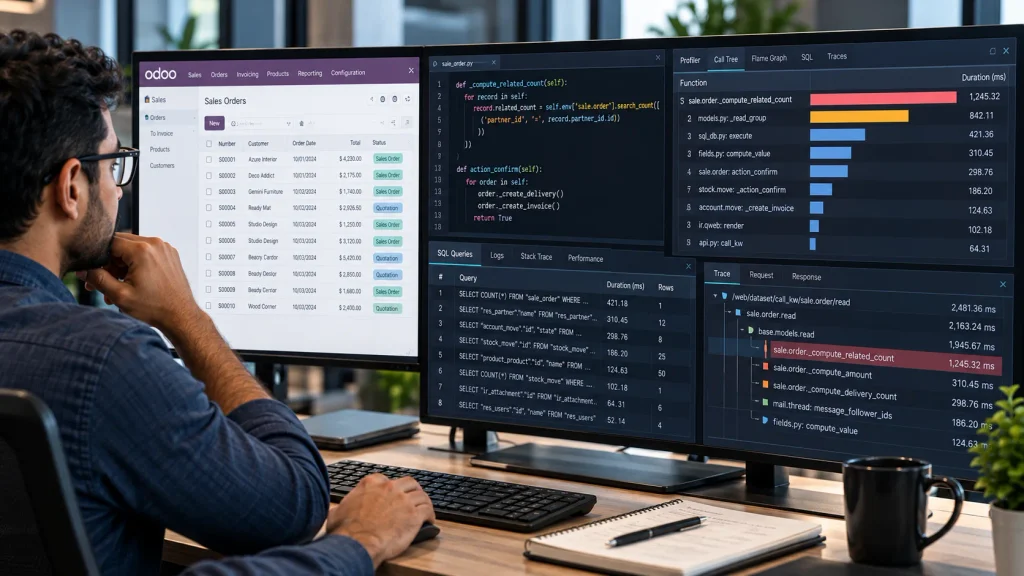
How to investigate a performance problem
- Reproduce the issue: Run the affected screen, report, or workflow using representative data.
- Capture profiling data: Enable the appropriate profiler for your Odoo version and environment.
- Analyze the results: Review execution traces, query counts, timings, and relevant code paths to identify the main bottleneck.
- Test the fix: Apply a targeted optimization and repeat the same operation under comparable conditions.
Profiling can introduce measurement overhead, depending on the collectors used. Compare results carefully rather than treating profiling timings as normal production response times.
Access limitations: Available diagnostic capabilities depend on the hosting environment and user permissions. Odoo Online, for example, does not provide the same server-level access as a self-hosted deployment.
Investigate Slow Reports, Integrations, and Scheduled Actions
Custom reports, external API calls, and scheduled jobs can delay Odoo workflows even when ordinary form operations perform normally.
Custom reports and QWeb templates
Slow reports may result from inefficient data retrieval, expensive calculations, excessive record processing, or complex QWeb rendering.
Investigate the report’s data preparation methods and template together. Odoo’s QWeb profiler collector can help identify expensive template operations, while SQL profiling can reveal database-related delays.
External API integrations
An Odoo workflow that depends on an external service may be delayed by slow responses or inefficient request handling.
Check:
- External API response times and timeout behavior.
- Repeated requests for the same data.
- Retry logic and unnecessary synchronous operations.
- Opportunities to batch requests where the API supports it.
Background processing or caching may help in appropriate cases, but changes must preserve data accuracy and business requirements.
Scheduled actions and background jobs
Scheduled jobs can compete with user-facing operations for database and server resources, particularly when processing large datasets.
Check job execution times, frequency, processed-record counts, and failures. Correlate these details with periods of slow performance to determine whether background activity contributes to the problem.
Determine Whether the Problem Is Code, Database, or Infrastructure
The same performance symptom can have different causes. Use the observed behavior and technical evidence to determine which component needs investigation.
| Observed symptom | Areas to investigate | Evidence to collect |
| One custom screen is slow | Custom methods, computed fields, ORM operations | Profiling traces and query counts |
| A report is slow | Data preparation, SQL queries, QWeb rendering | Execution timings and profiling results |
| Several applications are slow | Shared database activity, resource contention, infrastructure | Monitoring data and application logs |
| Performance worsens as data grows | Repeated queries, inefficient processing, query execution plans | Query counts and timings at different data volumes |
| Slowdowns occur during peak usage | Concurrent requests, database locks, resource limits | Monitoring data and transaction activity |
| External workflows are slow | API latency, retries, synchronous processing | Integration timings and error logs |
| Performance deteriorates after customization | Recent code changes and newly introduced queries | Before-and-after measurements and code review |
| Performance changes after an update | Compatibility, changed code paths, configuration | Version details, logs, and regression tests |
These indicators guide the investigation; they do not establish the root cause by themselves.
When should you hire an Odoo developer?
Developer support is appropriate when evidence points to inefficient custom code, expensive computed fields, excessive ORM queries, slow custom reports, or integration logic that delays application workflows.
If the primary cause is infrastructure configuration or database administration, the appropriate specialist may be needed instead. Some issues require collaboration between developers and infrastructure teams.
When custom code or application behavior is responsible, Odoobots’ Hire Odoo Developer service is the relevant next step to discuss the technical requirements.
What to Prepare Before Requesting Odoo Performance Support
Providing clear technical evidence helps identify the cause of an Odoo performance problem more efficiently.
Before requesting support, prepare:
- Affected operation: Identify the slow screen, report, button, or workflow and explain its expected behavior.
- Response time and reproduction steps: Record how long the operation takes and the steps required to reproduce the delay.
- Scope and data volume: Explain which users are affected and whether performance worsens as the number of records increases.
- Recent changes: Note relevant customizations, deployments, upgrades, or configuration changes.
- Technical evidence: Provide available application logs, profiling results, query timings, and monitoring data.
- Business impact: Identify the affected business process and explain how the delay disrupts operations.
Protect credentials, API secrets, customer information, and production database data when sharing diagnostic evidence.
You do not need every item before requesting help. Start with the available information and identify any additional evidence needed during the investigation.
Conclusion
Diagnosing Odoo performance issues requires evidence, not assumptions. Inefficient custom code, excessive ORM queries, database contention, slow reports, integrations, and infrastructure constraints can all contribute to delays.
Identify the affected workflow, investigate the relevant technical evidence, and measure performance before and after any changes. When custom code or application-level defects are responsible, an experienced Odoo developer can investigate and optimize the implementation without compromising business logic.
Need help diagnosing performance problems in your customized Odoo system? Explore Odoobots’ Hire Odoo Developer service to discuss your technical requirements.

