

A website visitor submits an enquiry through your Odoo website form, but no lead appears in Odoo CRM. The form may look normal from the customer’s side, yet the sales team has nothing to follow up.
The problem can occur when the website form is not connected to the expected CRM workflow, the form is configured for a different action, or the resulting lead is created or assigned somewhere the sales team is not checking.
Instead of recreating the form or changing several settings at once, trace the complete flow:
Website Form → Form Submission → CRM Lead → Sales Team → Lead Follow-up
This helps identify where the process stops and whether the issue is related to form configuration, CRM record creation, lead assignment, or visibility.
What Causes an Odoo Website Form Not to Create a Lead?
An Odoo website form does not create a CRM lead simply because it contains customer enquiry fields. The form must be configured to submit the required information through the intended Odoo workflow.
Common causes include:
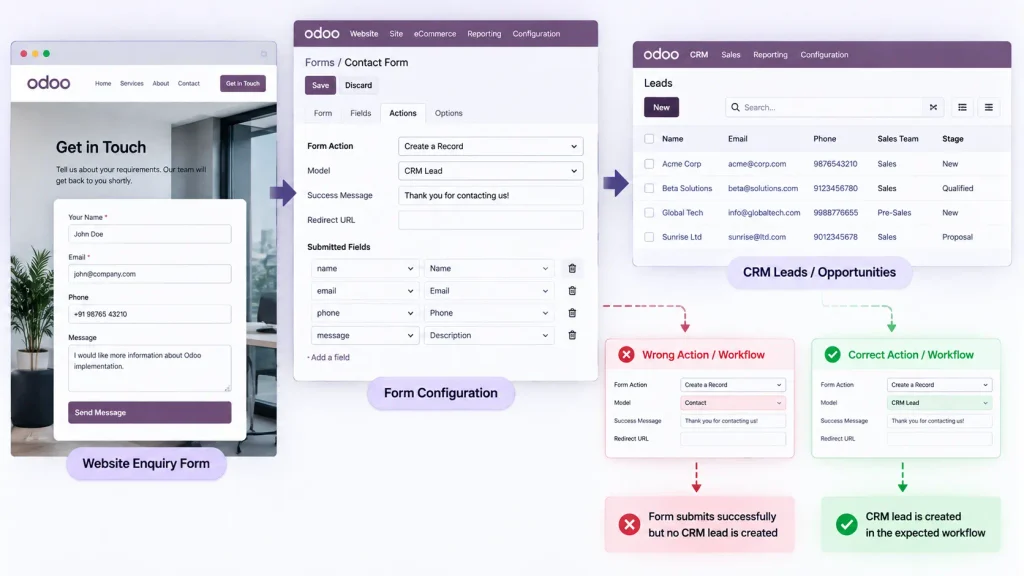
- The form is configured for the wrong action or record type.
Check what the website form is configured to create or update. The form may collect enquiry information without creating the CRM lead expected by the business. - The form is not connected to the intended CRM workflow.
Verify whether the submission is expected to create a lead, an opportunity, or another Odoo record. - Required information is incomplete.
Check whether the submitted data contains the information required by the configured workflow. - The lead is created but assigned or displayed elsewhere.
The submission may reach CRM successfully while sales team assignment, salesperson configuration, or user access causes the lead to appear outside the expected pipeline. - The form is using the wrong website or configuration.
In databases with multiple websites or website configurations, verify that the affected form is connected to the intended website and CRM workflow.
The key is to determine where the flow breaks:
Form Submission → CRM Record Creation → Lead Assignment → Lead Visibility
This distinguishes a form configuration problem from a CRM creation, assignment, or visibility problem.
Common Odoo Website Form and Lead Creation Problems
A missing lead can appear in different ways. Identify the actual symptom before changing the website or CRM configuration.
The Website Form Submits but the Expected Lead Is Missing
The visitor can complete the form successfully, but no expected CRM lead appears.
The first question is whether the form is configured to create the intended CRM record. A successful submission does not necessarily mean that the expected lead was created.
Check the form’s configured action, destination, and CRM workflow.
The Lead Is Created but the Sales Team Cannot Find It
If a CRM record exists, do not immediately change the website form.
Check the:
- Sales team
- Assigned salesperson
- CRM pipeline
- User access
- Lead visibility
- Website or company context
A lead can be created successfully but appear missing when it is assigned to another team or user or is outside the expected pipeline.
Different Website Forms Produce Different Results
If one website form creates leads while another does not, compare the working and affected forms.
Review differences in:
- Form configuration
- Required fields
- CRM workflow
- Website
- Sales team
- Record type
This comparison can identify whether the problem is specific to one form rather than the overall CRM configuration.
Lead Creation Is Inconsistent Between Submissions
If the same form creates leads for some submissions but not others, compare the affected submissions.
Check whether the differences involve submitted data, required fields, website configuration, routing, or CRM assignment.
This helps determine whether the problem is caused by the form itself or by how particular submissions are processed.
How to Check Why Your Odoo Website Form Is Not Creating Leads
Do not change multiple Website and CRM settings at the same time. Start with one affected submission and trace it through the complete workflow.
Step 1: Test the Affected Website Form
Submit the form using realistic test information.
Confirm that:
- The form can be submitted successfully
- Required fields can be completed
- The expected success response appears
- The form is being used on the intended website page
If the form cannot be submitted, investigate the website form first. If it submits successfully but no lead appears, continue to CRM.
Step 2: Check the Form Configuration and Submitted Data
Inspect the affected form and determine:
- What action is configured?
- What record or model is involved?
- Is it intended to create a CRM lead?
- Are the required fields mapped correctly?
- Is it using the intended website configuration?
- Does the submission contain the information required by the workflow?
A Contact Us or Enquiry form does not automatically mean that the expected CRM lead will be created. The configured form action and business workflow must match.
Step 3: Check Whether the CRM Record Was Created
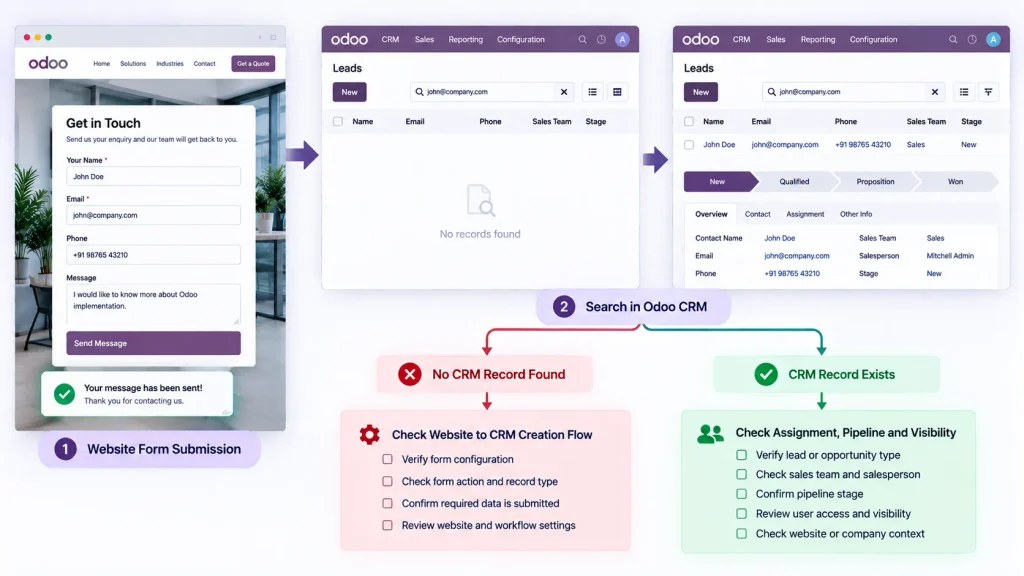
Search Odoo CRM using a unique value from the test submission, such as the company name or email address.
Determine which situation applies:
No CRM record exists
→ Continue investigating the form-to-CRM creation flow.
A CRM record exists
→ Continue by checking its record type, assignment, pipeline and visibility.
This distinction prevents unnecessary changes to the website form when the issue is actually within CRM.
Step 4: Check the CRM Record, Assignment and Visibility
If the record exists, verify that it is being handled as the expected lead or opportunity.
Check:
- Lead or opportunity type
- Sales team
- Salesperson
- Pipeline stage
- User access
- Website or company context
A website enquiry can reach Odoo successfully but still appear to be missing if it is assigned to another team or user or is outside the expected pipeline.
Compare the expected workflow with the actual result:
Website Enquiry → CRM Record → Sales Team → Salesperson → Follow-up
Step 5: Compare the Affected Form With a Working Form
If another Odoo website form creates leads correctly, use it as a reference.
Compare:
Website → Form Configuration → Submitted Fields → CRM Workflow → Sales Team → Resulting Record
Differences between the working and affected forms can reveal whether the problem is specific to the form, its configuration, or the downstream CRM workflow.
Odoo Website Form Lead Troubleshooting Checklist
Before modifying the configuration, verify:
| Check | What to Verify |
| Website Form | Correct form, website and configured action |
| Submitted Data | Required enquiry information is received |
| CRM Record | Expected lead or CRM record is created |
| Assignment | Correct sales team and salesperson |
| Visibility | Record appears in the expected pipeline and is accessible |
| Working Form | Compare with a form that creates leads correctly |
How to Prevent Missing Website Leads in Odoo
Keep the website form and CRM workflow aligned as the business changes.
When creating or modifying a website enquiry form, verify the complete path from form submission → CRM record → sales team → follow-up before publishing the form.
For businesses with multiple enquiry forms, maintain a clear mapping between each form, its intended CRM workflow, sales team, and follow-up process.
Test important forms after changes to website configuration, CRM workflows, user access, or sales-team assignment. A form that worked previously can produce a different result after related configuration changes.
Most importantly, monitor the complete enquiry flow, not just whether the website displays a successful form submission.
Frequently Asked Questions
Check what the form is configured to do, whether it is connected to the intended CRM workflow, and whether the submitted data satisfies the required process. Also verify whether a CRM record was created elsewhere.
Submit a test enquiry using a unique name or email address and search Odoo CRM for that information. If a record exists, check its assignment, pipeline, and visibility before changing the website form.
Check the sales team, salesperson assignment, and relevant CRM routing configuration. The website submission may be working correctly while the downstream lead assignment is incorrect.
Yes, when the form and CRM workflow are configured for that purpose. Verify the actual form action and resulting CRM record rather than assuming every website enquiry form creates a lead.
Conclusion
When an Odoo website form is not creating the expected lead, the first step is to trace the enquiry from the website submission through the CRM record and lead assignment.
The objective is to identify exactly where the flow breaks: form configuration, submitted data, CRM record creation, lead routing, or lead visibility. This avoids unnecessary changes and helps restore a reliable website-to-CRM enquiry process.

