

Generating VAT invoices in Odoo does not, by itself, establish readiness for the UAE’s electronic invoicing system. Businesses must assess whether their invoicing workflows, invoice data, and system integrations can support the applicable requirements.
For existing Odoo deployments, the main preparation tasks include validating required invoice fields, reviewing accounting configuration, mapping data to the selected Accredited Service Provider (ASP), and defining how submission responses and errors will be handled.
Identify these gaps before implementation begins. Unresolved data-mapping issues, custom workflow dependencies, or integration failures can delay testing and production readiness.
Understand What UAE E-Invoicing Requires from Odoo
The UAE e-invoicing framework requires applicable invoices to be exchanged as structured electronic data through the prescribed system. A PDF invoice sent by email does not, by itself, satisfy this requirement.
The framework uses a five-corner model involving the supplier, the supplier’s Accredited Service Provider (ASP), the buyer’s ASP, the buyer, and the Federal Tax Authority (FTA).
Generating an invoice in Odoo and exchanging an e-invoice through the required framework are separate technical responsibilities. Businesses must establish how their Odoo environment will prepare invoice data and connect to the selected ASP.
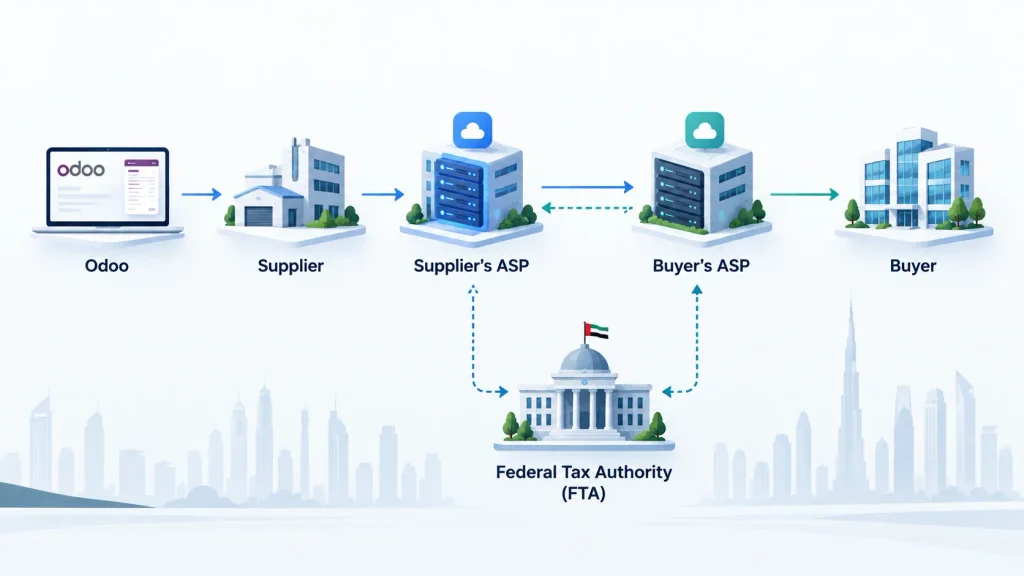
Assess these areas before implementation:
- Invoice data: Can Odoo supply the required business, customer, and tax information?
- Data mapping: Can Odoo’s fields be mapped to the applicable electronic invoice format?
- ASP integration: How will invoice data be transmitted to the selected provider?
- Response handling: How will the business identify rejected submissions, failed requests, and processing errors?
- Record retention: How will invoice records and relevant processing responses be retained and retrieved?
Installing an invoicing module or generating a VAT invoice does not, on its own, establish compliance. Assess the complete solution against the requirements applicable to your business.
Confirm Your Business’s Applicable Compliance Deadline
UAE e-invoicing deadlines depend on the business category, applicable revenue threshold, and regulatory scope. Confirm your business’s implementation phase before setting the Odoo configuration, integration, and testing schedule.
Under the published implementation timeline, the principal phases are:
| Business category | ASP appointment deadline | Mandatory implementation date |
| Businesses with annual revenue of AED 50 million or more | 30 October 2026 | 1 January 2027 |
| Businesses with annual revenue below AED 50 million | 31 March 2027 | 1 July 2027 |
| In-scope government entities | 31 March 2027 | 1 October 2027 |
Timeline checked against official UAE Ministry of Finance guidance as of 23 October 2026. Confirm the applicable revenue threshold, transaction scope, exclusions, and any subsequent regulatory amendments before relying on a deadline.
For businesses in the first phase, the ASP appointment deadline is 30 October 2026. With the deadline approaching, delaying provider selection or technical assessment could leave limited time for Odoo integration, invoice-data validation, and end-to-end testing.
Before planning implementation, establish:
- Which implementation phase and revenue threshold apply to your business?
- Which transactions are within the regulatory scope?
- Has an appropriately accredited ASP been selected and appointed?
- Which Odoo configuration changes, data mappings, or integrations are required?
- How much time is available for testing, correcting errors, and approving production readiness?
Use the confirmed deadline to establish implementation milestones, assign responsibilities, and allow time to resolve technical dependencies before go-live.
Audit Your Existing Odoo Invoicing Setup
Before selecting a connector or commissioning custom development, establish how your current Odoo environment handles invoicing.
A standard configuration may cover some requirements, while customised workflows, additional modules, or external applications may introduce dependencies that need separate assessment.
Review the following areas.
| Odoo area | What to check | Why it matters |
| Company details | Legal name, registration information, and applicable tax identifiers | Incomplete or inconsistent information can affect invoice data. |
| Customer and supplier records | Required identifiers, addresses, and other details specified by the applicable requirements | Missing or inaccurate master data can prevent accurate invoice preparation. |
| Sales and invoicing | Invoice creation, posting, credit notes, and corrections | Existing workflows must support the intended invoicing process. |
| Accounting and taxes | Tax configuration, invoice totals, and accounting entries | Incorrect calculations or data mappings can affect reported values. |
| Custom fields and modules | Additional invoice fields, automated actions, and custom business logic | Customisations may require changes to support the integration. |
| External applications | E-commerce, payment, billing, and other connected systems | Invoice data may originate outside Odoo or pass through several systems. |
Document each gap rather than assuming the entire environment needs redevelopment.
For example, an Odoo deployment might generate invoices correctly but rely on a custom module to populate additional customer information. If that information is not mapped correctly to the data structure required by the selected Accredited Service Provider (ASP), the integration may need modification even though invoice generation works.
Similarly, a business that generates invoice data through an external sales platform must identify where the data is created, validated, and transmitted.
The audit should produce a practical list of required configuration changes, data corrections, integration work, responsible owners, and unresolved technical questions. Use this list to define the scope of the Odoo e-invoicing implementation.
Plan the Odoo Integration with an Accredited Service Provider
Odoo configuration is only one part of the implementation. Your business must also establish how its invoicing process will connect to an appropriately accredited Service Provider (ASP).
Do not assume that Odoo’s accounting and invoicing capabilities make it an accredited ASP. Verify the provider’s current accreditation against the official UAE Ministry of Finance list, and confirm that its proposed integration supports your Odoo environment and business requirements.
What should the integration cover?
1. Invoice data mapping
Determine how Odoo fields correspond to the required electronic invoice data elements. Check customer and supplier information, invoice references, dates, line items, quantities, prices, and applicable tax information.
The final mapping must reflect the requirements applicable to the transaction and the selected integration.

2. Data transmission
Establish how invoice information will be transmitted from Odoo to the ASP. Confirm the supported interface, authentication method, required data structure, submission status, and handling of unsuccessful requests.
Also determine how the integration will prevent duplicate processing when a request times out or its outcome is unclear.
3. Responses and exceptions
Define how Odoo or the connected integration will record processing responses. Finance and operations teams need a clear process for identifying rejected submissions, correcting errors, and determining whether a failed request can be safely retried.
4. Transaction traceability
Preserve the references needed to connect an Odoo invoice to its corresponding ASP submission and processing response. Recording relevant submission references, statuses, and error details helps the team investigate discrepancies and resolve issues without searching across disconnected systems.
5. Integration ownership
Agree who maintains the connector, monitors failures, applies updates, and resolves issues involving Odoo or the ASP. Define clear responsibilities for technical support and issue resolution.
Before selecting a solution, ask the provider to demonstrate a complete transaction through the proposed Odoo integration, including a rejected submission and its correction. Confirm the integration’s supported functions, limitations, error handling, and testing process.
A general claim that a product supports e-invoicing is not enough. Verify that the specific integration meets your business requirements and supports the applicable UAE framework.
Validate Invoice Data Before Connecting the Systems
An integration cannot reliably process information that is missing, inconsistent, or incorrectly mapped.
Cleaning invoice data before implementation reduces avoidable failures during testing and helps the finance team identify issues before production use.
Focus on the following checks:
- Customer and supplier information: Identify missing or inconsistent details required for the applicable invoice.
- Invoice references: Check numbering, source references, and relationships between invoices and their underlying transactions.
- Line-item data: Validate descriptions, quantities, unit prices, and other required values.
- Tax calculations: Confirm that tax amounts and invoice totals are consistent with the configured accounting treatment.
- Credit notes and corrections: Check how existing workflows represent adjustments and link them to the relevant original transactions.
- Custom fields: Identify additional information that must be mapped to the required electronic invoice structure.
Do not assume that every existing field must be transferred or that every missing field requires custom development. First establish which information is mandatory for the relevant transaction and how it should be represented.
Keep accounting records consistent
Invoice-data changes must not create discrepancies between Odoo’s operational records and accounting entries.
Before approving the integration, compare representative invoice totals with their corresponding tax and accounting values. Investigate differences rather than modifying records simply to make the results appear consistent.
The finance team should approve the validation rules and reconciliation criteria before production deployment.
Test the Complete E-Invoicing Workflow Before Go-Live
A successful connection test does not prove that the complete invoicing process works correctly.
Testing should cover invoice preparation in Odoo, data transmission, responses from the connected service, exception handling, and the resulting business records.
Use a controlled test environment where the proposed integration supports it, and coordinate testing with the ASP.
Run these essential tests
| Test scenario | What to verify |
| Standard invoice | Required data is mapped correctly and the transaction follows the expected processing path. |
| Missing required information | The issue is identified and can be corrected before successful processing. |
| Incorrect data mapping | The affected field is identified and the mapping can be corrected. |
| Rejected submission | The response is recorded and the team can investigate the cause. |
| Failed connection | The failure is visible and can be resolved without losing track of the invoice. |
| Retry after failure | The retry process does not create unintended duplicate transactions. |
| Credit note or correction | Relevant references and accounting effects remain consistent. |
| End-to-end processing | Odoo records, ASP responses, and reconciliation results agree with the expected outcome. |
Not every error will originate in Odoo. Failures may arise from source data, the integration layer, the ASP, or another dependency. Testing should help the team identify the cause.
Define acceptance criteria
Before approving production use, document the conditions that must be met.
These should include:
- Required invoice data is mapped and validated.
- Critical business scenarios have passed testing.
- Rejected transactions can be identified and investigated.
- Failed requests can be handled safely.
- Invoice records and relevant accounting results can be reconciled.
- Responsible business and technical owners have approved the results.
Record unresolved issues and assign owners before go-live. A successful demonstration of one invoice does not establish that every relevant workflow is ready.
Build a Practical Odoo E-Invoicing Readiness Plan
Once the initial assessment is complete, convert the findings into an implementation plan with clear ownership and deadlines.
Organise the work into these priorities:
- Confirm compliance scope: Document the applicable implementation deadline, transaction scope, and responsible owner.
- Resolve assessment gaps: Prioritise the configuration changes, data corrections, and customisation requirements identified during the Odoo audit.
- Confirm the ASP: Verify accreditation and agree on the proposed integration’s technical scope.
- Complete integration and testing: Validate invoice data, test representative workflows, and resolve critical issues.
- Approve go-live readiness: Confirm that acceptance criteria are met, responsibilities are assigned, and support arrangements are in place.
Work backwards from your applicable implementation date. Allow time for provider onboarding, technical dependencies, corrections, and retesting rather than allocating all remaining time to development.
If a provider, module, or custom integration is not yet confirmed, make that dependency visible in the plan. An unresolved decision can delay implementation even when the Odoo configuration is otherwise ready.
Assign responsibility for monitoring failures after go-live. Readiness also requires a process for identifying rejected transactions, investigating their causes, and determining the appropriate corrective action.
When Do You Need Odoo E-Invoicing Implementation Support?
You may need specialist Odoo support when configuration and data corrections alone cannot address the requirements of your existing environment.
Common situations include:
- Custom invoice fields or modules require additional mapping.
- Invoices originate from multiple systems.
- Existing integrations need to be replaced or adapted.
- Automated invoice workflows require changes.
- Rejected transactions and retry behaviour need development.
- Accounting reconciliation reveals inconsistencies.
- The business cannot establish whether its proposed solution meets the applicable technical requirements.
The appropriate response depends on the actual gap. Some issues require data cleanup or configuration, while others may need connector development, API integration, or changes to custom modules.
Before commissioning development, define the scope, affected workflows, dependencies, testing responsibilities, and acceptance criteria.
Odoobots provides Odoo ERP implementation services for businesses assessing their configuration, customisation, and integration requirements. A technical assessment can help identify which parts of the existing environment need attention before implementation.
The objective is not simply to connect Odoo to an invoicing service. It is to establish a tested process that preserves invoice data, supports the required business workflows, and gives the responsible teams visibility into processing failures.
Frequently Asked Questions
No. Compliance depends on the applicable requirements and whether your Odoo configuration, invoice data, and integration meet them.
Businesses subject to the UAE e-invoicing framework must follow its applicable ASP requirements. Verify the provider’s accreditation and compatibility with your Odoo environment.
Test invoice data mapping, tax calculations, submissions, rejected transactions, failure recovery, and accounting records before go-live.
Conclusion
Preparing Odoo for UAE e-invoicing requires more than changing invoice settings. Businesses must confirm their applicable deadline, assess existing workflows, validate invoice data, select an appropriate ASP, and test the integration before go-live.
Start with a documented gap assessment, not an assumption that your current setup is ready. Identifying gaps early helps your team prioritise implementation work and address issues before the applicable compliance deadline.

