

Your Odoo data may be accurate, but if your reports cannot show the fields, calculations, or business details you need, your team still has to do the reporting work manually.
When standard reports fall short, the solution may involve modifying a QWeb report template, retrieving data from related Odoo models, implementing business-specific calculations, or changing the report output. The right approach depends on what your existing report cannot deliver.
Hiring an Odoo developer makes sense when standard reporting features and supported configuration cannot meet your requirements. Before committing to custom development, identify the reporting gap and determine which changes will solve it without adding unnecessary complexity.
This guide covers the types of reports developers can customize, the technical work involved, and how to define requirements and assess a developer for your reporting project.
When Do You Need an Odoo Developer for Custom Reports?
If your team must repeatedly export Odoo records, correct report calculations, or combine information manually to produce a usable business report, identify what the existing reporting setup cannot deliver.
Custom report development may be appropriate when you encounter these limitations:
- Missing business fields: Your report omits information needed to evaluate transactions, monitor operations, or prepare financial summaries.
- Business-specific calculations: Standard reports cannot represent the formulas, conditions, or calculation rules your reporting process requires.
- Restricted report layouts: Printed documents need additional sections, conditional fields, custom tables, or page layouts that the available configuration cannot support.
- Data across related models: A report must combine information from related Odoo records that the existing report does not present together.
- Repeated manual consolidation: Employees export records and combine spreadsheets because the required report cannot be generated directly from Odoo.
- Specific output requirements: Your workflow requires a particular document structure or export format that the existing reporting options cannot provide.
Before hiring a developer, determine whether the limitation actually requires code. A suitable configuration change, built-in reporting feature, or spreadsheet-based solution may be sufficient. Custom development becomes relevant when these options cannot meet the defined requirement.
The goal is to produce an accurate, usable report with the least complex maintainable solution—not to create a custom module when an existing Odoo feature can do the job.
What Types of Odoo Reports Can a Developer Customize?
Odoo reporting requirements generally fall into three categories: printable business documents, operational or analytical reports, and data exports. Each requires a different approach depending on the information, calculations, and output the business needs.
QWeb PDF Reports
Odoo uses QWeb templates for many printable business documents. Depending on the existing report implementation, a developer can modify the layout, display additional fields, organize information into tables, and add conditional content.
Common requirements include:
- Customized quotations and sales documents.
- Additional fields on invoices or delivery documents.
- Product or service details arranged in a specific layout.
- Conditional sections based on document values.
- Company-specific headers, footers, and page formatting.
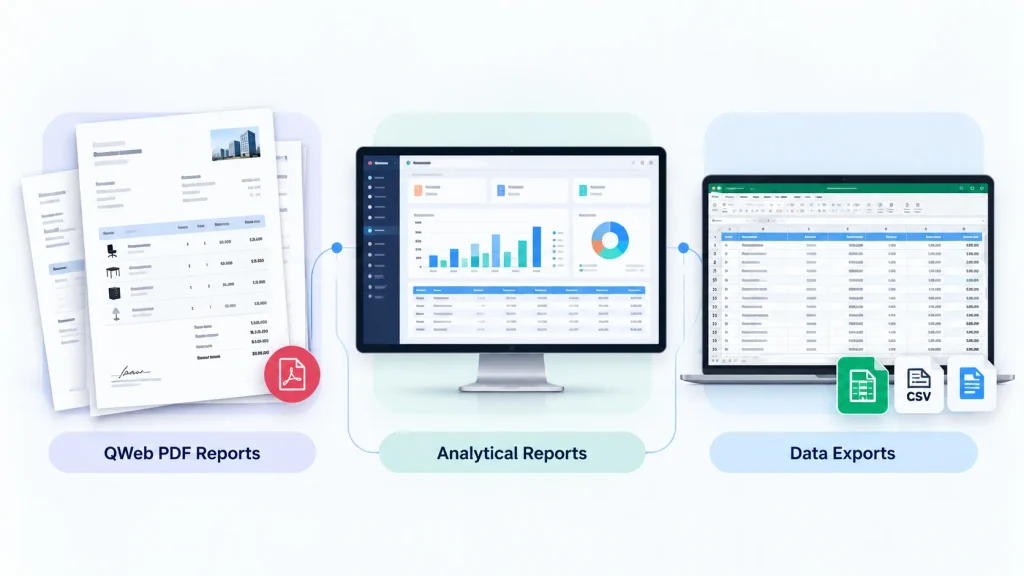
Before making changes, the developer should assess the existing template and its dependencies. The modified report must retain the required information and preserve expected document behaviour.
Operational and Analytical Reports
Operational and analytical reports help businesses examine information across transactions, records, and processes. Requirements may involve combining related data, applying business rules, calculating values, or grouping results for analysis.
Examples include inventory summaries, sales performance reports, purchasing analysis, and management reporting.
An existing list, pivot, graph, dashboard, or supported configuration may already provide the required result. Custom development is worth considering when these options cannot produce the necessary calculations, data relationships, or presentation.
Spreadsheet and Structured Data Exports
Some businesses need Odoo data in a specific format for further analysis, reconciliation, or exchange with another application.
Requirements may include selected columns, calculated values, formatting, or a defined data structure. The appropriate solution depends on the output format, the data involved, and how the exported information will be used.
Before development begins, clarify whether users need a printable document, an analytical report, a spreadsheet, or a structured export for another system. These outputs serve different purposes and should be specified separately.
What Technical Work Does Custom Odoo Report Development Involve?
A custom Odoo report can look correct and still produce incorrect figures, omit records, or expose information to the wrong users. Reliable report development requires the developer to handle data retrieval, business calculations, rendering, access controls, and performance—not just the layout.
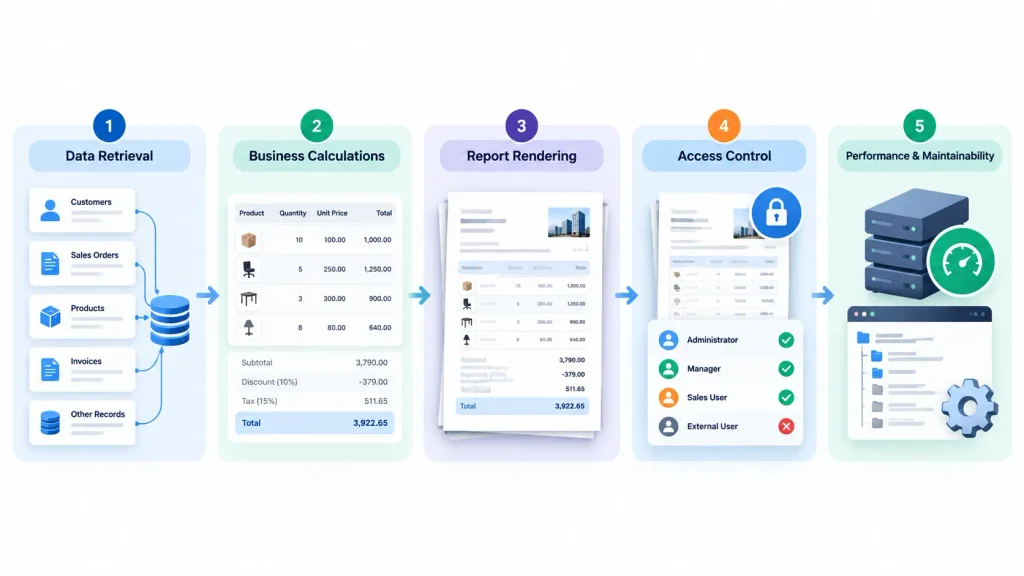
Data Retrieval and Model Relationships
A report may need information from the primary business record and related Odoo models.
For example, a sales report might combine order details with product information, customer records, and other relevant data. The developer must identify the correct sources, relationships, and filters before implementing the report.
Incorrect relationships, duplicated records, or incomplete filters can produce misleading totals even when the report looks correct. Testing should confirm that the report includes the expected records and represents their values accurately.
Business Calculations and Grouping
Report calculations must follow the rules governing the business process.
The developer should establish how totals are calculated, which records are included or excluded, and how grouping affects the results. Where appropriate, established business logic should be reused instead of implementing inconsistent calculations in separate places.
For financial or operational reports, define expected results before development begins. Sample records and independently verified calculations can then be used to check the output.
QWeb Templates and PDF Rendering
For QWeb reports, development may involve XML-based templates, field rendering, conditional expressions, loops, and layout adjustments. PDF generation also depends on the report configuration and rendering environment.
A template that works for one record may fail when fields are empty, text is longer than expected, or a document contains many lines. Page breaks, table alignment, and content overflow can also affect the final document.
Testing should therefore cover realistic records and document variations rather than relying on a single successful preview.
Security and Access Permissions
Custom reports must respect the access rules of the Odoo environment.
A report should not expose restricted information simply because its data retrieval logic accesses additional records or uses elevated permissions. Developers must consider applicable access rights, record rules, and how report data is retrieved.
Test the report using the relevant user roles, not just an administrator account. Confirm that authorized users can access the information they need and that restricted records remain protected.
Performance and Maintainability
Complex data retrieval, inefficient calculations, and excessive processing can slow report generation, particularly when reports handle large numbers of records.
The developer should investigate the actual bottleneck before optimizing the report. Depending on the cause, improvements may involve more efficient data retrieval, reducing unnecessary processing, or changing how report values are prepared.
Custom code should also remain understandable and maintainable. Document important dependencies and avoid unnecessary changes to standard Odoo components.
How Should You Define Your Custom Reporting Requirements?
Unclear reporting requirements can lead to incorrect calculations, missing information, and repeated development revisions. Before hiring an Odoo developer, define what the report must contain, how its results should be calculated, and how users will access the finished output.
Document these eight requirements before requesting development.
| Requirement | What to specify |
| Business purpose | What decision, process, or task will the report support? |
| Source data | Which Odoo applications, records, and fields provide the required information? |
| Required calculations | Which totals, formulas, conditions, or business rules must be applied? |
| Filters and grouping | How should users filter, sort, or group the results? |
| Output format | Is the required output a PDF, spreadsheet, on-screen report, or structured export? |
| User permissions | Which users can generate the report, and what information may each role access? |
| Expected volume | How many records might the report process during normal use? |
| Acceptance criteria | What must the report demonstrate to be approved? |
Where possible, provide a sample of the current report and a proposed layout. Identify the missing fields, incorrect calculations, or manual steps the new report should eliminate.
For reports involving calculations, include expected results for representative records. The developer can use these examples to test whether the output follows the specified business rules.
Approve the report only after its required data, calculations, permissions, and output have been verified—not simply because the layout looks correct.
How Do You Evaluate an Odoo Report Developer?
A developer who can write Python is not automatically equipped to deliver accurate, maintainable Odoo reports. Evaluate candidates on their reporting experience, understanding of Odoo data, testing methods, and ability to maintain the solution.
Check Relevant Reporting Experience
Ask about previous projects involving the type of report you need. Experience with QWeb templates is relevant to printable reports, while analytical reporting and structured exports may require different technical capabilities.
Ask the developer to explain a comparable reporting challenge, the approach taken, and how the final output was validated. A clear technical explanation provides more useful evidence than a general claim of experience.
Assess Data and Calculation Knowledge
The developer should understand the Odoo models and relationships involved in your report and explain how calculations, filters, grouping, and related records affect the results.
If the report combines multiple data sources, ask how the implementation will prevent duplicated records, missing information, and incorrect totals.
Review Testing Practices
Ask how the developer will test different record counts, missing values, long text, and relevant user permissions.
For PDF reports, establish how page breaks, margins, headers, footers, and rendering behaviour will be checked. For analytical reports, ask how totals and grouped results will be reconciled against the underlying records.
Establish Maintainability
Before approving the work, confirm how the custom code will be documented, tested, delivered, and handed over.
Ask which existing components will be extended, what dependencies the report introduces, and what may need attention during future changes or Odoo upgrades.
A capable developer should also explain when standard Odoo functionality can satisfy the requirement without custom development.
What Should You Confirm Before Starting the Project?
A custom report is not ready for approval simply because it matches the proposed layout. Before development begins, agree on the deliverables, expected results, testing responsibilities, and conditions for accepting the finished report.
- Defined deliverables: Specify which reports will be created or modified and which output formats are included.
- Technical scope: Identify the affected models, existing templates, calculations, integrations, and dependencies where known.
- Acceptance criteria: Agree on the required fields, calculations, filters, permissions, and output behaviour.
- Testing responsibilities: Establish who will validate the report, verify its results, and approve the completed work.
- Deployment arrangements: Confirm how changes will be tested and moved into production, including appropriate backup and recovery arrangements.
- Ownership and documentation: Clarify access to source code, ownership terms, documentation, and handover responsibilities.
- Maintenance and upgrades: Establish who will address defects, maintain the customization, and assess compatibility during future upgrades.
The level of assessment should reflect the report’s complexity and business impact. A minor layout adjustment may require limited validation, while reports involving financial calculations, multiple data sources, or restricted information need more extensive testing.
Before accepting the work, verify that the report meets the agreed requirements, produces the expected results, respects user permissions, and works in its intended environment. A visual mock-up or delivery date alone cannot establish that the report is ready for use.
When Should You Hire an Odoo Developer for Custom Reporting?
Hire an Odoo developer when your reporting requirements cannot be met reliably through the reporting features and configuration already available in your system.
Professional development may be appropriate when your business needs:
- Additional data relationships: Reports combining information from related Odoo models that existing reporting options cannot present correctly.
- Business-specific calculations: Custom formulas, conditions, or reporting rules that standard features cannot adequately support.
- Modified report templates: Changes to QWeb layouts, document structure, or conditional content beyond available configuration options.
- Reliable report performance: Technical investigation and remediation when report generation becomes unacceptably slow.
- Controlled access to report data: Custom reporting that must respect specific user permissions and data restrictions.
- Ongoing report maintenance: Debugging, compatibility assessment, or modifications to existing custom reports that no longer meet business requirements.
Custom development is not always necessary. If an existing report, supported configuration, or built-in reporting feature meets your requirements, introducing custom code may add avoidable complexity and maintenance work.
Before engaging a developer, document the reporting limitation, the expected output, and the results the finished report must produce. This gives both parties a clear basis for defining the scope and evaluating the solution.
If your reporting requirements extend beyond standard Odoo functionality, explore Odoobots’ Odoo developer services to discuss the development work your business needs.
Frequently Asked Questions
Yes. Depending on the existing report and your requirements, a developer can extend its template, add fields, modify the layout, or change how report values are prepared. The existing implementation and its dependencies should be assessed before making changes.
No. The appropriate approach depends on the report type and the changes required. Some modifications can be handled through supported configuration or template inheritance, while others may require additional Python logic or a custom module.
Provide your Odoo version, the report’s business purpose, the required fields and calculations, the output format, and relevant access requirements. A sample of the current report, an example of the expected result, and details of any manual work involved will help the developer assess the requirements.
Conclusion
Custom Odoo report development is worthwhile when it turns reporting limitations into accurate, usable business information without adding unnecessary complexity.
Before hiring a developer, define what your existing reports cannot deliver, identify the required data and calculations, and establish how the finished report will be validated. Evaluate the developer’s reporting expertise against those requirements—not just general programming experience.
The objective is straightforward: a report your team can rely on, maintain, and use to make informed business decisions.

