OdooBots
Loading
Capability · Odoo portals

Odoo Portal Developer

A portal is the part of Odoo your customers, suppliers and dealers actually see. It is also the part most often left at the Odoo default, which is a list of documents and little else.

Portal development is building the pages, the permissions and the things a portal user is allowed to do — without giving anyone a backend login.

Karthik RajOdoo Technical Consultant, 10+ years| Reviewed by Suresh Babu| Updated 26 October 2026| Customer · vendor · partner portals
0Odoo projects delivered
0Consultants & developers
FreePortal users, by licence
ChennaiAmbattur, Tamil Nadu
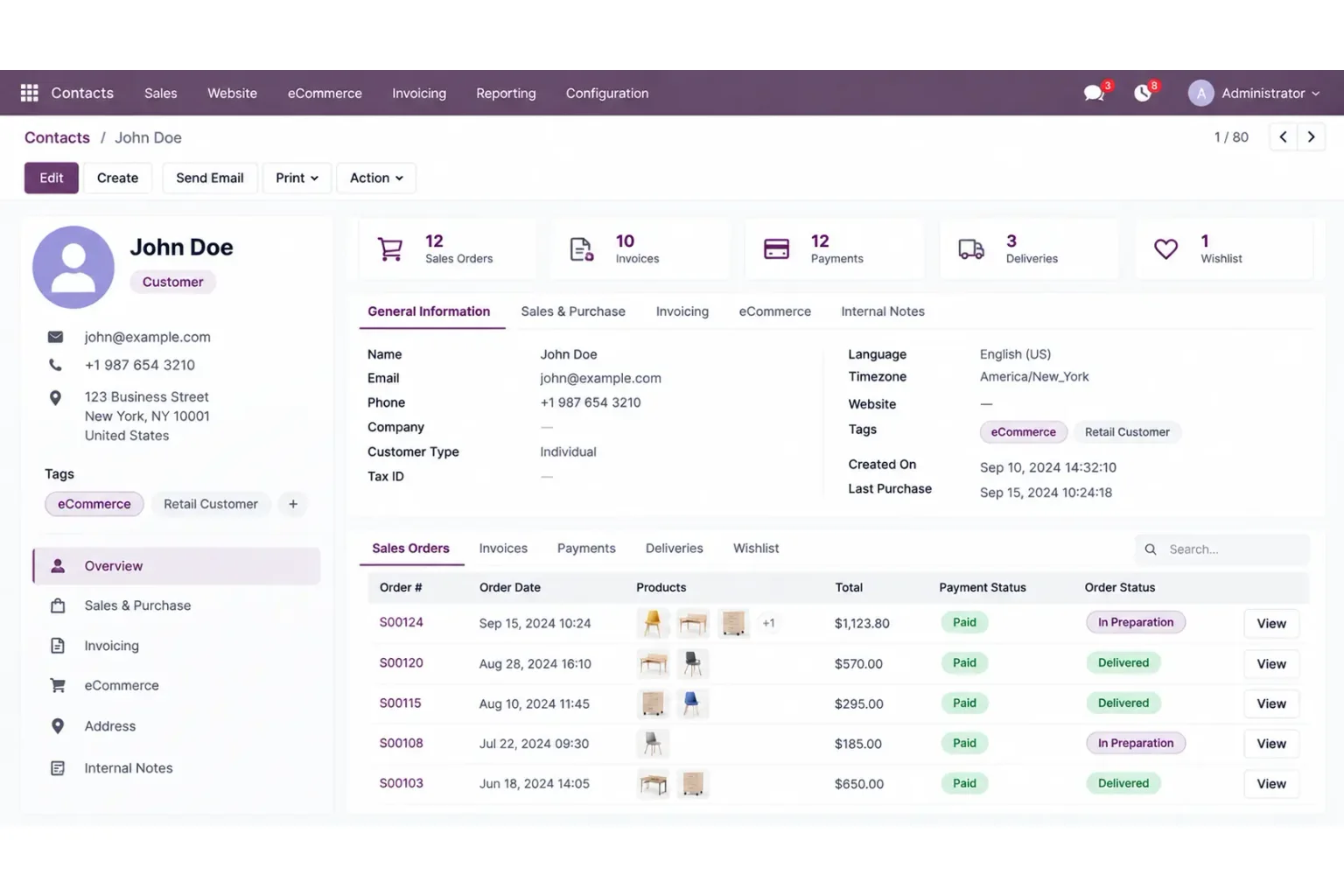
An Odoo customer record showing the orders, invoices, payments and deliveries a portal exposes
10+
Karthik RajTechnical Consultant

Businesses whose customers log into Odoo

Dhanalakshmi Industries logo Sanjeev Autoparts logo Electro Flux Equipments logo Anchor Marine Equipment Company logo NEXG logo PV Constructions logo SESS logo
Definition

What does an Odoo portal developer do?

An Odoo portal developer builds the pages outside users see when they log in, and the rules that decide what each of them is allowed to see and do. That means custom pages under /my/, record rules that scope data to the person logged in, document sharing by access token, and portal forms that write back into Odoo. It is a mix of backend security work and frontend work, which is why it is a specialism rather than a configuration task.

The test of a portal is not what it shows. It is what happens when a customer changes the record ID in the address bar.

Portal user
An external login with no backend access. Odoo does not charge a user licence for one, so the portal is usually the cheapest way to give people access.
Record rule
The row-level filter that decides which records a portal user can see. This is where portals are secured, or are not.
Access token
A key in the document link that lets someone open one record without an account at all.
Portal mixin
The Odoo model behaviour that gives a record its portal URL and token, so a custom model can be exposed the same way the standard ones are.

Capabilities

What we build on Odoo portals

Each of these is portal work rather than website work. Some of it is configuration; where it is, we say so before quoting.

Customer portals

Quotations, orders, invoices, payments, delivery status and support tickets in one place, with only that customer’s records visible. The standard portal does part of this; the gap is usually what you want shown together.

OrdersInvoicesDeliveries

Vendor & supplier portals

Purchase orders a supplier can acknowledge, delivery confirmations, and bill submission — so chasing happens in the system rather than over email.

RFQ responseBill upload

Partner & dealer portals

Price lists, stock visibility, order placement and claim submission for a dealer network, scoped so each dealer sees their own terms and nobody else’s.

Dealer pricingClaims

Custom portal pages

New pages under /my/ for a model Odoo does not expose by default — a service contract, a project milestone, a test report — with the counters on the portal home page updated to match.

ControllersQWeb templates

Portal forms that write back

Letting a portal user raise a request, update their own details, upload a document or approve something, with validation on the server rather than only in the browser.

ValidationAudit trail

Document access & sharing

Share a single quotation or invoice by a tokenised link that works without an account, and expire or revoke it when it should no longer work.

Access tokensRevocation

Access control & record rules

The part that matters. Scoping every portal-visible model to the logged-in partner, including the ones a custom page pulls in indirectly through a related field.

Record rulesRelated fields

Portal branding & layout

Your identity on the portal rather than the stock Odoo layout — done by inheriting the portal templates, so an upgrade does not undo it.

Template inheritanceUpgrade safe

Payments from the portal

Online payment against an invoice or order through a configured provider, and the reconciliation behaviour behind it. See Odoo integration for the provider side.

Pay onlineReconciliation
Expertise · how a portal is judged

Four questions that decide a portal project

These settle the scope. Getting them answered before development starts is most of the difference between a portal that launches and one that is quietly abandoned.

  1. Who is logging in, and as what?

    A portal user, an internal user, or nobody at all with a shared link. The answer changes the licence cost, the security model and the amount of work — and it is the question most briefs skip.

  2. What can they see, exactly?

    Not "their own data" — which records, on which models, including the ones reached through a link on a page. Every portal security problem we have been called to fix was a model somebody forgot was reachable.

  3. What can they change?

    A read-only portal is a different project from one where a customer can place an order or a supplier can confirm a delivery. Writing back needs validation, an audit trail and a decision about what happens to the record afterwards.

  4. What does it look like under load?

    Portal pages are public-facing and hit by people who are not your staff. Queries that are fine for ten internal users are not always fine for two thousand customers on the first of the month.

Licensing

Portal users do not carry a user licence

This is the single most useful fact about Odoo portals, and it decides the shape of a lot of projects. Odoo charges per internal user. Portal users — external people with no backend access — are not charged for, so giving two thousand customers a login costs nothing in licence terms.

That makes the portal the right answer far more often than people expect. We have seen businesses buy internal user licences for staff at a client company, when the work those people were doing was reading their own orders and approving deliveries, which a portal user can do.

It also sets the boundary. A portal user cannot open backend views, so anything that genuinely needs the Odoo back office is not a portal job. Where a request is on that line we say so before quoting, because the cheap answer and the correct answer are not always the same one.

  • Check the licence position against your own Odoo contract — terms change between versions and editions.
  • Portal access is available on Community and Enterprise alike; what differs is the surrounding apps, not the portal.
  • A tokenised document link needs no user at all, which is cheaper again where someone only has to open one record.
An Odoo customer record showing sales orders, invoices, payments and deliveries
What a portal exposes — the same records staff see in the back office, filtered to the one partner who is logged in
Cost

What drives the cost of portal development

We quote after the four questions above are answered, not before. These are what move the number.

  • Standard or custom pagesConfiguring and branding the portal Odoo already ships is a fraction of the cost of new pages for a model it does not expose.
  • Read-only or write-backLetting a portal user change something adds validation, permissions and an audit trail. It is the biggest single step in scope.
  • Number of models exposedEach model on the portal needs its own record rule, its own template and its own test with a real portal login.
  • Security review depthFor portals carrying pricing or financial data we test for access across partners deliberately, which takes time and is worth it.
  • Existing customisationWorking on top of a patched portal, or one already overridden by a third-party app, is slower. We say so after looking rather than after invoicing.
Why us

Who does this work

Portal work sits across security and frontend, so it is reviewed by a solution architect rather than signed off by whoever wrote it.

Based inAmbattur, ChennaiTamil Nadu 600053, India
Phone+91 98414 81435Mon–Sat, business hours IST
Reviewed bySuresh BabuOdoo Solution Architect, 7+ years
Versions supportedOdoo 16 – 19Community and Enterprise
FAQ

Odoo portal development: frequently asked questions

What is the difference between the Odoo portal and the Odoo website?
The website is public pages anyone can open. The portal is what someone sees after logging in as an external user — their own orders, invoices, deliveries and documents. They share the same frontend framework and templates, which is why the same developer usually does both, but the security model is entirely different. The website is about what you publish; the portal is about what you expose to one named person.
Do portal users cost anything in licence fees?
Odoo does not charge a user licence for portal users, so external logins are normally free regardless of how many you create. Internal users — anyone who opens the back office — are charged. Check the position against your own contract, because terms differ between editions and versions, but as a rule this is why the portal is the cheaper way to give customers and suppliers access.
Can a portal user see another customer’s data?
Not if the record rules are right, and the only way to know is to test it with a real portal login rather than trust the page. The usual failure is a custom page that reaches a second model through a related field nobody scoped. We test portals by trying to reach another partner’s records deliberately, including by editing IDs in the address bar.
Can we add our own pages to the portal?
Yes. A custom portal page is a controller route under /my/, a QWeb template, a record rule and an entry in the counters on the portal home page. Any model can be exposed this way, including a custom one, provided it carries the portal mixin so it has a portal URL and an access token.
Will a portal customisation survive an Odoo upgrade?
If it is built by inheriting the portal templates and controllers rather than replacing them, yes, with the normal review every custom module needs at a major version. If it is built by patching the portal addon in place, it will not. We build it the first way, and we tell you which way an existing portal was built before quoting work on it.
Can someone open a document without any login at all?
Yes — that is what the access token in a shared document link does. It grants access to one record and nothing else. It is the right answer when a person has to approve or pay for a single document and will never come back, and the wrong answer when they need an ongoing view of their account.
Do you work on an existing portal somebody else built?
Often. We read what is there first and tell you whether the sensible move is to extend it or to rebuild the customised part properly, with the reasoning. Taking over someone else’s portal code is normal work and we do not insist on starting again to make it easier for ourselves.
References

Sources and official documentation

The Odoo behaviour this page describes, in Odoo’s own documentation.

Thinking about a customer or supplier portal?

Tell us who has to log in and what they need to do once they are there. We will tell you whether the standard portal covers it, what it would take if it does not, and whether a portal user is the right answer at all — and the diagnosis call is free.