
Bills of materials
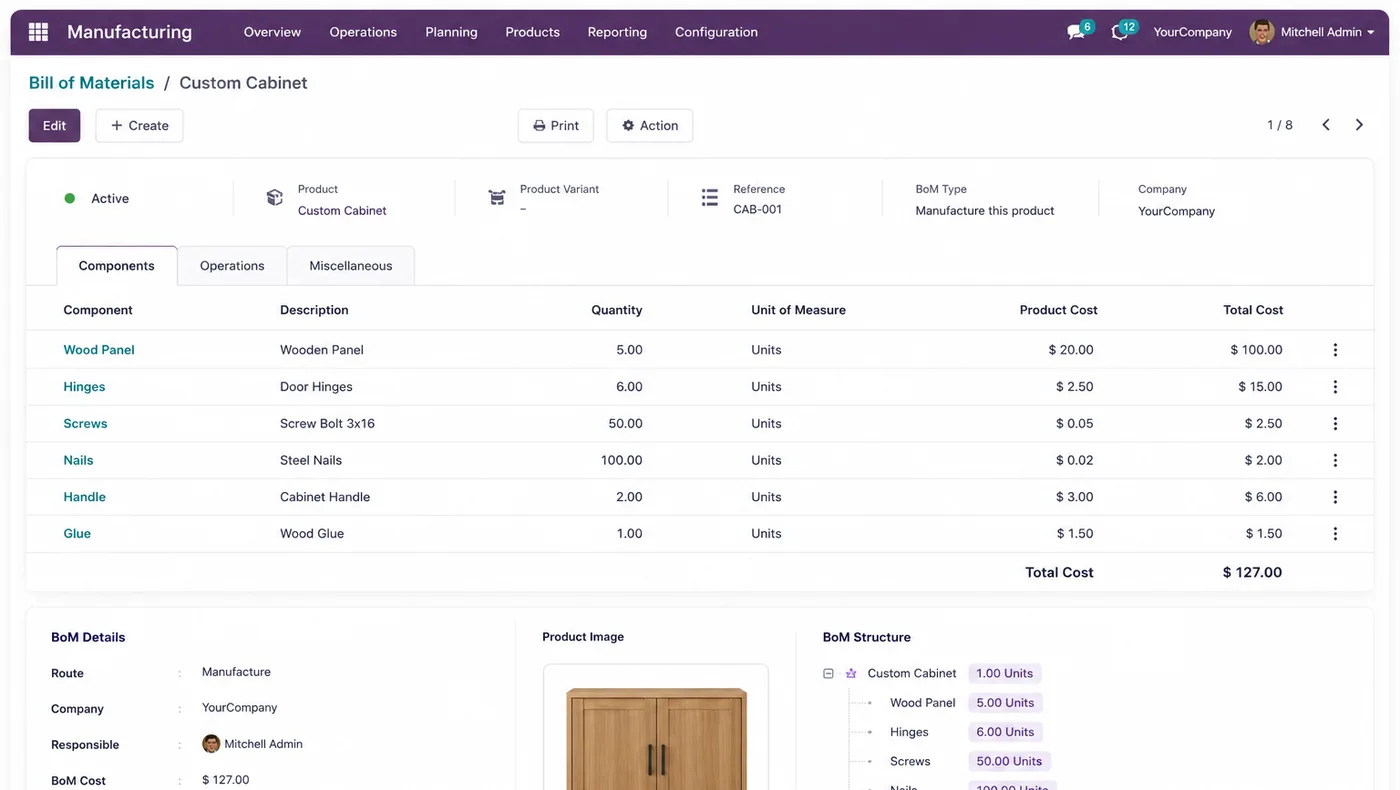
Multi-level BOMs with sub-assemblies, variants, phantom kits and scrap allowance, so what is issued matches what the product actually takes.
Multi-levelVariantsScrap
This page is about the Manufacturing application itself — bills of materials, routing, work orders, consumption and cost. If you want how an implementation runs in a factory, with the sequencing and the mistakes, that is on Odoo ERP for manufacturing.
The application is capable and unforgiving in the same way: it will issue exactly what the bill of materials says, which is excellent when the BOM is right and expensive when it is two revisions out of date.
Businesses running Odoo with OdooBots







Odoo Manufacturing turns a demand into a manufacturing order that consumes components and produces output against a bill of materials. Multi-level BOMs cover sub-assemblies, operations and work centres give routing with setup and run times, work orders record what the shop floor actually did, subcontracting handles processes bought in with material issued, and analytic accounting brings material, labour and machine time onto the same order.
The system issues what the BOM says, not what the operator knows. Verifying the BOMs for your highest-volume products against actual consumption is the work that decides whether this application helps or fights you.
Six parts make up the manufacturing application, and it sits between purchasing and sales rather than beside them.
Multi-level BOMs with sub-assemblies, variants, phantom kits and scrap allowance, so what is issued matches what the product actually takes.
Operations sequenced across work centres with separate setup and run times, capacity and cost per hour, so short runs do not look as cheap as long ones.
Orders raised from demand or from a reordering rule, reserving components, tracking progress and recording output against the right location.
Work orders started and finished by operators, with time booked, quantities produced and scrap recorded where it happened rather than estimated later.
Outside processes with components issued to the vendor and the finished item received back, so work in progress stays visible instead of vanishing.
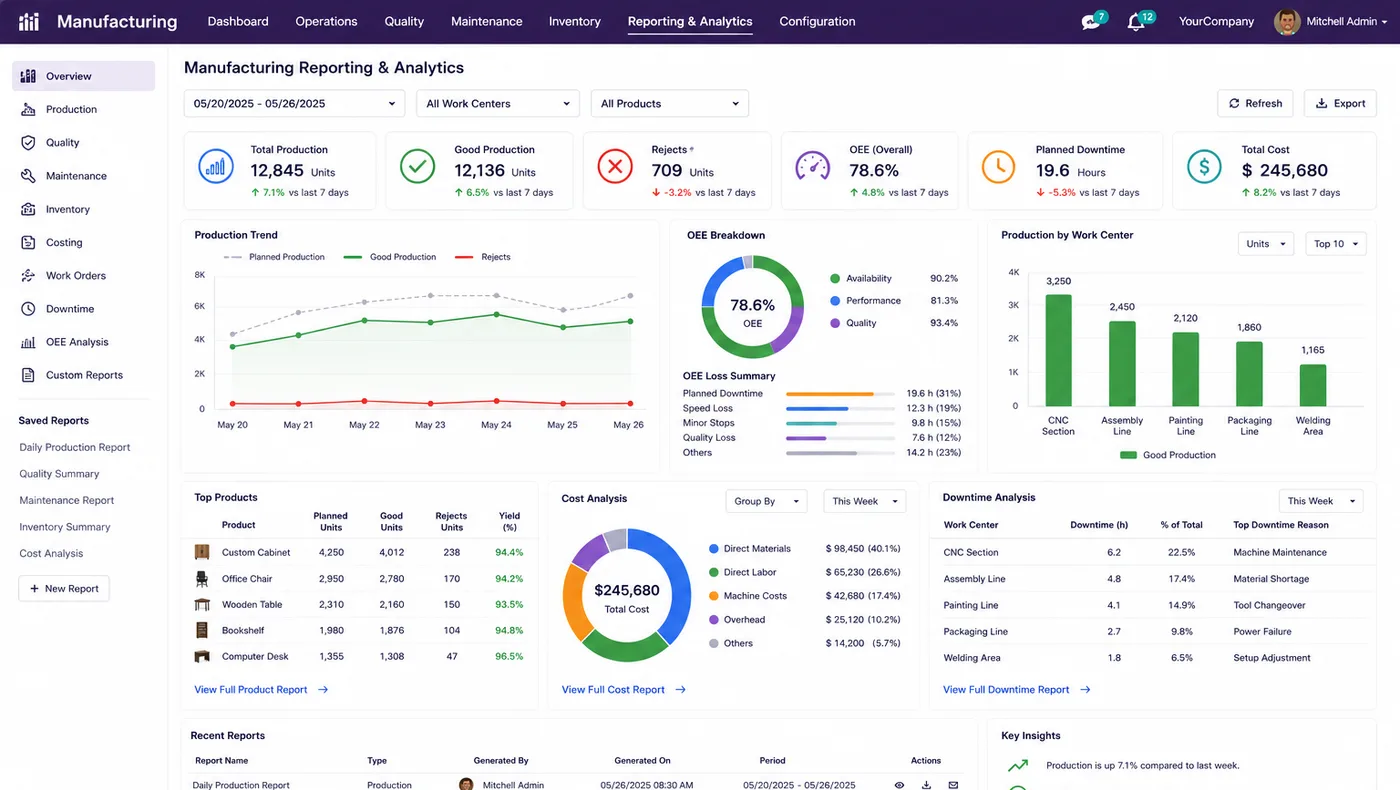
Material, labour and work centre time accumulated on the order through analytic accounting, giving an actual cost rather than a standard one.
A sales order or a reordering rule raises a need. The manufacturing order reserves components from inventory, work orders record what each operation took, and the finished goods are received into stock ready to despatch. Material cost comes from inventory valuation, work centre time from the routing, and both land on the same analytic account.
Because components are consumed by the same inventory module that purchasing replenishes, shortages appear as a real shortage rather than as a surprise on the shop floor.
These are the configuration decisions that are cheap to make now and structural to change once transactions exist. We walk through each one before a single record is migrated.
Verified against what the shop floor actually consumes. Trying to verify every BOM before go-live is how manufacturing projects slip by a year.
Simple manufacturing orders without work orders is a legitimate first phase. Routing with measured times comes once you have records to measure.
All material issued at order start or consumed operation by operation. Changes what work in progress looks like at any moment.
How scrap is recorded and whether rework consumes material again. Absorbing it quietly is why material cost never reconciles.
Issuing material to the vendor gives real work-in-progress visibility; buying a service is simpler and sees less.
Which location finished goods land in, and whether a quality gate stands between production and available stock.
How labour and overhead are absorbed, agreed with finance, because the ERP figure will differ from the spreadsheet and somebody must explain why.
Odoo moves features between Community and Enterprise from one version to the next, so the list below is what holds today and is confirmed against your own version during the diagnosis rather than taken as permanent.
Community includes manufacturing orders, multi-level bills of materials, work centres, routing, work orders, scrap and subcontracting. A factory can run on it.
Enterprise adds the three applications most manufacturers eventually want, and they are worth pricing against the problem each one solves rather than bought as a set.
We would rather say this before you buy licences than after. These are the areas where we scope real development, recommend a bolt-on, or tell you another tool is the better answer.
Odoo plans against work centre capacity; it is not a constraint-based scheduler and will not solve a complex shop like one.
Reading counts and run time directly from machines needs IoT or an integration, not a configuration setting.
Co-products, by-products and potency-based consumption need careful modelling and sometimes development.
Activity-based costing or absorption rules beyond the standard methods are custom work.
Sequencing and changeover optimisation across many machines usually needs specialist software alongside.
The application issues exactly what the BOM says. No feature compensates for one that is two revisions out of date.
Implementing Odoo Manufacturing needs more than installing the application. It should reflect how your business already works, and change only what is worth changing.
Understand what you make, how BOMs are maintained today, whether operations are timed, and what proportion of work is subcontracted.
Settle BOM scope, whether routing is in the first phase, the component issue method and the costing basis before anything is configured.
Set Odoo Manufacturing up around how you work rather than installing it at its defaults, and build only what configuration genuinely cannot reach. See Odoo customization.
Masters, open items and opening balances prepared and loaded. Data cleaning is scoped explicitly, because it is usually the largest single task. See Odoo migration.
Your team runs real transactions in a test database before go-live, including the awkward cases that never appear in a demonstration.
Role-based training for the people who key transactions daily, then cutover, hypercare and ongoing support and AMC.
We do not publish one price, because the same application costs very differently depending on the factors below. We do publish what moves the number, and the price is fixed in writing before work starts.
We usually advise going live without capacity scheduling and switching it on three months later, once your own records have produced real cycle times. A plan built on optimistic estimates is ignored within a fortnight, and then the planning module is dead weight.
Product capabilities stated on this page are documented by Odoo. The configuration advice, edition notes and limitations come from our own implementations.
Tell us roughly how many BOMs you maintain and whether operation times are measured today. Those two answers decide the sequencing, and the diagnosis call is free.