
Inventory management
Locations, putaway and removal strategies, routes, internal transfers and cycle counting, configured around how your goods actually move.
PutawayRoutesCycle counts
Distribution is a throughput business. Every extra touch in the warehouse, every mis-pick, every stock figure nobody trusts shows up as cost per order — and none of it is visible in the accounts until the end of the month.
Odoo connects warehouse operations, barcode execution, replenishment, delivery and accounting so the cost of moving a line is something you can see and reduce.
Businesses running Odoo with OdooBots






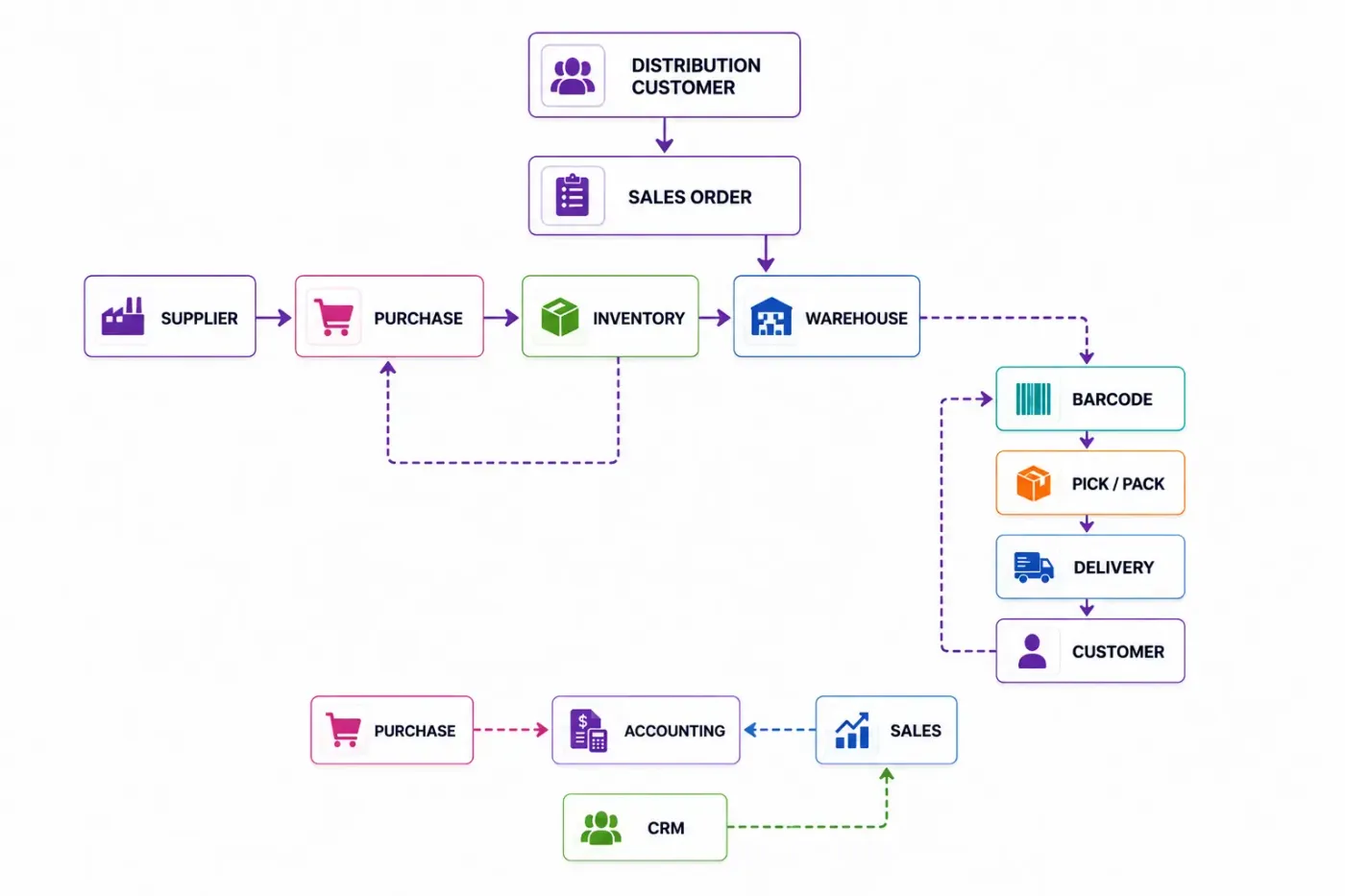
Odoo ERP for distribution runs warehouse operations and the buying and selling around them on one database. Receipts, putaway, internal transfers, picking and delivery are driven by configurable routes and executed by barcode; replenishment rules keep each location stocked for its own demand; and accounting posts the result without re-keying.
The configuration that decides distribution efficiency is the number of warehouse steps. Each extra step buys you control and costs you a scan, a screen and a trained operator. More steps is not better; matching your real physical flow is.
Odoo connects the applications distribution depends on: Inventory and Warehouse for the physical flow, Barcode for execution, Purchase for replenishment, Sales and CRM for demand, and Accounting underneath all of it.
Locations, putaway and removal strategies, routes, internal transfers and cycle counting, configured around how your goods actually move.
Multi-step receipts and deliveries, batch and wave picking, packing and despatch, sized to your order profile rather than to a template.
Scanner and phone-driven receiving, putaway, picking, packing and counting, which is what makes the stock figure trustworthy.
Replenishment per location, vendor lead times, purchase agreements and approval limits by value.
Customer pricing, order capture from multiple channels, and delivery commitments checked against live availability.
Enquiries and customer history in the same system as orders, so account managers are not working from a separate list.
Invoicing, vendor bills, GST and e-invoice, with cost-to-serve reporting by customer and by channel.
An order drops into a pick, the pick is grouped with others going the same way, the operator scans it, the delivery confirms, and the invoice posts — all against the same stock record that purchasing is replenishing.
These are the configuration decisions that are cheap to make now and structural to change later. We walk through each one before a single record is migrated.
One, two or three. This should mirror your physical flow exactly — extra steps buy control and cost a scan, a screen and training on every single order.
Where goods go on receipt and which stock leaves first. FIFO, FEFO or closest location, decided per product category rather than globally.
Single order, batch or wave. The right answer comes from your order profile — lines per order and orders per day — not from a preference.
Which operations are scanned, on what devices, and who trains the floor. The software is the small part of this.
A location scheme operators can read and scan. Renaming locations after go-live is a physical job, not a software one.
Count classes and frequency, replacing the annual stocktake that stops the business for two days.
Whether despatch ends at the gate or at the customer signature, and what evidence is captured.
The right configuration depends on how your business actually operates, not on your sector label.
Central warehouse feeding depots, with transfers and local replenishment rules.
High order count, small lines per order, where picking efficiency dominates cost.
Few orders, large volumes, where handling and vehicle loading matter more than pick paths.
B2B orders alongside marketplace and eCommerce from the same stock pool.
Expiry-driven removal, batch control and fast turns to limit write-offs.
Holding and moving other people’s stock, needing separate ownership and billing by activity.
We would rather say this before you buy licences than after. These are the areas where we scope real development, recommend a bolt-on, or tell you Odoo is the wrong tool.
Slotting optimisation, labour management and cartonisation are WMS territory. Odoo covers the common 80% and will not replace a dedicated WMS at high volume.
Vehicle routing, drop sequencing and load planning need a specialist system or an integration.
Conveyors, sorters and AS/RS integration is a project, not a configuration setting.
Billing by storage, handling and movement for third-party stock needs custom development.
Statistical forecasting with seasonality and promotional uplift is not native.
Tens of thousands of stock moves daily need infrastructure work, queue jobs and careful module choices.
Implementing Odoo for distribution needs more than installing the applications. Your ERP should reflect how your operations actually run.
Understand your order profile, warehouse layout, how goods physically move today, your picking method and what is scanned.
Map receipt to despatch onto Odoo, and settle warehouse steps, putaway strategy and picking method before any location is created.
Configure the applications above around your requirements rather than installing them at their defaults.
Prepare and migrate masters, open items and opening balances. Data cleaning is scoped explicitly, because it is usually the largest single task. See Odoo migration.
Connect the systems you are keeping and build only what configuration genuinely cannot reach. See integration and customization.
Your own team runs real transactions in a test database before go-live. Role-based training for the people who key them daily. See Odoo training.
Cutover planning, opening balance freeze, hypercare in the first weeks, then ongoing support and AMC.
We do not publish one implementation price, because the same application list costs very differently depending on the factors below. We do publish what moves the number, and the price is fixed in writing before work starts.
Distribution projects are decided on the warehouse floor, not in the configuration screen. We size the warehouse steps and picking method from your actual order profile, and we treat barcode rollout as the training project it really is.
Product capabilities stated on this page are documented by Odoo. The configuration advice and limitations come from our own implementations.
Tell us your lines per order and orders per day. That profile decides your picking method and most of the warehouse configuration, and the diagnosis call is free.