
Multi-warehouse stock
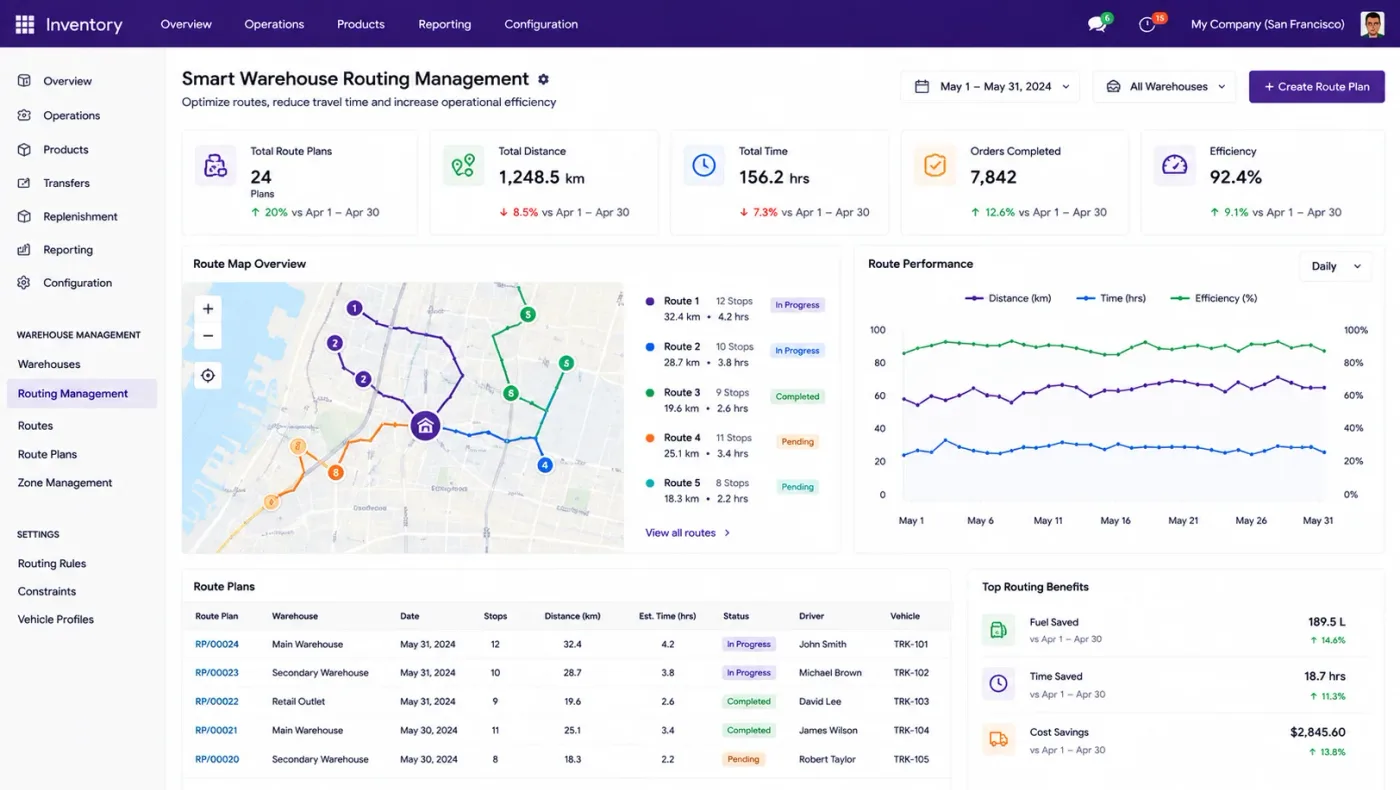
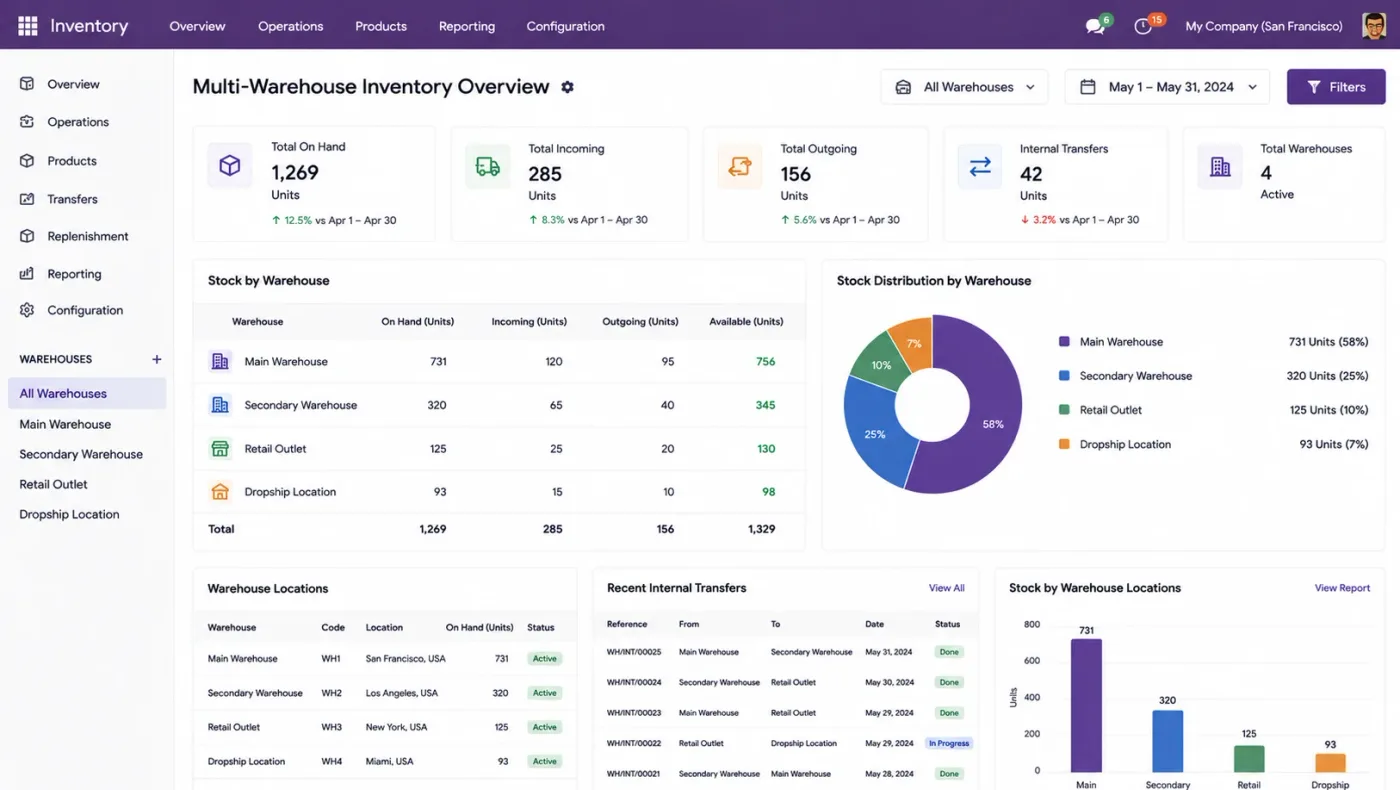
Several warehouses and nested locations with transfers between them, resupply rules, and stock visible per location rather than as one company total.
WarehousesLocationsTransfers
Stock accuracy is the hinge every other part of an ERP turns on. Sales promise against it, purchasing reorders from it, manufacturing consumes it, and accounting values it. When it is wrong, four modules produce confident nonsense.
Odoo Inventory is not hard to configure. What takes care is deciding how many steps a receipt takes, what gets tracked by lot, and which costing method the valuation uses — because all three are painful to change once stock is live.
Businesses running Odoo with OdooBots







Odoo Inventory tracks stock by location and lot, reserves it against demand, and posts its own valuation entries. Receipts and deliveries run in one, two or three steps depending on whether you need a quality or packing gate, reordering rules replenish per product and location, lots and serials carry genealogy from supplier to customer, barcode scanning speeds picking, and every move can post a valuation entry on your chosen costing method.
The figure worth publishing anywhere — to a website, a salesperson, a planner — is forecast available, not on hand. On hand includes stock already reserved against other orders, and promising against it is how businesses oversell.
Six areas make up the inventory application, and every other module reads from them.
Several warehouses and nested locations with transfers between them, resupply rules, and stock visible per location rather than as one company total.
One, two or three-step flows so a quality check or a packing station becomes a real stage rather than an informal habit.
Reordering rules per product and location, make-to-order routes, vendor lead times and a replenishment view showing what to buy and why.
Traceability from supplier receipt through production to customer delivery, with expiry and first-expiry-first-out removal where shelf life matters.
Scanning for receipts, internal transfers, picking and counts, which removes most of the keying errors that make stock wrong in the first place.
Standard, FIFO or average costing per product category, with automated valuation entries and landed costs adding freight and duty to product cost.
A confirmed sales order reserves stock and creates a picking. A reordering rule raises a purchase suggestion when forecast available falls below its minimum. A manufacturing order consumes components and produces output. Each of those movements adjusts the same figure, and on automated valuation each one posts its own accounting entry.
That is why stock discipline is not a warehouse concern: the sales promise, the purchase decision and the margin figure are all reading the number the warehouse maintains.
These are the configuration decisions that are cheap to make now and structural to change once transactions exist. We walk through each one before a single record is migrated.
One, two or three-step receipts and deliveries. More steps give you a gate and cost handling time; fewer are faster and see less. Painful to change once stock is live.
Standard, FIFO or average. Standard cost with no periodic revaluation is the single most common reason a margin report is wrong.
Lot or serial tracking only where a contract, a regulator or a recall genuinely requires it. Tracking everything doubles data entry and loses shop-floor cooperation.
How granular locations get — warehouse, zone, rack, bin. Deeper is more accurate and only works if people actually scan.
A full physical count reconciled immediately before cutover. The most expensive shortcut available in any implementation.
Which products get min and max levels, and who reviews suggestions rather than approving them without looking.
Whether freight and duty are added to product cost. If not, every margin figure is understated by that amount.
Odoo moves features between Community and Enterprise from one version to the next, so the list below is what holds today and is confirmed against your own version during the diagnosis rather than taken as permanent.
Community includes the inventory engine in full: multi-warehouse, locations, routes, reordering rules, lots and serials, valuation on all three costing methods, and landed costs.
Enterprise adds the operational layers around it, and barcode is the one that most often justifies the charge on its own.
We would rather say this before you buy licences than after. These are the areas where we scope real development, recommend a bolt-on, or tell you another tool is the better answer.
Wave picking, slotting optimisation and labour management are warehouse management territory rather than standard Odoo.
Statistical forecasting from thin or irregular history produces confident numbers with nothing behind them.
Conveyors, sorters and automated storage need integration work rather than configuration.
Anything outside standard, FIFO or average is custom development, and it is rarely worth it.
Export packing lists with container-level detail usually need a custom module.
No configuration recovers from an opening stock figure that was never physically verified.
Implementing Odoo Inventory needs more than installing the application. It should reflect how your business already works, and change only what is worth changing.
Understand your warehouses and locations, what needs lot tracking, how stock is counted today, and how receipts and despatches physically happen.
Settle the warehouse steps, costing method per category, traceability scope and location depth before anything is configured.
Set Odoo Inventory up around how you work rather than installing it at its defaults, and build only what configuration genuinely cannot reach. See Odoo customization.
Masters, open items and opening balances prepared and loaded. Data cleaning is scoped explicitly, because it is usually the largest single task. See Odoo migration.
Your team runs real transactions in a test database before go-live, including the awkward cases that never appear in a demonstration.
Role-based training for the people who key transactions daily, then cutover, hypercare and ongoing support and AMC.
We do not publish one price, because the same application costs very differently depending on the factors below. We do publish what moves the number, and the price is fixed in writing before work starts.
We will not go live on a stock figure nobody counted. It makes us unpopular for a week and it is the difference between an ERP people trust and one they quietly work around with their own spreadsheet.
Product capabilities stated on this page are documented by Odoo. The configuration advice, edition notes and limitations come from our own implementations.
Tell us how many warehouses you run and when stock was last physically counted. Those two answers shape the project, and the diagnosis call is free.