OdooBots
Loading
Industry · Manufacturing

Odoo ERP for Manufacturing

Manage production, materials, inventory, purchasing, quality, maintenance and sales through one integrated Odoo ERP. From MRP and BOMs to work orders and shop-floor operations, Odoo gives manufacturers a clear view of production, material availability and operational progress.

OdooBots implementation team| Updated 15 October 2026| Covers Odoo 16–19, Community & Enterprise
0Odoo projects delivered
0Odoo consultants & developers
0Years in ERP
ChennaiAmbattur, Tamil Nadu

Manufacturers and industrial businesses running Odoo with us

Dhanalakshmi Industries logo Sanjeev Autoparts logo Electro Flux Equipments logo Anchor Marine Equipment Company logo NEXG logo PV Constructions logo SESS logo
Definition

What is Odoo MRP?

MRP stands for Manufacturing Resource Planning. Odoo MRP is the manufacturing application inside Odoo ERP that plans and runs production — manufacturing orders, bills of materials, work orders, work centers and production scheduling — using the same database as inventory, purchasing, quality, maintenance and sales. Odoo covers MRP II scope: not just material planning, but capacity, routing, costing and shop-floor execution.

Yes, Odoo has MRP. It is included in Odoo Community as the Manufacturing app; PLM, Quality, Maintenance, the Shop Floor interface and the Master Production Schedule are Enterprise.

Manufacturing order (MO)
The instruction to produce a quantity of one finished product. It consumes the BOM components and creates the finished stock.
Work order (WO)
One operation inside a manufacturing order — cutting, assembly, finishing — executed at a specific work center. One MO can have many WOs.
Bill of materials (BOM)
The recipe: which components and which operations are needed to make one unit of the product.
Work center
The machine, line or station where a work order runs, carrying its capacity, cost per hour and OEE.
Connected production

Odoo manufacturing ERP for connected production

Odoo connects manufacturing with the business operations that support production. Manage manufacturing orders, BOMs, work orders, work centers, production planning, inventory, procurement, quality, maintenance, traceability and manufacturing costs within one ERP environment.

Each stage works with the information required by the next, helping production, procurement, warehouse, quality and sales teams coordinate operations from material procurement through finished-goods delivery.

  • One database for production, stock, purchasing and accounting — no nightly exports
  • Work orders that reflect the real routing on your floor, not a generic template
  • Material availability checked against live stock before a manufacturing order is released
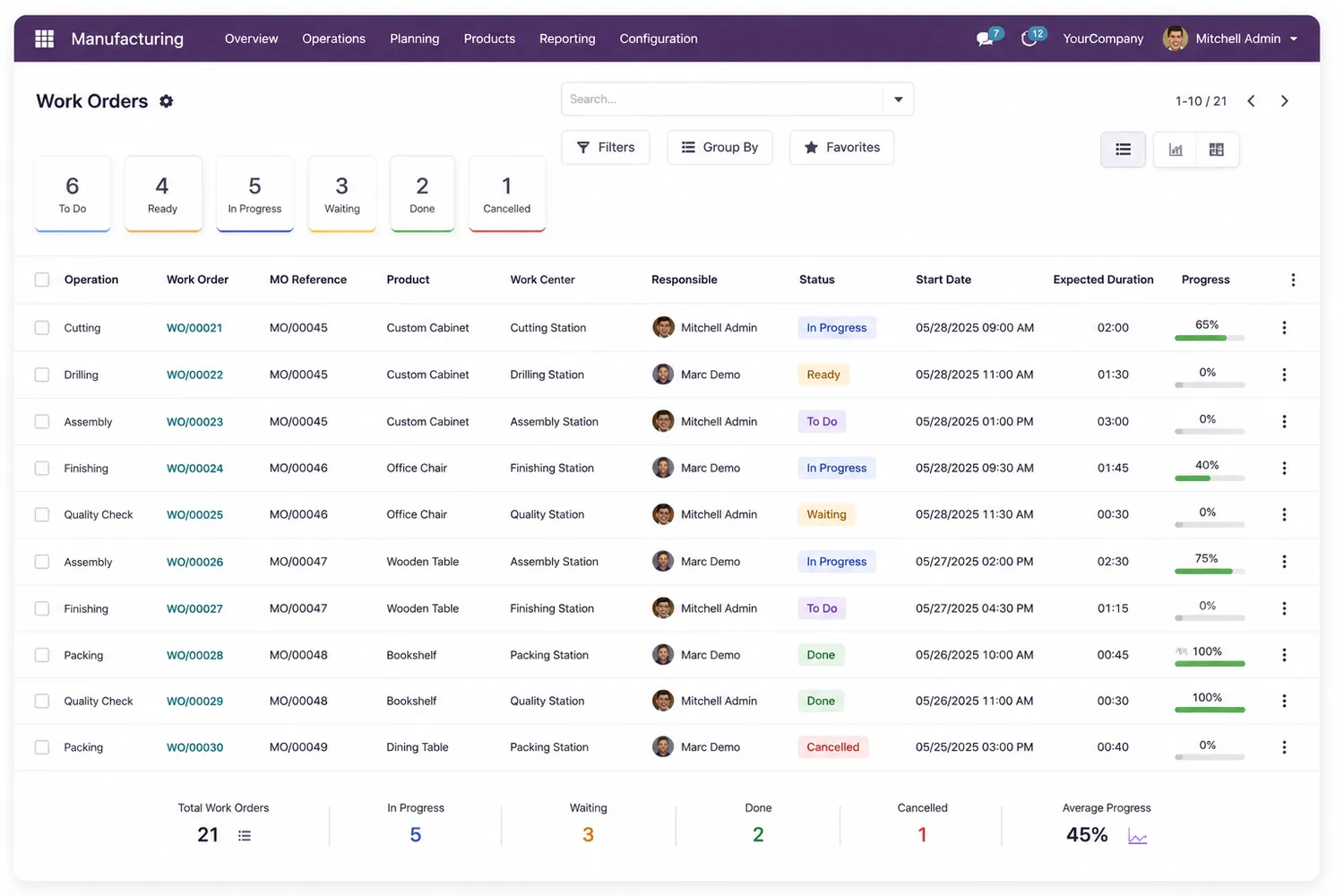
Odoo Manufacturing work orders list showing operation, work order, MO reference, product, work center, status and progress
Work Orders — operations, work centers, status and live progress against each manufacturing order.
Experience · our own projects

Manufacturing companies we have implemented Odoo for

Each of these is a project OdooBots delivered. The scope described is what was actually implemented — not a capability list.

Dhanalakshmi Industries logo

Dhanalakshmi Industries

Manufacturing · India
What we implemented

Sales, manufacturing, dispatch, invoicing and GST compliance running as a single connected ERP flow, so a confirmed order carries through production to a compliant invoice without re-keying.

Why it mattered

Dispatch and invoicing were the handover points where quantities and tax treatment used to drift. Bringing them into the same flow as manufacturing removed that gap.

Sanjeev Autoparts logo

Sanjeev Autoparts

Automotive parts · India
What we implemented

A customised Odoo ERP and CRM covering RFQ management, quotation tracking, sales forecasting and opportunity management across the parts business.

Why it mattered

High RFQ volume with repeat part numbers needs quotation history and forecasting in the same system as stock, or sales commits to quantities production cannot meet.

Electro Flux Equipments logo

Electro Flux Equipments

Equipment manufacturing · India
What we implemented

Technical quotation management, enquiry tracking, quotation revision control and sales analytics consolidated into one integrated platform.

Why it mattered

Engineered-to-order equipment quotes go through many revisions. Without revision control the version that reaches the customer and the version costed in production stop matching.

Canlitek Private Solutions

Machinery service & manufacturing · Chennai
What we implemented

ERP implementation with customisation plus IoT-based automation for AMC and CMC contracts, predictive alerts for machinery degradation, and a workforce and testing-tool allocation model. Apps: Contacts, Employees, Inventory, Purchase, Sales, Service and Accounting.

Why it mattered

Service contracts and manufacturing were tracked separately, so breakdowns were discovered after they happened rather than scheduled against machine data.

Looking for your own sector? See every industry we implement Odoo for, or read the full OdooBots case studies.

Modules

Odoo manufacturing modules for your business

The applications that carry a manufacturing business, and what each one owns once it is configured around your operation rather than installed from a template.

Manufacturing Resource Planning (MRP)

Manufacturing orders, production planning, scheduling, work orders and shop-floor operations. The Master Production Schedule supports longer-term planning from forecast demand plus existing manufacturing and purchase orders.

Plan MOsSchedulingCapacityPerformance

Bill of Materials (BOM)

A BOM defines the components and operations required to manufacture a product. Odoo supports multi-level BOMs, product variants, operations and routing configurations.

Multi-level BOMsVariantsRouting

Work orders & work centers

Work orders divide manufacturing into defined operations; work centers carry scheduling, capacity planning, equipment, costs and efficiency. Work-order dependencies control the sequence operations run in.

Operation sequenceDependenciesOEE

Product Lifecycle Management (PLM)

Product changes and BOM versions managed through engineering change orders and approval workflows, with version history so teams can track changes to products and manufacturing structures.

ECOsApprovalsVersion history

Quality management

Quality control points, checks, instructions and alerts built into manufacturing operations, so quality is part of the production workflow rather than a separate process.

Control pointsInspectionsAlerts

Maintenance management

Preventive and corrective maintenance for manufacturing equipment, with requests scheduled and tracked alongside production operations instead of in a separate register.

PreventiveCorrectiveEquipment

Inventory management

Manufacturing depends on availability and traceability of raw materials, components, WIP and finished products. Odoo connects manufacturing with inventory and supports lot and serial tracking.

Lots & serialsTraceabilityMO transfers

Purchase management

Procurement connects to production requirements so purchasing manages the materials manufacturing needs. Planning considers purchase orders and forecast demand when replenishing.

ReplenishmentProcurement planning

Sales management

Sales demand connects with manufacturing and inventory, aligning customer orders with production and fulfilment instead of running sales and production as isolated processes.

Demand to MOAvailabilityFulfilment

Subcontracting

Odoo supports three subcontracting flows — basic, with components dropped to the subcontractor, and with resupply — so outsourced operations stay inside the same BOM, costing and traceability chain instead of becoming a purchase you reconcile later.

Drop-ship componentsResupplySubcontractor BOM

Shop floor & barcode

Operators run work orders from a tablet or barcode scanner: start, pause, record quantities, log work instructions and close the operation. The WIP numbers in the back office then reflect what actually happened on the line.

Shop FloorBarcodeWork instructionsTimesheets

Scrap, waste & unbuild

Scrap removes material to a dedicated scrap location so it leaves stock without disappearing from the ledger. Unbuild orders reverse a finished product back into its components — the correct route for rework, warranty teardown and incorrectly built units.

Scrap locationsUnbuild ordersBy-productsRework

Other Odoo manufacturing capabilities we configure

Manufacturing lead timesManufacturing routesMaster Production Schedule Demand forecastingProduct packagingOperator timesheets Quality control pointsSerial number trackingLot genealogy By-productsWork instructionsMulti-level BOM explosion Work-order dependenciesManufacturing cost analysisProduction reporting Manufacturing dashboardsBatch manufacturingMake-to-order routes
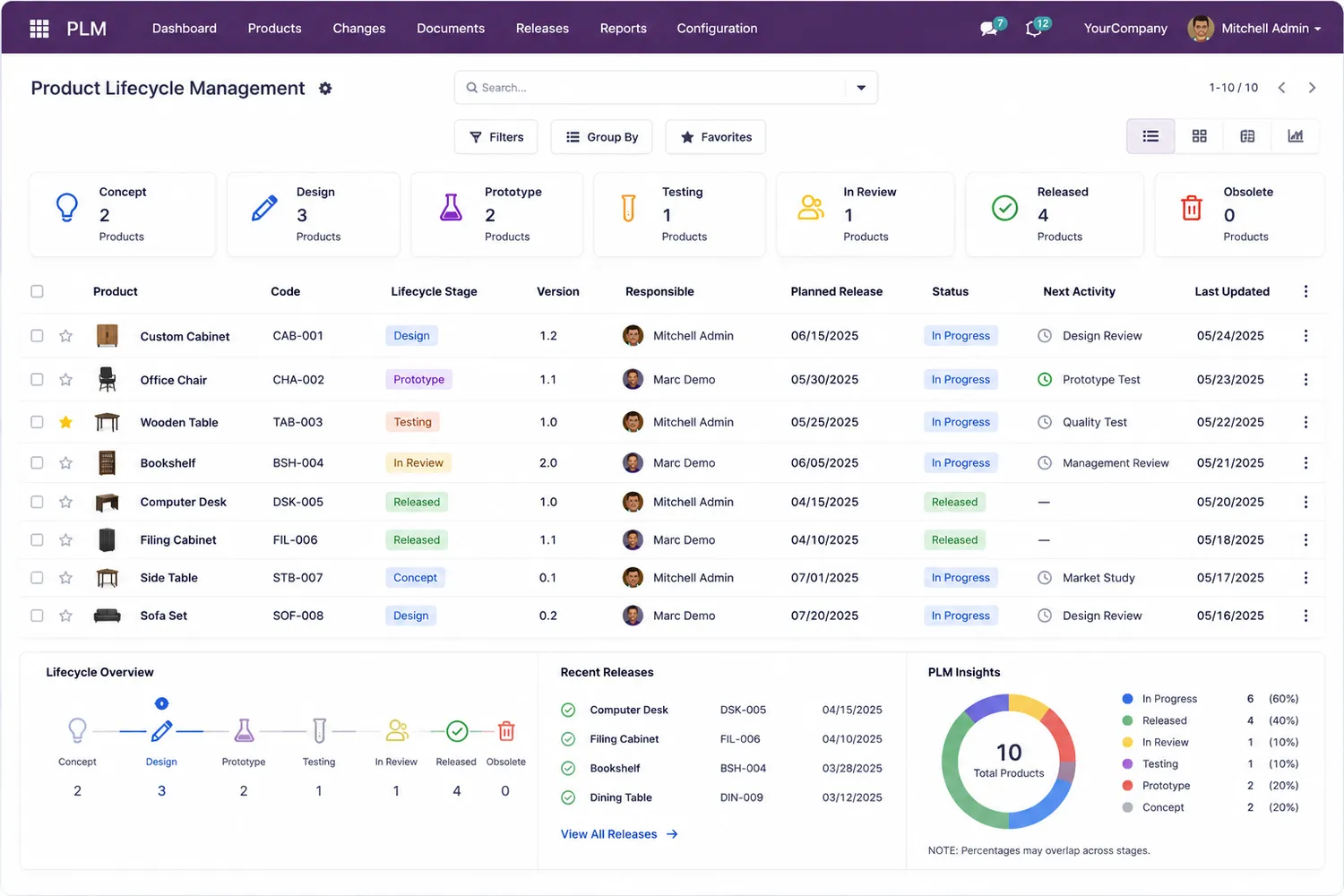
Odoo PLM screen showing product lifecycle stages, versions, planned release dates and engineering change approvals
Product Lifecycle Management — concept to release, with versions and the next approval activity on every product.

Engineering changes that do not break costing

On most manufacturing rollouts the BOM is not the hard part — keeping the BOM, the routing and the product cost in step after an engineering change is. PLM gives every revision an owner, an approval and a version history, so production and accounting are reading the same structure.

  • Engineering change orders with named approvers
  • BOM version history retained for audit and traceability
  • Change impact visible to planning before the revision is released
Expertise · how we work

The eight things we check in week one of an Odoo manufacturing implementation

These are the configuration decisions that decide whether a manufacturing rollout holds up after go-live. We walk through each one on the shop floor before a single record is migrated.

  1. Manufacturing steps: 1, 2 or 3

    One-step posts components and finished goods instantly. Two- and three-step add pick-components and store-finished transfers, which you need the moment WIP sits on the floor overnight. Set at Inventory › Configuration › Warehouses and painful to change later.

  2. Costing method per product category

    Standard, FIFO or AVCO at Inventory › Configuration › Product Categories. Standard cost with no periodic revaluation is the single most common reason a manufacturer’s margin report is wrong.

  3. BOM type: manufacture or kit

    A kit explodes at delivery and never creates a manufacturing order. Teams that pick “Kit” for a sub-assembly lose all work-order routing and shop-floor visibility beneath it.

  4. Routing and work-center capacity

    Work centers need realistic capacity, time efficiency and OEE targets, otherwise scheduling returns dates nobody on the floor believes and planners go back to spreadsheets.

  5. Lot and serial tracking depth

    Tracking every raw material by lot sounds safe and doubles data entry. We set tracking only where traceability is contractually or legally required, then use Inventory › Products › Traceability to prove the chain still closes.

  6. Replenishment: reordering rules or MPS

    Reordering rules suit stable consumption; the Master Production Schedule suits forecast-driven assembly. Running both on the same product generates duplicate purchase orders.

  7. Scrap, by-product and rework handling

    Odoo handles scrap and by-products cleanly, but only if the locations and cost shares are defined up front. Rework flows almost always need a configuration decision rather than custom code.

  8. Who closes the work order

    Shop-floor tablet, supervisor back-office or barcode. This single decision drives training, hardware and whether your WIP numbers are real at 6pm.

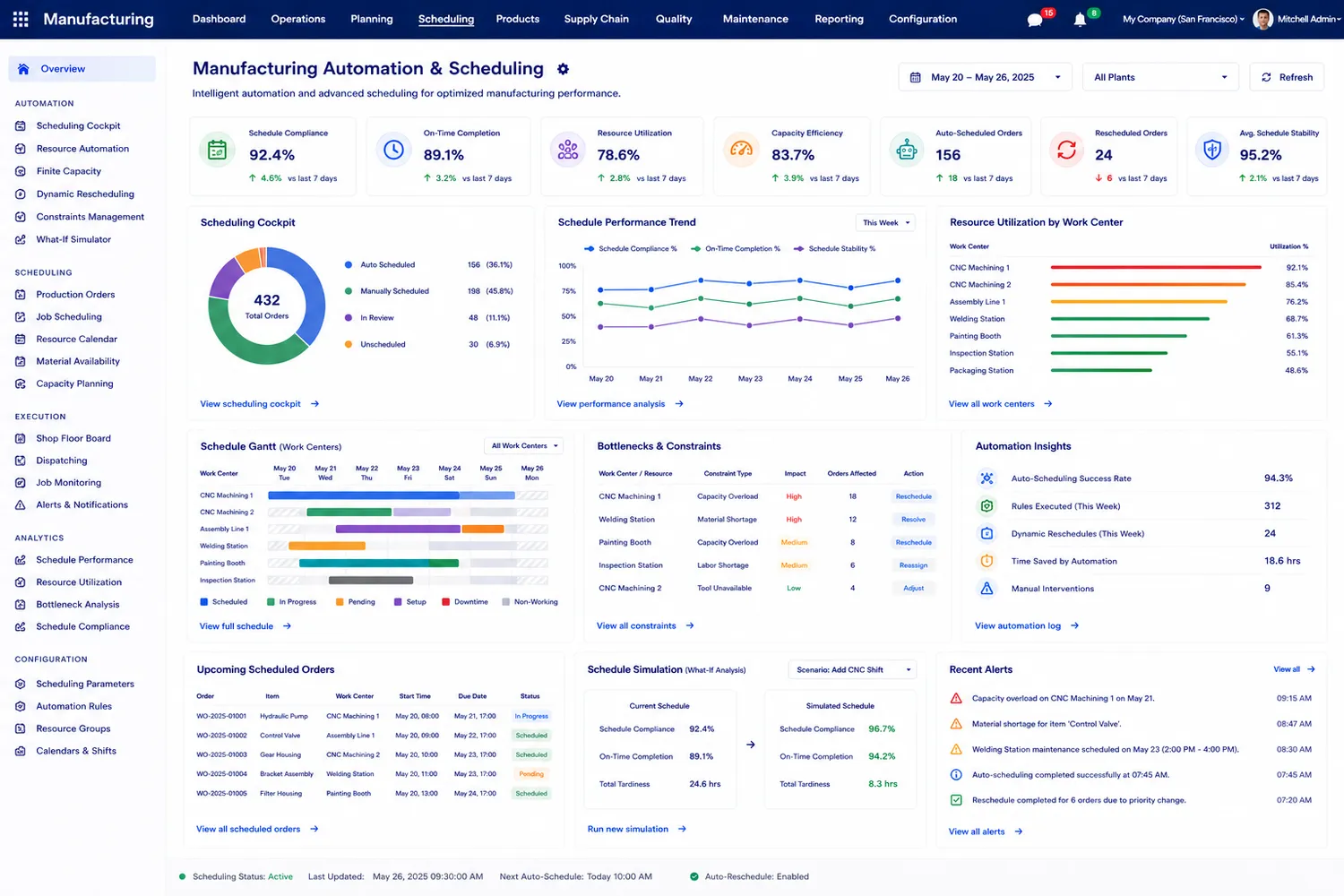
Manufacturing scheduling screen with work-center Gantt, capacity utilisation, bottleneck constraints and schedule compliance metrics
Scheduling and capacity — work-center utilisation, bottlenecks and schedule compliance. Decisions 4 and 6 above are what make this view trustworthy.
Workflow

How Odoo connects the manufacturing workflow

Odoo connects the processes that move a product from customer demand and material procurement through production, quality and finished-goods delivery — teams work with shared manufacturing, inventory, procurement and sales information inside one ERP.

01

Sales

Customer demand creates the need for products and establishes production requirements.

02

Purchase

Raw materials and components are planned and procured from manufacturing requirements.

03

Inventory

Materials are tracked for availability, movement and traceability before and during production.

04

BOM

Required components, quantities and manufacturing operations are defined for each product.

05

MRP

Manufacturing orders are planned and scheduled against demand and available resources.

06

Work orders

Production is organised into operations and executed across the appropriate work centers.

07

Quality

Quality checks and production issues are incorporated into the manufacturing process.

08

Finished goods

Completed products move into inventory, available for delivery and fulfilment.

Traceability that survives an audit

Odoo supports one-, two- and three-step manufacturing, so the warehouse steps can match how your product physically moves. Lot and serial genealogy then links a finished unit back through its work orders to the raw-material lot and the purchase order it arrived on.

  • Lot and serial numbers applied where traceability is actually required
  • Full genealogy from raw material lot to delivered customer order
  • Expiry and quality alerts raised against the lot, not a spreadsheet
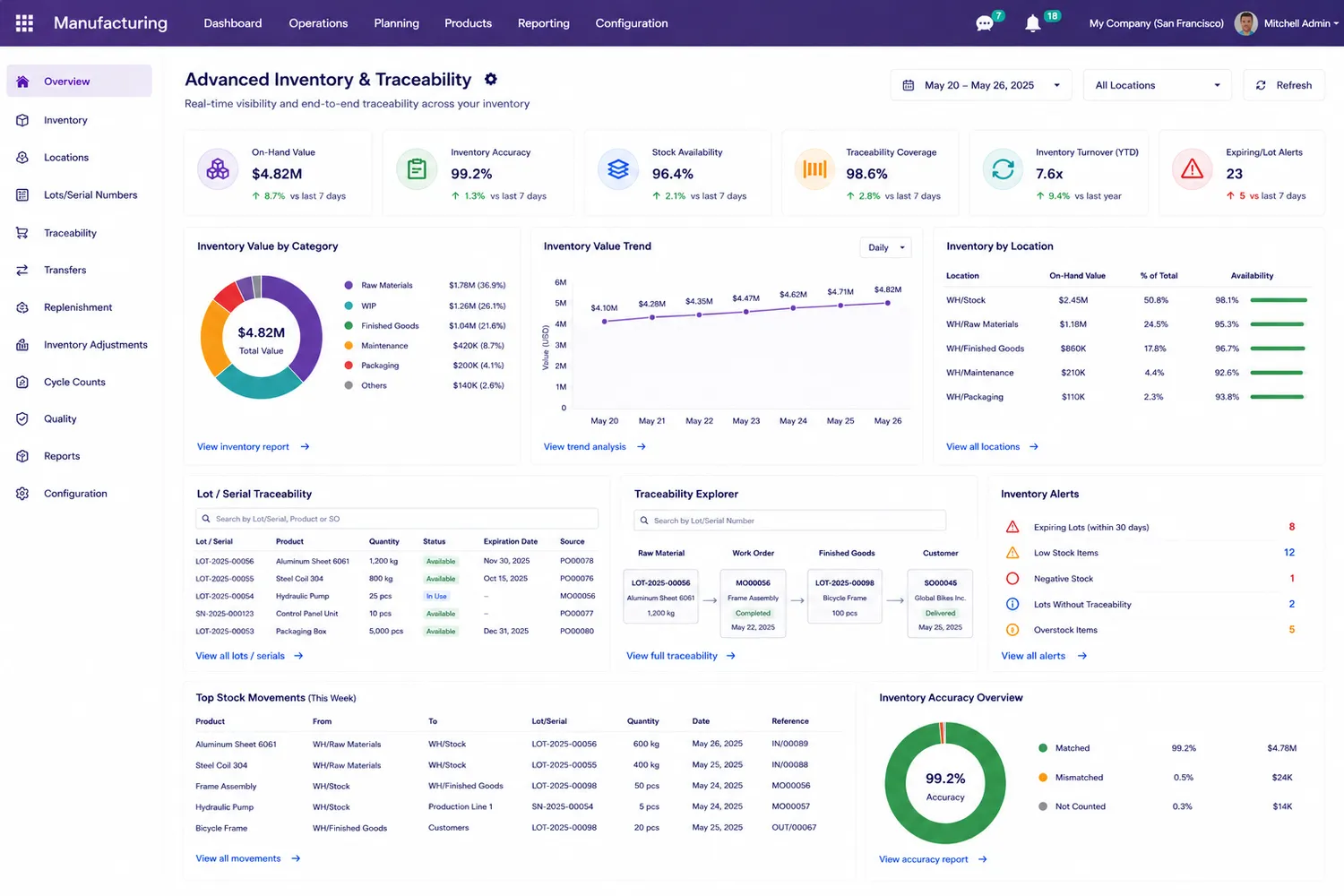
Odoo inventory traceability dashboard showing lot and serial numbers, traceability explorer from raw material to customer, and inventory accuracy
Lot & serial traceability — raw material lot, work order, finished goods and the customer order, in one chain.
Production models

Odoo manufacturing for different production models

The right configuration depends on your products, production processes, warehouses, procurement model and operational requirements.

Production models

Multi-level manufacturing, multi-step manufacturing and multi-stage production, configured to match how your product is actually built.

Manufacturing structure

BOM depth, sub-assemblies and the warehouse steps that sit between each stage of production.

Product & operations

Product variants, routing, operation sequences and continuous improvement through engineering change orders.

Traceability & control

Serial-number tracking, lot genealogy and the quality control points that gate each operation.

Trust · where Odoo struggles

When Odoo manufacturing is not the right fit

We would rather tell you this before you buy licences than after. These are the cases where we scope significant development, recommend a bolt-on, or tell you Odoo is the wrong tool for the job.

Finite-capacity / APS scheduling

Odoo schedules against work-center capacity but is not an advanced planning and scheduling engine. Sequence-dependent changeovers and true finite scheduling need an external APS or custom development.

Process manufacturing with potency

Recipe-based production with variable potency, concentration or yield-by-batch is not native. Chemicals, pharma and food blending usually need custom fields and costing logic.

Heavy co-product cost allocation

By-products are supported; splitting cost across multiple co-products by market value or yield is not, and requires development on manufacturing order valuation.

Real-time machine integration at scale

PLC and SCADA data can be pushed into Odoo, but Odoo is not a MES. High-frequency machine telemetry belongs in a MES or historian that feeds Odoo in summary.

Very high transaction volumes

Tens of thousands of stock moves per day need infrastructure work, queue jobs and careful module choices — not a default hosting plan.

Teams who will not change process

If the shop floor will not move off its spreadsheets, no ERP succeeds. We raise this during requirement analysis, not after go-live.

If your requirement is on this list, say so on the first call. We will tell you what it costs to build it — or that you should buy something else.

Our services

Odoo manufacturing implementation services

Implementing Odoo for manufacturing requires more than installing the Manufacturing app. Your ERP should reflect how materials, production operations, quality, inventory, purchasing and sales work together across your business.

  1. Requirement analysis

    Understand your products, production processes, BOMs, work centers, inventory flow, procurement requirements and reporting needs.

  2. Manufacturing workflow design

    Map your existing processes and define the Odoo workflows that fit your manufacturing operations.

  3. Odoo configuration

    Configure MRP, BOMs, work orders, inventory, purchase, quality, maintenance and related applications around your requirements.

  4. Customisation & integration

    Extend Odoo where standard functionality does not meet a specific requirement, and integrate it with the systems you already run. See Odoo customization and Odoo integration.

  5. Data migration

    Prepare and migrate relevant products, BOMs, inventory data, vendors, customers and other business records. Moving from an older version? See Odoo migration.

  6. Testing & user training

    Validate manufacturing workflows, resolve issues and train users before deployment. See Odoo training.

  7. Go-live & support

    Deploy the configured solution and provide ongoing support and optimisation after launch. See Odoo support & maintenance.

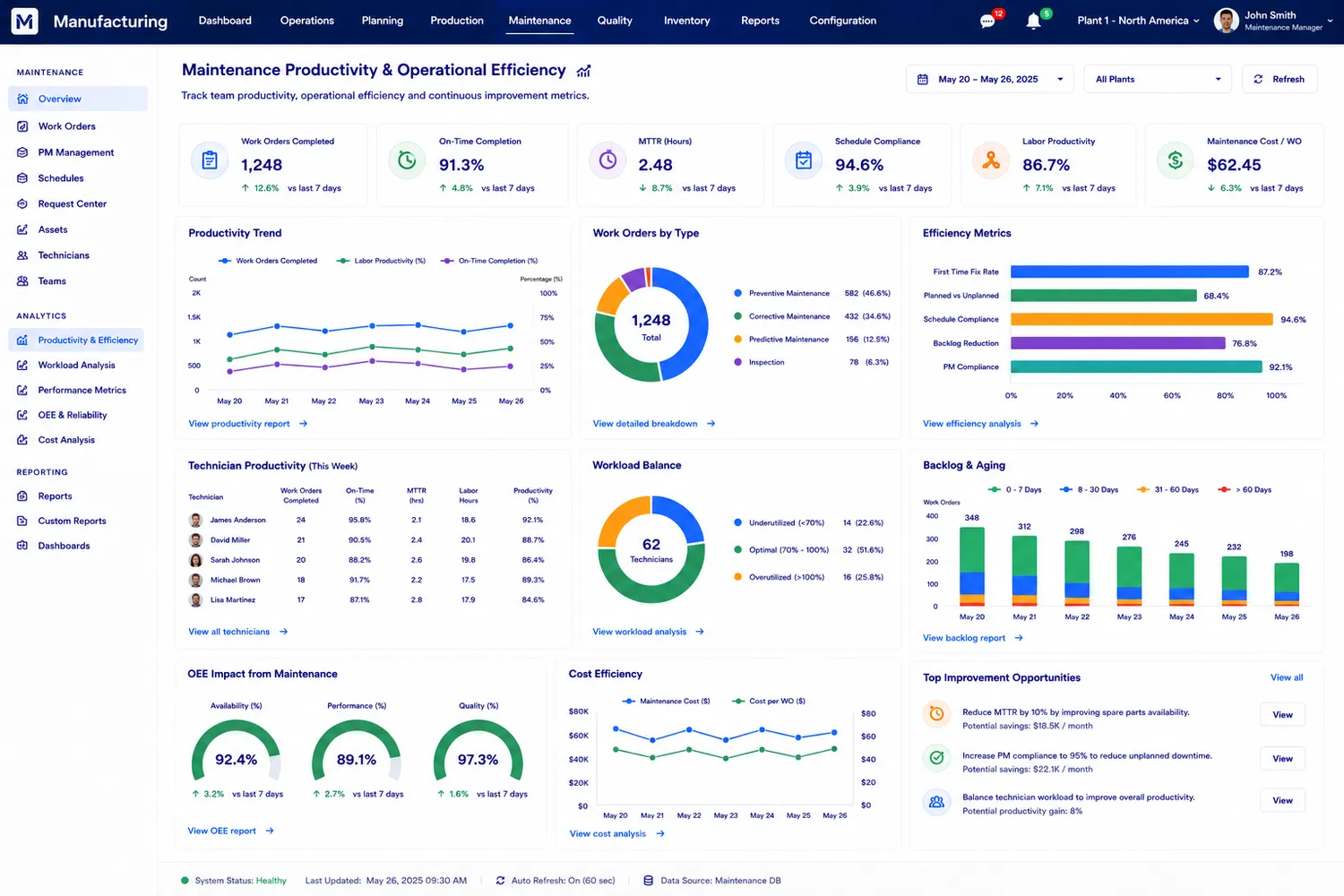
Maintenance productivity dashboard showing work orders completed, MTTR, PM compliance, OEE impact and cost per work order
Maintenance & reliability — preventive compliance, MTTR and OEE impact, tracked against the same equipment records production uses.
Trust · what it costs

What an Odoo manufacturing implementation costs

We do not publish one implementation price, because the same app list costs very different amounts depending on the six factors below. We do publish what moves the number — and we fix the price in writing before work starts.

  • Number of BOM levelsA single-level assembly is days of configuration. A five-level BOM with sub-assembly routing and ECO approvals is weeks.
  • Manufacturing stepsThree-step manufacturing adds warehouse transfers, locations and operator training that one-step does not need.
  • Data quality you start withA clean product master and BOM sheet migrates quickly. Hand-kept Excel with duplicate part numbers is usually the largest single line item.
  • Configuration vs developmentAnything we can configure is cheap. Anything needing a developer is quoted separately, with the reason written down.
  • IntegrationsTally, e-invoice, e-way bill, barcode hardware, machine data — each is a separately scoped item.
  • Shop-floor users to trainOperator training, not consultant time, decides whether the system is still in use in month three.
Why us

Why choose OdooBots for manufacturing ERP implementation

Manufacturing processes differ from one business to another, so a successful Odoo implementation starts with your operational requirements — not a generic module list. OdooBots designs and implements an integrated ERP environment across production, BOMs, work orders, inventory, purchasing, sales, quality, maintenance and reporting.

Based inAmbattur, ChennaiTamil Nadu 600053, India
Phone+91 98414 81435Mon–Sat, business hours IST
Delivered630+ Odoo projects30+ consultants and developers
Versions supportedOdoo 16 – 19Community and Enterprise
FAQ

Odoo manufacturing ERP: frequently asked questions

What is Odoo Manufacturing ERP?
Odoo Manufacturing is an ERP solution for planning and managing manufacturing operations — manufacturing orders, BOMs, work orders, work centers and production planning — connected to inventory, purchasing, quality and sales in one database.
Can Odoo manage Bills of Materials?
Yes. Odoo supports BOMs that define the components and operations required to manufacture products, including multi-level BOM structures, product variants and routing.
Can Odoo manage work orders and work centers?
Yes. Work orders split production into defined operations, and work centers carry the scheduling, capacity, equipment and cost structure behind them. Work-order dependencies control the operation sequence.
Can Odoo connect manufacturing with inventory and purchasing?
Yes. Manufacturing requirements drive replenishment, and raw materials, work in progress and finished goods move through the same inventory operations.
Can Odoo manage product changes and BOM revisions?
Yes, through Odoo PLM: engineering change orders, approval workflows and BOM version history.
Can Odoo manage manufacturing quality and maintenance?
Yes. Quality control points and alerts sit inside the production workflow, and preventive and corrective maintenance are scheduled against the same equipment records.
Do we need Odoo Enterprise for manufacturing?
MRP, BOMs and work orders are available in Odoo Community. PLM, Quality, Maintenance, the shop-floor interface and the Master Production Schedule are Enterprise features. We tell you which of your requirements force the Enterprise licence before you buy it.
What is the difference between a manufacturing order and a work order in Odoo?
A manufacturing order is the instruction to produce a quantity of a finished product; it consumes the BOM components and produces the finished stock. A work order is one operation inside that manufacturing order, such as cutting or assembly, executed at a specific work center. One manufacturing order can contain several work orders, and work-order dependencies control the order they run in.
Does Odoo have MRP, and is it free?
Yes. The Manufacturing (MRP) app is part of Odoo Community, which is open source and free of licence cost — you pay for hosting, implementation and any Enterprise apps you need. PLM, Quality, Maintenance, the Shop Floor interface and the Master Production Schedule are Enterprise-only.
Does Odoo support manufacturing subcontracting?
Yes. Odoo supports three subcontracting flows: basic subcontracting, subcontracting with components dropped to the subcontractor, and subcontracting with resupply. The subcontracted operation stays inside the same BOM, costing and traceability chain rather than being handled as a separate purchase.
Can Odoo handle scrap, waste and rework?
Scrap moves material to a dedicated scrap location so it leaves usable stock while remaining in the ledger. Unbuild orders reverse a finished product back into its components, which is the correct route for rework and warranty teardown. Both need their locations and cost treatment agreed during configuration.
How does Odoo calculate manufacturing lead time?
Odoo combines the product’s manufacturing lead time, the operation durations on the routing, work-center capacity and the security lead time set in manufacturing settings. If work-center capacity and time efficiency are left at their defaults, the scheduled dates will not match the floor — which is why capacity is one of the week-one checks above.
Do you implement Odoo manufacturing outside Chennai?
Yes. We are based in Ambattur, Chennai and implement Odoo for manufacturers across India and overseas, including clients in the Gulf. Requirement workshops can run on site or remotely.
What is the difference between BOM cost and product cost in Odoo?
The product cost is the value stored on the product record and used for stock valuation. The BOM cost is what the components and operations add up to on the bill of materials. They only match if you recompute the product cost from the BOM — on a standard-cost product that recompute has to be run deliberately, which is why margin reports drift after a component price change. We agree during configuration who recomputes it and how often.
Can one BOM apply to several product variants in Odoo?
Yes. A BOM can be set against the product template so it applies to every variant, or restricted to specific variants, and individual component lines can be made variant-specific. Choosing between one variant-aware BOM and several separate BOMs is a decision that affects how many records your team maintains for the rest of the system’s life.
How long does an Odoo manufacturing implementation take?
It depends on BOM depth, data quality and how many of the eight week-one decisions above are already settled. We give a written timeline after the free diagnosis call, not before.

References

Sources and official documentation

Every product capability stated on this page is documented by Odoo. The configuration advice and the limitations come from our own implementations.

Ready to connect your manufacturing operations with Odoo?

Build a manufacturing ERP that connects production, materials, inventory, procurement, quality, maintenance and sales around the way your business actually operates. Start with a free diagnosis call — four questions, no licence pitch.