

Odoo can post a transaction to an unexpected income, expense, receivable, payable, or other account when the accounting configuration used for that transaction does not point to the account you expected.
The problem may appear as a wrong journal entry, an unexpected account balance, or a transaction appearing under the wrong revenue or expense category.
For example:
Invoice / Bill / Payment → Account Configuration → Journal Entry → Wrong Account
The important question is not only “Which account is wrong?” but:
“Which Odoo configuration caused this transaction to use that account?”
If the same problem occurs repeatedly, correcting individual journal entries without fixing the underlying configuration can cause future transactions to be posted incorrectly again.
To investigate the cause, check:
Transaction → Product / Category → Journal → Fiscal Position → Account Mapping → Journal Entry
How Does Odoo Decide Which Account to Use?
Odoo records financial documents as journal entries, with the debit and credit lines posted to accounts in the company’s chart of accounts. The chart of accounts defines the accounts used in the general ledger and their types.
For transactions involving products, the account used can depend on the accounting configuration associated with the product or its product category. Fiscal positions can also replace income or expense accounts according to their configured mapping rules.

Transaction
↓
Product / Product Category
↓
Journal / Accounting Configuration
↓
Fiscal Position or Account Mapping
↓
Journal Entry
This means a wrong account does not necessarily mean the journal entry itself is the source of the problem. The incorrect account may have been selected earlier by the configuration that generated the entry.
Why Is Odoo Posting Transactions to the Wrong Account?
Several configuration problems can cause Odoo to use an unexpected account.
Product or product-category account configuration
For sales and purchase transactions, accounting information can be configured at the product or product-category level.
If the configured income or expense account is incorrect, transactions involving that product can be posted to an account that does not match the intended accounting treatment.
This can also occur when product-level accounting configuration differs from the product category.
Example:
Product Account: Sales – Domestic
Expected: Sales – Domestic
Actual: Other Income
If one product posts differently from otherwise similar products, compare its accounting configuration with a product that generates the expected account before changing the journal entry.
Journal configuration
Odoo uses journals to organize accounting transactions, including Sales, Purchase, Bank, Cash, Credit Card, and Miscellaneous journals.
If the unexpected account occurs consistently within a particular journal or transaction type, review the journal’s accounting configuration and compare it with a similar workflow that posts correctly.
Check:
Journal → Configuration → Accounting Settings The relevant settings depend on the transaction and accounting workflow.
Fiscal position or tax mapping
Fiscal positions can replace income or expense accounts through configured account mappings. They can also be applied automatically based on configured conditions. When multiple automatic fiscal positions can apply, their sequence determines which one is selected.
For example:
Product Account: Sales – Domestic
Fiscal Position: Export Customer
Mapped Account: Export Sales
The transaction can therefore use a different account even though the product’s default configuration is correct. If the wrong account appears only for specific customers, countries, tax conditions, or fiscal positions, review the applicable mapping before changing the product account.
Company-specific accounting configuration
Multi-company databases require additional checks because accounting configuration can differ between companies.
If the same product or workflow produces different accounting results between companies, compare the relevant company-specific accounting configuration rather than assuming the transaction itself is incorrect.
This is particularly important when the companies use different accounting structures or localization settings.
Customization or integration is affecting the posting
Not every incorrect account comes from standard Odoo configuration.
Custom modules, automated workflows, or external integrations can affect how accounting transactions are generated.
Look more closely at customization when:
- standard transactions post correctly but automated transactions do not
- only transactions imported from an external system are affected
- the problem began after a customization or integration change
- the same wrong account appears across one customized workflow
In these cases, changing the product or journal configuration without checking the customized workflow may not resolve the underlying problem.
How Do You Find Which Configuration Is Causing the Wrong Posting?
Do not correct the journal entry first. Trace how Odoo generated it.
Use this investigation path:
Wrong Journal Entry → Identify Transaction → Check Configuration → Compare With Correct Transaction → Identify Root Cause
Start with the incorrect journal entry
Record the key details:
Document Type → Date → Partner → Product → Company → Journal → Account → Tax → Fiscal Position
This establishes exactly what Odoo posted and gives you the configuration points to investigate.
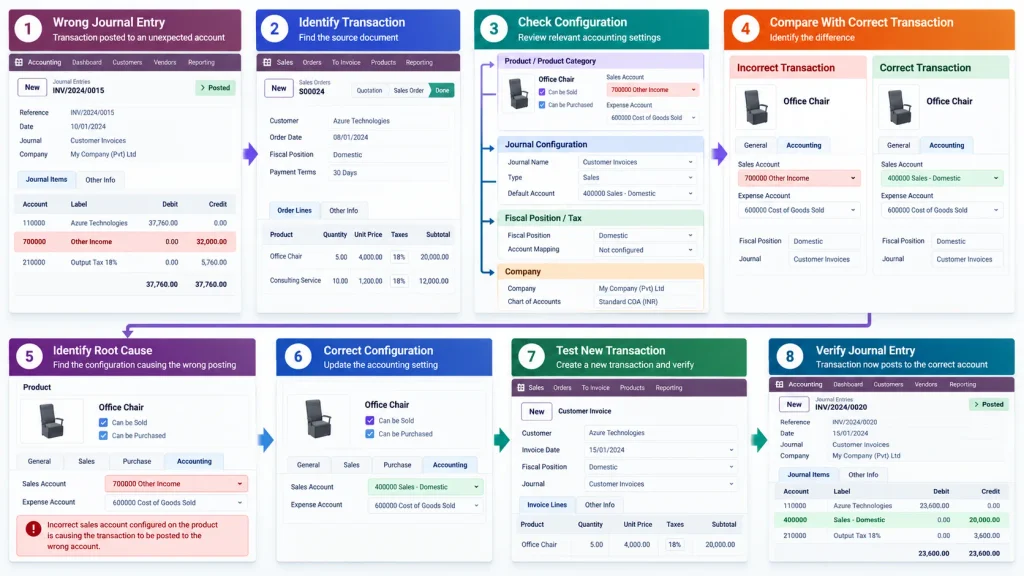
Trace the relevant configuration
Check the product or product category, journal, fiscal position, tax, and company configuration identified in the previous section.
The goal is not to change each setting. It is to determine which setting explains why the unexpected account was selected.
Compare it with a correct transaction
A similar transaction that posts to the expected account gives you a useful reference.
| Check | Incorrect Transaction | Correct Transaction |
| Product | Product A | Product B |
| Category | Category X | Category X |
| Journal | Sales | Sales |
| Company | Company A | Company A |
| Fiscal Position | Export | Domestic |
| Account | Unexpected | Expected |
The first meaningful difference gives you a strong candidate for the root cause.
Confirm before correcting
Once you identify the suspected configuration, test whether it explains the incorrect posting before changing historical accounting records.
The objective is:
Find the source → Correct the configuration → Test a new transaction → Verify the journal entry
How Do You Fix the Wrong Account Posting?
Once the cause is identified, fix the source of the incorrect account, not just the visible result.
If the product configuration is wrong
Correct the relevant product or product-category accounting configuration. Then create a test transaction and verify the resulting journal entry.
If the journal configuration is wrong
Correct the relevant journal configuration and test a new transaction.
If the fiscal position is wrong
Review its automatic conditions, sequence, and account mapping. If multiple automatic fiscal positions can apply, check for overlapping rules and confirm that the intended fiscal position is being selected.
If a customization or integration is responsible
Trace the customized workflow before changing standard accounting configuration.
The objective is:
Find Source → Correct Configuration → Test New Transaction → Verify Journal Entry
What About Transactions That Were Already Posted?
Changing the configuration does not automatically mean that historical journal entries should simply be edited.
Separate the problem into two areas:
Future transactions
Fix the underlying configuration so new transactions use the correct account.
Historical transactions
Determine the appropriate accounting correction for entries that have already been posted.
Depending on the accounting situation, this may involve correcting and reposting the source document or making an appropriate reclassification entry rather than directly altering posted journal lines.
Direct changes to posted accounting data can affect historical reporting, reconciliation, and the audit trail. Historical corrections should therefore follow the appropriate accounting workflow.
How Do You Prevent Odoo From Posting to the Wrong Account Again?
Once the root cause is fixed, test the workflow before applying the same configuration broadly.
Check product accounting
Verify that commonly used products and categories point to the intended accounts.
Review fiscal positions
Check automatic conditions, account mappings, and sequence when multiple fiscal positions can apply.
Test representative transactions
Do not test only one invoice or bill. Test different combinations of:
- Products
- Customers or vendors
- Taxes
- Fiscal positions
- Companies, where applicable
Compare the generated journal entry
The final check should be:
Business Transaction → Generated Journal Entry → Expected Account
If the expected account is consistently produced across representative transactions, the configuration is more reliable.
When Should You Get Odoo Accounting Implementation Support?
An incorrect account on one transaction can often be corrected quickly. The situation becomes more significant when the same accounting error appears repeatedly across products, customers, journals, companies, or automated workflows.
Specialist support becomes particularly relevant when:
- multiple transaction types use the wrong accounts
- different companies produce inconsistent accounting results
- fiscal positions have overlapping rules
- product and category accounting is difficult to trace
- historical entries require systematic correction
- custom modules or integrations affect accounting
- fixing one transaction does not prevent the next one from posting incorrectly
- accounting configuration needs to be reviewed across multiple Odoo modules
At that point, the problem is no longer just a single incorrect journal entry. It may involve how Sales, Purchase, Inventory, Accounting, Taxes, Products, Partners, and custom workflows are configured together.
Need help resolving recurring Odoo accounting configuration problems?
Our Odoo ERP Implementation Company team can review the accounting workflow, account mapping, product configuration, fiscal positions, journals, and related Odoo processes to identify the source of incorrect postings and correct the underlying configuration.
Frequently Asked Questions
The account may be coming from incorrect product or product-category configuration, journal settings, fiscal position account mapping, company configuration, or a customized workflow.
Depending on the transaction, relevant settings can include product or category accounting configuration, journal settings, fiscal positions, tax configuration, company accounting setup, and customized workflows.
Not necessarily. Configuration changes primarily affect future transactions. Existing posted entries need to be reviewed and corrected through the appropriate accounting process.
Start with the journal entry and trace the transaction’s product, category, journal, fiscal position, tax, company, and account mapping. Comparing the incorrect transaction with a similar transaction that posts correctly can help isolate the cause.
Conclusion
When Odoo posts a transaction to the wrong account, correcting the journal entry alone may not solve the underlying problem.
The reliable approach is to trace the transaction through its product, product category, journal, fiscal position, tax, company, and accounting configuration to identify what caused the unexpected account to be selected.
Once the root cause is corrected, test a new transaction and verify the resulting journal entry. This helps prevent the same accounting issue from affecting future transactions.

