

Odoo 19 can match a bank transaction to the wrong invoice or vendor bill when more than one document qualifies for the same transaction. The payment amount may be correct, the partner may be correct, and the transaction may still be reconciled against the wrong accounting document.
The problem usually appears when the available matching information does not uniquely identify the document that was actually paid.
For example:
Bank Transaction → Same Partner → Same Amount → Multiple Open Invoices/Bills → Wrong Match
A wrong reconciliation can leave the selected invoice or bill marked as paid while the document that actually belongs to the payment remains open. That turns a matching mistake into a reconciliation and accounts-receivable/payable problem.
To find the cause, check the information Odoo used to qualify the document:
Partner → Amount → Bank Label/Reference → Matching Conditions → Reconciliation Model
How Does Odoo 19 Match a Bank Transaction?
Odoo 19 uses the information available on a bank transaction to find a matching invoice, vendor bill, payment, or other accounting item. When a suitable match can be identified, Odoo can propose or apply it during bank reconciliation.
The matching path depends on whether the transaction already has a Partner.
Partner not set
Odoo compares the transaction Label with references on existing invoices, bills, and payments, including the document number, customer reference, bill reference, and payment reference.
Partner set
Odoo looks at that partner’s invoices, bills, and payments and applies amount-based matching rules in sequence, including exact amount, applicable discounted amount, and an amount found in the transaction label.
The basic path is:
Bank Transaction → Matching Information → Candidate Document → Reconciliation
Odoo 19 can also use Reconciliation Models to automate additional reconciliation actions. Their conditions can restrict transactions by Journal, Partner, Amount, or Label. When several automated models match, Odoo applies the first model in the configured sequence.
Why Does Odoo 19 Match the Wrong Invoice or Bill?
The problem usually occurs when the information on the bank transaction is sufficient to find a match, but not specific enough to identify one intended invoice or bill.
Multiple open invoices or bills have the same partner and amount
Suppose a vendor has several open bills:
Bill 1045 — ₹25,000
Bill 1072 — ₹25,000
Bill 1091 — ₹25,000
A bank transaction for ₹25,000 from that vendor can qualify more than one document. The partner and amount identify the candidate set, but they do not necessarily identify the bill that was actually paid.
The bank reference does not identify the document clearly
A bank transaction may contain a generic description, shortened reference, or incomplete payment information.
When the available label does not clearly point to one invoice or bill, Odoo has less information to distinguish between valid candidates.
An automated reconciliation model is too broad
A reconciliation model can apply automatically when its configured conditions are satisfied.
For example, a model based on a broad journal, partner, amount, or label condition may qualify transactions that should require manual review.
Multiple reconciliation models can qualify the same transaction
When more than one automated reconciliation model applies, model sequence matters. A broader rule placed before a more specific rule can be applied first, causing a transaction to follow the wrong reconciliation path.
How Do You Find Why Odoo 19 Chose the Wrong Invoice or Bill?
Do not correct the accounting entry before tracing the match.
Open the affected bank transaction
Open the transaction in the Bank Matching view and review:
Date → Label → Partner → Amount → Reconciled Counterpart
This gives you the exact transaction data Odoo used during reconciliation. Odoo’s Bank Matching view shows these transaction details and the reconciled counterpart.

Verify the partner
Check whether the transaction is assigned to the correct customer or vendor.
A wrong partner can immediately produce the wrong candidate documents. If the partner is correct, continue with the amount and references.
Compare the amount and open documents
Check the bank amount against the partner’s open invoices or bills.
Pay particular attention when:
Same Partner + Same Amount + Multiple Open Documents
This is the point where a transaction may qualify more than one document.
Check the bank label and document references
Compare the bank transaction’s Label with:
Invoice Number → Bill Reference → Payment Reference → Customer Reference
When the partner is not set, Odoo uses the transaction label against these reference fields as part of its matching process.
Check the reconciliation model
Open the Reconciliation Models used by the bank journal and review:
Journal → Partner → Amount → Label Conditions → Type → Sequence
Look for conditions broad enough to include transactions that should have been reviewed manually. If multiple automated models can apply, check which model appears first in the sequence.
Establish the reason for the wrong match
At the end of the investigation, you should be able to state one specific reason:
Same amount → several documents qualified.
Weak reference → the bank label did not identify the intended document.
Wrong partner → the candidate set was incorrect.
Broad model → an automated rule accepted a transaction that needed review.
Model sequence → a broader rule was applied before the more specific one.
How Do You Fix the Wrong Reconciliation?
Correct the reconciliation itself first. Do not create another payment or journal entry just to offset the wrong match.
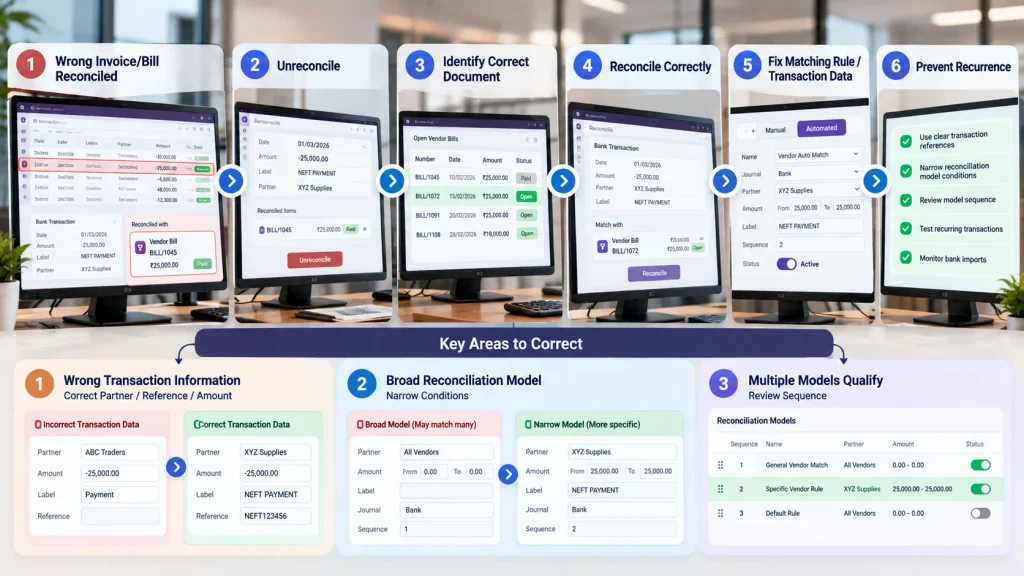
Wrong invoice or bill already reconciled
Open the affected bank transaction and unreconcile it by removing the counterpart items associated with the transaction. Odoo 19 supports this directly from the Bank Matching view.
Then use Reconcile to select the invoice, vendor bill, or payment that the bank transaction actually belongs to. Odoo lets you search existing journal items and select the correct counterpart.
Ambiguous transaction information
Correct the information Odoo uses for matching:
Correct Partner → Clear Reference → Correct Amount
A bank label that does not identify the intended document can leave several invoices or bills eligible for matching. Odoo uses transaction fields and document references as part of its matching process.
Reconciliation model is too broad
Open the affected Reconciliation Model and narrow its matching conditions.
Review:
Journal → Partner → Amount → Label
Odoo requires a transaction to satisfy the model’s defined conditions, while an automated model applies automatically when those conditions are met.
If transactions should be reviewed before confirmation, consider whether the model should remain Automated or be changed to Manual. Odoo 19 supports both model types.
Multiple models can apply
Review the sequence of automated reconciliation models. When more than one model matches a transaction, Odoo applies the first applicable model in the sequence. A broad rule placed ahead of a more specific rule can therefore control the reconciliation.
The correct sequence is:
Unreconcile → Identify the correct document → Reconcile correctly → Fix the matching rule or transaction data that caused the error
How Do You Prevent Odoo 19 From Matching the Wrong Document Again?
The goal is to make the bank transaction specific enough for Odoo to identify the intended invoice, bill, or payment without relying on an ambiguous match.
Use clear transaction references
Make sure the bank transaction contains a usable invoice number, bill reference, or payment reference where available. Odoo uses transaction labels and document references as part of its matching process.
Narrow automated reconciliation models
Review automated models that can match a wide range of transactions.
For example:
All Vendors + Broad Amount Condition
is less restrictive than:
Specific Vendor + Specific Journal + Specific Label Condition
Odoo 19 allows reconciliation models to use conditions such as Journal, Partner, Amount, and Label.
Check model sequence
When several automated models can match the same bank transaction, review their sequence. A broader rule placed before a more specific rule can be applied first.
Use manual review for ambiguous matches
Automatic reconciliation works well when the transaction clearly identifies one document.
When several invoices or bills share the same partner and amount, manual confirmation can prevent Odoo from automatically settling the wrong document.
Test recurring payment patterns
Pay particular attention to transactions where the same combination occurs repeatedly:
Same Partner + Same Amount + Repeated Payments
Test these patterns before relying on automatic reconciliation at scale.
When Should You Get Odoo 19 Accounting Support?
A wrong reconciliation becomes a deeper Odoo accounting issue when the same matching error keeps occurring, the cause cannot be traced, or correcting one transaction does not prevent the problem from returning.
Specialist support is worth considering when:
- multiple invoices or bills are repeatedly matched incorrectly
- automated reconciliation affects a high volume of transactions
- reconciliation models overlap or behave unexpectedly
- imported bank references are inconsistent
- historical reconciliations need to be reviewed or corrected
- different companies or bank journals require different matching rules
- customized accounting workflows are involved
At this stage, the investigation may need to cover bank-import data, matching rules, reconciliation models, partner mapping, accounting configuration, and existing reconciliations together.
Need help fixing recurring Odoo 19 reconciliation problems?
Our Odoo ERP Implementation Company team can investigate the matching workflow, reconciliation configuration, bank transaction data, and accounting setup to identify the source of repeated incorrect matches and correct the underlying process.
Frequently Asked Questions
Odoo 19 uses information such as the partner, amount, transaction label, and document references. When multiple documents satisfy the available conditions, the wrong invoice or bill can be selected.
Yes. Odoo 19 supports automatic matching through its standard matching rules and Automated Reconciliation Models.
Unreconcile the transaction, select the correct invoice, bill, or payment, then review the matching rule or reconciliation model that caused the wrong match.
When several bills have the same partner and amount, the amount alone may not identify the intended bill. Other transaction references or reconciliation conditions can determine which document qualifies.
Conclusion
An incorrect Odoo 19 bank reconciliation can occur when a transaction is matched to the wrong invoice or vendor bill.
Before changing accounting records, trace the transaction’s partner, amount, label, document references, and reconciliation rules to determine why that document was selected.
The goal is not simply to reconcile the bank transaction. It is to reconcile it with the invoice or bill that the payment actually belongs to.

