

Odoo 19 can show a Stock Variation figure in the Inventory Valuation report even when the underlying stock quantity appears correct. The difficult part is not seeing the amount—it is tracing what created it.
That becomes a reconciliation problem when the Inventory valuation and accounting position do not appear to agree. Before changing inventory values or posting a manual journal entry, you need to identify the transactions and valuation changes behind the difference.
The investigation is therefore:
Stock Variation → Stock Movements → Valuation → Accounting Transactions
This article explains how to trace that difference in Odoo 19, determine whether it comes from an expected valuation or timing difference, and identify the appropriate correction.
What Does Stock Variation Mean in Odoo 19?
Stock Variation is the amount Odoo uses to reconcile the accounting inventory value with the inventory value calculated from stock movements. It does not mean that the physical quantity in your warehouse is wrong.
In Odoo 19, go to Accounting → Review → Inventory Valuation. The report shows three key positions:
Initial Balance → Stock Variation → Ending Stock
The relationship is:
Initial Balance + Stock Variation = Ending Stock
Here, Initial Balance is the accounting inventory value at the beginning of the period. Ending Stock is the inventory value calculated from the remaining stock quantities and their valuation. Stock Variation is the difference that brings the accounting position toward that ending inventory value.
The reason this difference appears is that inventory movements and accounting recognition do not always occur at the same point in time. Odoo’s Inventory app updates valuation from physical stock movements, while the Accounting side follows the configured valuation method and posting process.
For example, a receipt can increase the inventory value before its vendor bill is posted. The stock has already entered inventory, while the related accounting transaction may still need to be recognized through the appropriate process. Odoo 19 specifically provides accrual workflows for transactions where delivery or receipt and invoicing occur at different times.
So the Stock Variation figure should be investigated—not automatically treated as an inventory error.
Why Is Odoo 19 Showing a Large Stock Variation Amount?
A Stock Variation amount becomes difficult to explain when the inventory value calculated from stock movements does not align with the accounting position. In Odoo 19, that difference can come from transaction timing, product valuation, negative stock, manual valuation changes, or the configured valuation method.
Inventory moved before the related accounting transaction
A receipt can increase inventory valuation before its vendor bill is posted. Likewise, a delivery can reduce inventory before the related customer invoice is posted.
Odoo 19 provides Bills To Receive, Billed Not Received, Invoices To Be Issued, and Invoiced Not Delivered reports to identify these timing gaps and support the related accrual process.
Product cost changed the valuation
The value applied to a stock movement may differ from the amount later recorded on the vendor bill or from the product’s previous cost. The effect depends on the costing method. Odoo 19 supports Standard Price, AVCO, and FIFO, and each method handles inventory valuation differently.
Negative stock changed the valuation
When goods are delivered before the corresponding receipt is recorded, Odoo values the outbound move using the last known product cost. When the later receipt arrives at a different cost, Odoo adjusts the outbound valuation. Odoo explicitly includes the negative-stock value in Stock Variation.
Inventory or move valuation was adjusted
Inventory adjustments, product-cost updates, and changes to the value of completed stock moves can alter inventory valuation without representing a normal receipt or delivery.
Odoo provides an Adjust Valuation action for correcting the value of a specific completed move through the Moves Analysis report.
Valuation configuration affects the accounting difference
The costing method, inventory valuation method, valuation account, variation account, and journal determine how inventory value is reflected in Accounting.
Odoo 19 supports Periodic and Perpetual inventory valuation, and the accounting behavior differs between them.
So a large Stock Variation amount should not be treated as an error until its underlying movements and accounting timing have been identified.
How Do You Find What Is Creating the Stock Variation?
Do not adjust the accounting entry first. Trace the amount first.
Start from the Inventory Valuation report and work backward until you can connect the Stock Variation to specific stock movements or accounting transactions.
Start with Inventory Valuation
Go to:
Accounting → Review → Inventory Valuation
Review:
Initial Balance → Stock Variation → Ending Stock
Stock Variation is the difference between the posted accounting inventory value and the inventory valuation recorded in the Inventory app.

Check transactions that have not reached accounting
Review:
Bill To Receive → Billed Not Received → Invoices To Be Issued → Invoiced Not Delivered
These reports help identify cases where goods have moved but the related billing or invoicing has not been recorded yet. Odoo 19 provides accrual-entry tools for these differences.
Trace the underlying stock movements
Use Inventory → Reporting → Moves Analysis to examine the movements contributing to the inventory value.
Check the:
Product → Quantity → Value → Remaining Quantity → Remaining Value
This lets you investigate individual receipts, deliveries, manufacturing operations, and other valuation-affecting moves rather than treating Stock Variation as one unexplained number.
Check the product’s costing behaviour
For affected products, verify whether the category uses:
Standard Price / AVCO / FIFO
Do not compare the product’s displayed Cost directly with every stock-move value. Odoo 19 distinguishes the product Cost field from the unit value recorded on individual stock movements, particularly under FIFO.
Classify the difference
After tracing the transactions, determine what type of difference you have:
Timing difference
Stock movement exists, but the related accounting transaction is pending.
Valuation difference
The stock movement value changed because of costing, negative stock, or a valuation adjustment.
Configuration difference
The costing or inventory-valuation setup is producing an unexpected accounting result.
Historical/data difference
Migration, previous adjustments, or historical transactions are affecting the current valuation.
Only after identifying this category should you decide what needs to be corrected.
How Do You Fix an Odoo 19 Stock Variation Difference?
Do not correct the Stock Variation amount just because it looks wrong. First identify what created the difference.
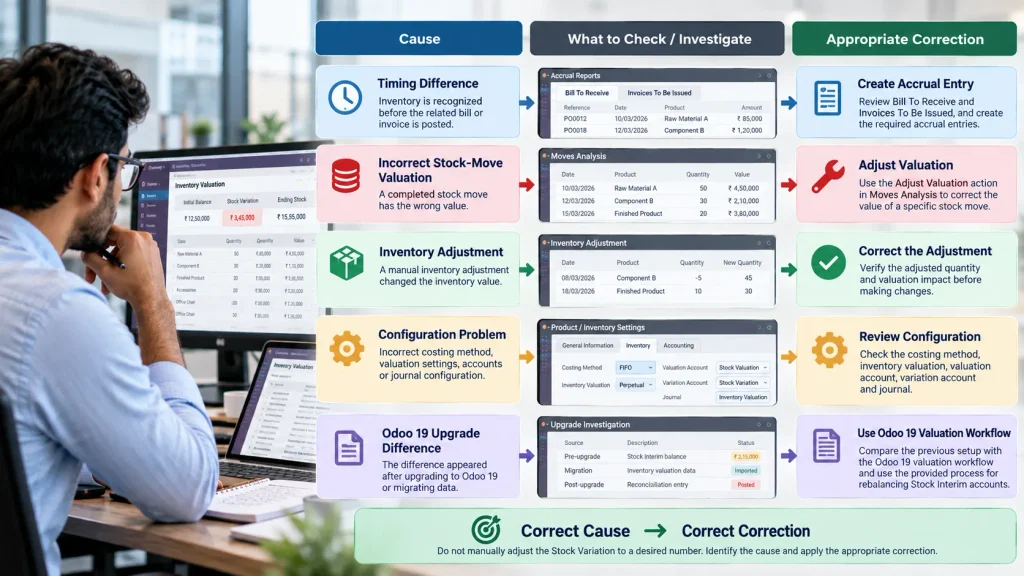
Timing difference
If the difference comes from inventory being recognized before the related invoice or bill, review Bill To Receive or Invoices To Be Issued and create the appropriate accrual entry where required. Odoo 19 provides these reports and an accrual-entry process for transactions where inventory movement and invoicing occur at different times.
Incorrect stock-move valuation
If a completed stock move carries the wrong value, investigate the product cost, source transaction, and costing method. Odoo 19 provides Adjust Valuation in the Moves Analysis report to correct the value of a specific completed move.
Inventory adjustment
If the difference was created by an inventory adjustment, verify the adjusted quantity and resulting valuation before changing the accounting entry. An inventory adjustment changes valuation based on the product’s current cost and the quantity difference.
Costing or valuation configuration
Check:
Costing Method → Inventory Valuation → Valuation Account → Variation Account → Journal
Odoo 19 supports Standard Price, FIFO, and AVCO, together with Periodic and Perpetual inventory valuation. These settings determine how inventory value is reflected in Accounting.
Difference after an Odoo 19 upgrade
If the problem appeared after upgrading, compare the previous accounting setup with the Odoo 19 valuation workflow before applying an old correction method.
Odoo 19 changed perpetual inventory accounting: valuation is handled at the invoice level, with the closing process managing differences between inventory and accounting values. Odoo also provides a specific process for balancing Stock Interim accounts during the upgrade.
The correct fix is the one that resolves the transaction, valuation, or configuration issue producing the difference—not simply the Stock Variation balance itself.
How Do You Know the Stock Variation Is Correct?
A changed Stock Variation amount does not prove that the problem is fixed. The inventory value, accounting valuation, and resulting journal entry must agree with the underlying stock position.
Check the complete chain:
Inventory Value → Stock Variation → Closing Entry → General Ledger
Then verify:
- inventory quantity and valuation are correct
- pending bills or invoices are accounted for appropriately
- the closing entry reflects the intended difference
- the Valuation and Variation accounts show the expected balances
- the General Ledger agrees with the resulting inventory position
In Odoo 19, the Inventory Valuation report uses Generate Entry to create the Stock Closing entry, which can then be reviewed and posted. The Stock Valuation and Stock Variation accounts are updated in the General Ledger after posting.
Do not treat zero Stock Variation as the definition of a successful fix. The objective is to make the inventory valuation and accounting records represent the same underlying business position.
When Should You Get Odoo 19 Inventory Support?
A Stock Variation difference needs deeper investigation when you cannot trace the amount back to specific transactions or explain why the inventory and accounting values differ.
Technical or accounting support is especially relevant when:
- the Stock Variation changes unexpectedly between periods
- Inventory Valuation and the General Ledger cannot be reconciled
- negative stock has affected valuation
- AVCO or FIFO produces unexpected values
- manufacturing transactions are involved
- the issue appeared after an Odoo 19 upgrade or migration
- historical adjustments or valuation changes are difficult to trace
- multiple companies or complex valuation configurations are involved
At this stage, the issue may require reviewing stock movements, product costing, valuation configuration, accounting entries, and historical data together. Correcting only the visible accounting difference can leave the underlying problem unresolved.
Need help tracing an Odoo 19 Stock Variation difference?
Our Odoo ERP Implementation Company team can investigate inventory valuation, accounting configuration, migration-related differences, and related Odoo workflow issues to identify the source before corrective changes are made.
Frequently Asked Questions
No. Stock Variation is the difference between the accounting inventory value and the inventory valuation recorded by the Inventory app. A timing difference or valuation difference can therefore produce a Stock Variation without indicating that the inventory data is incorrect.
Check for pending bills or invoices, negative stock, product-cost differences, inventory adjustments, costing methods, and recent migration or configuration changes. These can create differences between Inventory valuation and Accounting.
Start with Accounting → Review → Inventory Valuation. Then trace pending transactions and the underlying stock movements. Moves Analysis can help identify the individual movements and values contributing to the inventory valuation.
Not before identifying its cause. A manual adjustment may change the reported balance without correcting the underlying timing, valuation, configuration, or data issue.
Conclusion
An unexpected Odoo 19 Stock Variation amount does not automatically mean your inventory is wrong.
Trace the difference through the Inventory Valuation report, stock movements, accounting transactions, and valuation configuration before making any manual adjustment.
If the amount still cannot be explained or reconciled, the underlying inventory and accounting setup should be investigated together.
Need help investigating an Odoo 19 Stock Variation difference?
Explore Odoo ERP Implementation Services →

