Why Does Odoo Show Stock as Available When It Is Already Reserved?
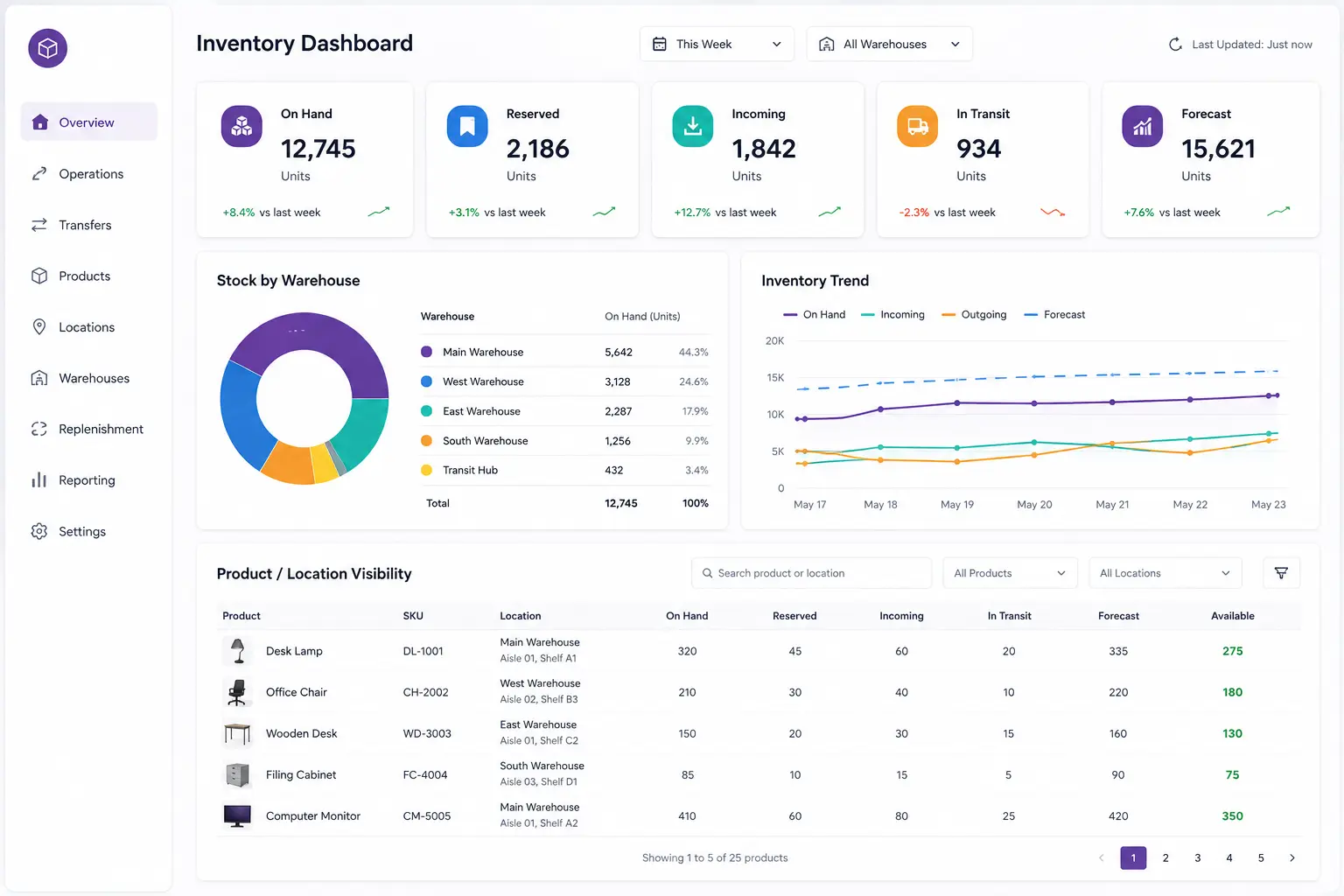
Odoo Stock Allocation On-Hand vs. Available Stock
Does Odoo show sufficient stock for a product, but fail to reserve the required quantity when confirming or processing another sales order?
This can happen when the quantity displayed as available is not the same as the quantity that is free for a new order. Odoo tracks on-hand stock, outgoing demand, reservations, incoming receipts, and delivery schedules. These values serve different purposes in inventory management.
When users rely only on the product's on-hand quantity, they may assume that the entire quantity can be promised to another customer. However, some of that stock may already be allocated to confirmed sales orders, manufacturing operations, or other delivery movements.
Understanding how Odoo handles stock reservations and forecasted quantities helps identify the actual issue before changing inventory records or confirming delivery commitments.
Why Available Stock and Promisable Stock Are Different
A product can physically exist in a warehouse without being available for another sales order.
The important distinction is between stock physically held in inventory and stock that remains free after existing demand has been considered.
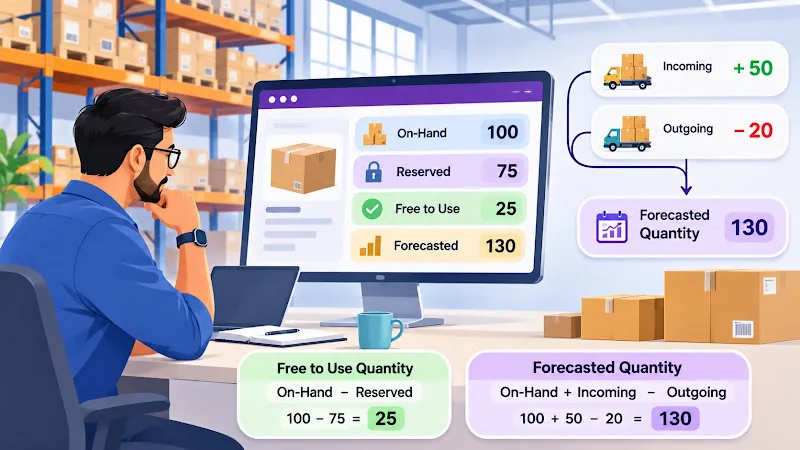
Consider a warehouse holding 100 units of a product. If 75 units are already reserved for confirmed delivery orders, only 25 units remain free for other requirements.
The inventory may still display 100 units on hand, but treating all 100 units as available for a new customer order would create an incorrect delivery commitment.
Odoo provides different inventory quantities to help users understand this situation:
- On Hand: The quantity currently recorded in inventory.
- Reserved: The quantity allocated to existing operations.
Free to Use: The on-hand quantity that is not reserved for delivery or manufacturing operations.
- Incoming: The quantity expected from confirmed replenishment operations.
- Outgoing: The quantity expected to leave inventory.
- Forecasted: The projected stock position after considering incoming and outgoing movements.
These figures should be reviewed together rather than treating on-hand stock as the quantity available for every new order.
On-Hand, Reserved, Free-to-Use, and Forecasted Quantities in Odoo
- Understanding these quantities is essential when investigating stock availability problems.
On-Hand Quantity
- On-hand quantity represents the physical stock recorded in Odoo for a product.
It helps warehouse teams understand how much inventory is currently recorded, but it does not automatically indicate how much can be allocated to a new order.
Reserved Quantity
- Reserved quantity represents stock allocated to an existing operation.
Reservations help ensure that products required for confirmed delivery or manufacturing operations are not unintentionally allocated elsewhere.
A product can therefore have a positive on-hand quantity while some or all of its stock is already reserved.
Free-to-Use Quantity
Free to Use is particularly important when checking whether stock can be allocated to another operation.
It represents the on-hand quantity that is not reserved for delivery or manufacturing orders.
A useful way to understand the relationship is:
Free to Use = On-Hand Quantity − Reserved Quantity
This is a simplified explanation of the stock relationship. Actual availability can also depend on locations, product tracking, operation types, and the specific reservation workflow.
Forecasted Quantity
Forecasted quantity helps users understand the expected inventory position after planned stock movements.
Forecasted Quantity = On-Hand Quantity + Incoming Quantity − Outgoing Quantity
A positive forecast does not necessarily mean that the required stock is available immediately. The expected receipt date and delivery schedule must also be considered.
A purchase order expected next week cannot automatically fulfil a delivery requirement scheduled for today.
Five Reasons Odoo Shows Stock as Available When It Cannot Be Reserved

- Several Odoo inventory configurations and operational conditions can create this situation.
Stock Is Already Reserved for Another Sales Order
One of the most common reasons is that existing sales orders have already allocated the available inventory.
When another sales order is confirmed, Odoo checks whether the required quantity can be reserved according to the configured reservation method and available stock.
If existing operations have consumed the available quantity, the new delivery order may remain waiting for stock.
What to check:
- Open the product's Forecasted Report.
- Review the outgoing operations.
Check the Used By column to identify the sales orders or other operations using the stock.
- Review the Replenishment information to understand how quantities are allocated.
This helps identify which existing operations are affecting the stock available for a new order.
The Reservation Method Is Set to Manual
Odoo supports different reservation methods for delivery operations:
At Confirmation: Products are reserved when a sales order is confirmed, provided sufficient stock is available.
- Manually: Users must check availability and reserve the required quantity manually.
Before Scheduled Date: Products are reserved according to the configured number of days before the scheduled delivery date.
When the Manual method is selected, a confirmed sales order does not automatically mean its products have been reserved.
The product may still show available stock, but the delivery order can have a reserved quantity of zero until a user performs the reservation.
What to check:
- Open the Inventory application.
- Navigate to Configuration → Operations Types.
- Open the relevant Delivery Orders operation type.
- Review the Reservation Method.
- If Manual is configured, check whether the delivery order requires manual reservation.
Do not change the reservation method without reviewing how your warehouse handles order priorities and delivery commitments.
The Scheduled Delivery Date Has Not Reached the Reservation Window
- The Before Scheduled Date method reserves stock based on the delivery schedule.
When this method is configured, Odoo waits until the specified reservation window before allocating products to the delivery order.
Consequently, a product can have sufficient physical stock while the required quantity has not yet been reserved for a particular order.
What to check:
- Open the relevant Delivery Order.
- Review its scheduled date.
- Check the reservation method configured for its operation type.
- Review the Reserve Before Scheduled Date setting.
- Check whether the order has reached its reservation window.
If the stock needs to be reserved earlier, users can review the delivery order and use Check Availability when appropriate.
Incoming Stock Will Arrive After the Required Delivery Date
- Incoming stock affects forecasted inventory, but its arrival date matters.
A confirmed purchase order can increase the expected stock position. However, if the receipt is scheduled after the customer's delivery date, it cannot fulfil that delivery commitment on time.
The Forecasted Report helps users compare expected receipts with outgoing demand and scheduled delivery dates.
What to check:
- Review confirmed purchase orders.
- Check the expected receipt dates.
- Compare receipt dates with sales order delivery dates.
- Review the forecasted quantity on the required date.
- Identify whether another incoming shipment can fulfil the demand earlier.
If the receipt is delayed, the purchasing or sales team may need to revise the replenishment or delivery plan.
The Stock Is in a Different Warehouse or Location
- Inventory availability also depends on where the stock is physically recorded.
A product may have sufficient stock across the business, but the required quantity may not be available in the warehouse or location assigned to a delivery operation.
This can occur when businesses manage multiple warehouses, internal locations, transit locations, or multi-step delivery routes.
What to check:
- Review the warehouse assigned to the sales order and delivery order.
- Open the product's stock information.
- Check the Locations breakdown.
- Review internal transfers and stock movements.
Confirm whether the quantity is in the location required by the delivery workflow.
Do not assume that stock in one warehouse is immediately available for delivery from another warehouse without checking the configured routes and transfer process.
How to Investigate Incorrect Stock Availability in Odoo
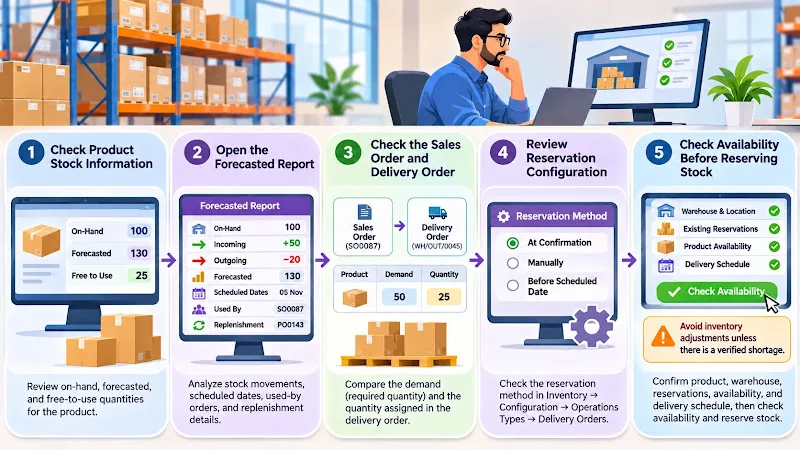
- Instead of immediately adjusting inventory quantities, follow a structured troubleshooting process.
Step 1: Check the Product's Stock Information
- Open the product record in the Inventory application.
Review its on-hand and forecasted quantities. Where available, open the Stock Report to inspect the Free to Use quantity.
This helps determine whether the issue is related to existing reservations or future stock movements.
Step 2: Open the Forecasted Report
The Forecasted Report provides a more detailed view of the product's inventory position.
Review:
- On-hand quantity.
- Incoming stock.
- Outgoing demand.
- Forecasted inventory.
- Scheduled receipt and delivery dates.
- Used By information.
- Replenishment details.
- Identify which operations are affecting the quantity available for the order.
Step 3: Check the Sales Order and Delivery Order
- Open the affected sales order and access its related delivery order.
- Compare the Demand and Quantity values in the Operations tab.
The Demand value indicates the required quantity, while the Quantity value indicates the quantity assigned to the operation.
If these values do not match, investigate whether the delivery is waiting for reservation, whether the reservation method is manual, or whether sufficient stock is unavailable.
Step 4: Review the Reservation Configuration
Navigate to:
Inventory → Configuration → Operations Types → Delivery Orders
- Review the configured reservation method.
- Check whether the workflow uses At Confirmation, Manually, or Before Scheduled Date.
The correct setting depends on when your warehouse needs to allocate products and how it manages delivery priorities.
Step 5: Reserve Stock Only After Confirming Availability
If the product is available and the delivery order requires reservation, use Check Availability where appropriate.
Before proceeding, confirm that:
- The correct product and variant are selected.
- The required warehouse and location are correct.
- Existing reservations have been reviewed.
- The required quantity is available.
- The delivery schedule is realistic.
If sufficient stock cannot be reserved, investigate the shortage instead of forcing an inventory adjustment.
How to Prevent Incorrect Stock Availability and Delivery Commitments
Resolving an individual reservation issue is not enough if the same problem repeatedly affects warehouse operations.
- Businesses should establish consistent inventory practices.
Use an appropriate reservation method
Configure reservation methods according to actual warehouse operations. Decide whether stock should be reserved when a sales order is confirmed, manually, or before its scheduled delivery date.
Review forecasted stock before confirming delivery commitments
Sales teams should consider existing demand, incoming receipts, and scheduled deliveries rather than relying only on on-hand quantities.
Maintain accurate warehouse locations
Use appropriate warehouse and internal location configurations. Ensure that stock movements and transfers are recorded correctly.
Monitor unreserved delivery orders
Regularly review waiting delivery orders and investigate why their required quantities have not been reserved.
Coordinate purchasing, sales, and warehouse teams
Sales commitments should reflect realistic stock availability and expected replenishment dates. Purchasing teams should communicate delays that may affect customer deliveries.
Avoid unnecessary inventory adjustments
Inventory adjustments should reflect verified physical stock differences. They should not be used as a shortcut to resolve reservation or configuration problems.
When Do You Need Odoo Customization?
Standard Odoo inventory features support stock tracking, reservations, replenishment, and forecast reporting. However, some businesses have additional allocation requirements that need more advanced configuration or development.
Customization may be appropriate when your business requires:
- Automatic stock allocation based on customer priority.
- Reservation rules across multiple warehouses.
- Custom delivery commitment calculations.
- Advanced stock availability checks for sales teams.
- Integration between Odoo and external warehouse or order management systems.
- Custom alerts when available stock falls below a defined threshold.
Before developing a custom solution, review whether standard reservation methods, routes, locations, and replenishment settings can meet the requirement.
Custom development should address a clearly defined business rule rather than duplicate functionality already available in Odoo.
Frequently asked questions
Why does Odoo show available stock but not reserve it for a sales order?
This can happen when the reservation method is configured as Manual or Before Scheduled Date, when existing operations have already allocated the stock, or when the required quantity is not available in the relevant warehouse or location. Review the delivery order and Forecasted Report to identify the reason.
What is the difference between on-hand quantity and free-to-use quantity in Odoo?
On-hand quantity represents the stock recorded in inventory. Free to Use represents the on-hand quantity that is not reserved for delivery or manufacturing operations. Therefore, free-to-use quantity is generally more useful when checking how much stock remains available for another operation.
How can I check which sales order has reserved a product in Odoo?
Open the product's Forecasted Report and review the outgoing operations and Used By information. These details help identify the sales orders or other operations affecting the product's stock allocation.
Conclusion
Odoo showing available stock does not always mean that the entire quantity can be allocated to a new sales order. Existing reservations, reservation methods, warehouse locations, and incoming delivery schedules all influence actual stock availability.
The best approach is to review the product's stock information, inspect the Forecasted Report, and verify the related delivery order before making inventory adjustments or promising a delivery date.
If your business needs help improving stock allocation, warehouse workflows, or custom inventory operations, explore Odoo ERP implementation services from OdooBots.