

An Odoo 19 “Missing Record” error can appear when a document, transaction, or workflow tries to load a record that Odoo can no longer resolve. The error may identify a model and record ID, yet the real problem can be elsewhere: a relational field may still point to a deleted record, a module change may have removed referenced data, custom code may be requesting an invalid record, or access rules may prevent the record from being resolved.
That makes the error more serious than a simple “record was deleted” message. A broken reference can affect the document that contains it, interrupt a transaction, or prevent a business workflow from completing.
The failure occurs at the point where Odoo follows a reference and attempts to retrieve the target record:
Business Document → Relational Reference → Model + Record ID → Record Lookup → Missing Record
The key diagnostic question is therefore:
Why is Odoo still requesting this record, and what is the reference that leads to it?
Finding that reference first is critical. Creating another record, deleting related data, or changing permissions without identifying the failing relationship can introduce a second problem while leaving the original one unresolved.
What Does the Odoo 19 “Missing Record” Error Actually Mean?
An Odoo 19 “Missing Record” error means Odoo attempted to retrieve a specific record but could not resolve it for the current operation. The message may appear as:
“Record does not exist or has been deleted.”
Odoo may also identify the affected model and record ID, such as:
stock.picking(414)
Here, stock.picking is the Odoo model and 414 is the record ID Odoo attempted to access.
The important point is that a Missing Record error does not automatically prove that the record was deleted. Odoo can reach this failure when a reference points to unavailable data, when customized logic requests an invalid record, or when the current operation cannot access the expected record.
So the model and record ID provide the starting point for diagnosis. They tell you what Odoo attempted to retrieve; they do not, by themselves, explain why that record cannot be resolved.
The next step is to trace what is requesting that record and determine why the reference can no longer be resolved.
Why Is Odoo 19 Trying to Access a Missing Record?
Odoo can request a record that is unavailable for several different reasons. The most important ones are deleted related data, invalid references, module changes, customization, stored interface references, and access restrictions.
A deleted record is still referenced
A record may have been removed while another Odoo record still contains a reference to it.
Document A → Related Record B
If Record B no longer exists, Odoo can fail when Document A tries to load, update, compute, or process that relationship.
The visible error may therefore appear on Document A even though Record B is the actual missing object.
A module update or uninstall changed referenced data
Module installation, updates, or removal can change fields, views, actions, models, and module-provided data.
If existing records still depend on data that was changed or removed, an operation can attempt to resolve a reference that is no longer valid.
If the Missing Record error started immediately after a module change, that change should be part of the investigation.
Custom code or a third-party module requests an invalid record
Custom modules can create relationships, perform searches, or access records programmatically.
If custom logic assumes that a record exists without handling the case where it is unavailable, the operation can produce a Missing Record error.
This is particularly relevant when the problem occurs only in a customized workflow or after a custom module was installed or modified.
A saved view, action, or filter contains an outdated reference
Some errors occur while opening a particular menu, view, saved filter, or action rather than while processing a transaction.
If the error is limited to one interface path, the stored configuration behind that path should be checked for references to data that no longer exists.
Access rights or record rules prevent the record from being retrieved
A record can exist in the database while remaining unavailable to a particular user because of access rights or record rules.
A useful distinction is:
Record unavailable to everyone → investigate deletion or data/reference integrity.
Record unavailable only to specific users → investigate access rights and record rules.
This prevents an existing record from being incorrectly recreated when the actual issue is security configuration.
Where Does the Missing Record Error Start?
The easiest way to understand the problem is to follow the request through Odoo:
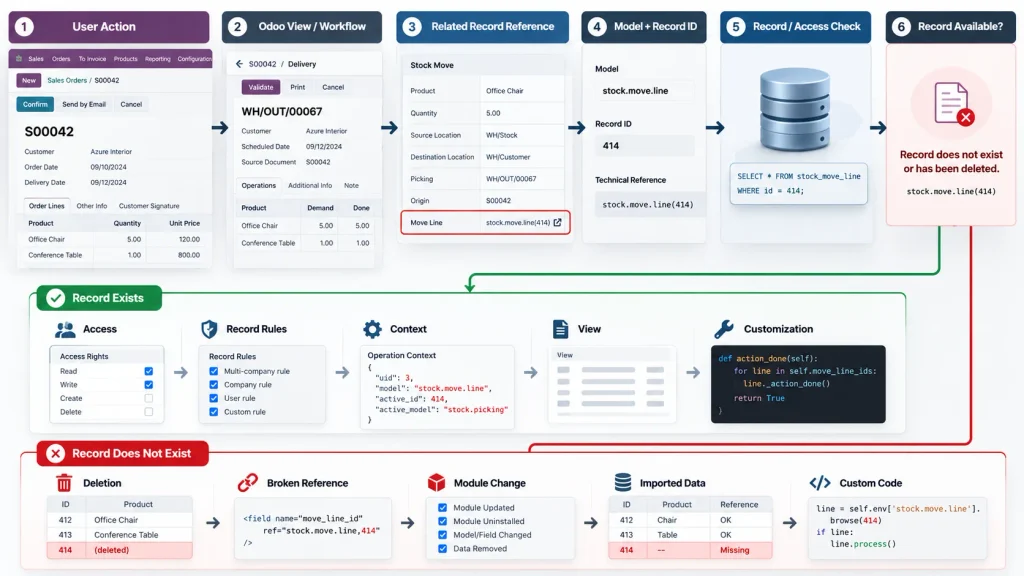
User Action
↓
Odoo View / Workflow
↓
Related Record Reference
↓
Model + Record ID
↓
Record / Access Check
↓
Record Available?
If the record exists:
Access → Record Rules → Context → View → Customization
If the record does not exist:
Deletion → Broken Reference → Module Change → Imported Data → Custom Code
This flow separates record availability from access or reference problems, which is essential when diagnosing a Missing Record error.
How Do You Find Which Record Is Causing the Error?
Step 1: Capture the Exact Error
Start with the complete Odoo error instead of a shortened message.
Record the:
- model name
- record ID
- document or menu where the error appears
- action that triggered it
- user experiencing the problem
For example:
stock.picking(414)
is more useful for diagnosis than simply:
“Odoo shows a Missing Record error.”
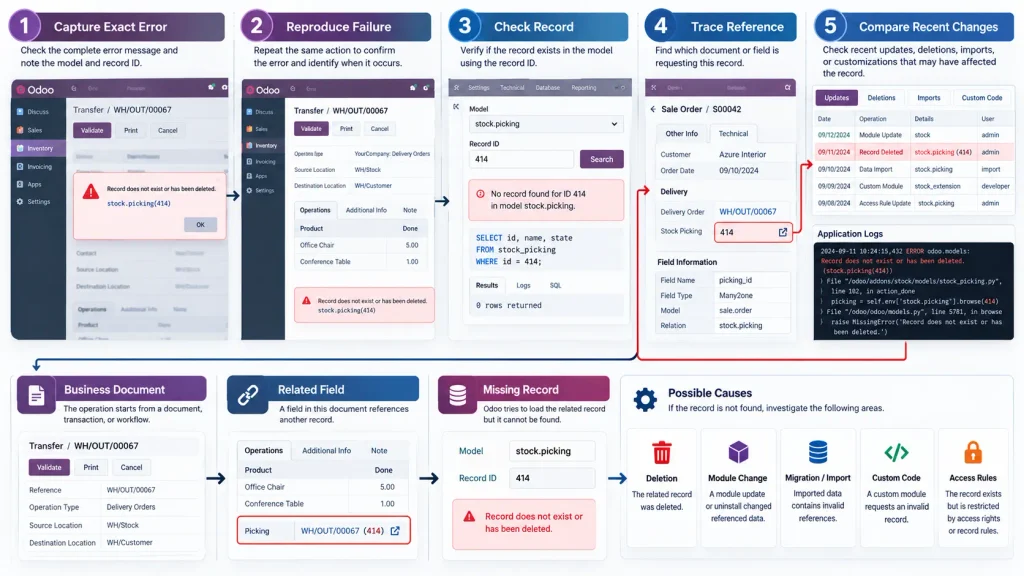
Step 2: Reproduce the Exact Failure
Repeat the action that triggers the error and note where it occurs:
Open → Edit → Save → Validate → Process
If the error occurs only from a particular menu, view, document, or workflow, that narrows the source of the reference.
Step 3: Check Whether the Record Exists
Use the model and record ID from the error to determine whether Odoo can actually retrieve the requested record.
Record exists: investigate access rights, record rules, context, related fields, views, or customization.
Record does not exist: investigate the reference that still points to it, along with deletion, module changes, migration/import activity, or custom code.
Step 4: Trace the Reference
If the record is missing, identify which field, document, workflow, view, action, or custom process is still requesting it.
This is the point where the investigation moves from:
“Which record is missing?”
to:
“Why is Odoo still requesting this record?”
That distinction is important because recreating the missing record may hide the symptom without correcting the invalid relationship.
Step 5: Compare the Error With Recent Changes
Check whether the problem began after:
- a module update or removal
- data migration or import
- custom module deployment
- view modification
- access-right changes
- record deletion
- environment changes
A clear timing relationship can identify the change that introduced the invalid reference.
How Do You Fix an Odoo 19 Missing Record Error Safely?
The correction should match the failure identified during diagnosis. Do not recreate records or modify database relationships before confirming why the reference is invalid.
If the record was deleted:
Identify the records or fields that still reference it. Depending on the business relationship, the reference may need to be removed, restored, or corrected.
If a stale reference remains:
Correct the relationship pointing to the unavailable record. Removing the invalid reference is preferable to simply suppressing the error.
If custom code or a third-party module is responsible:
Inspect the affected field, view, automated action, or code path and correct the logic that requests the unavailable record.
If a module update or removal caused the problem:
Review the affected module’s data, views, relationships, and update status before changing database records.
If access rights or record rules are involved:
Compare the affected user’s access with a user who can retrieve the same record. Correct the relevant security configuration rather than recreating existing data.
If database-level correction is required:
Treat the change as a production-data operation. Before modifying relational data:
- Identify the exact invalid reference.
- Confirm why it is invalid.
- Back up the database.
- Confirm the intended relationship.
- Apply the smallest necessary correction.
- Re-test the original workflow.
A Missing Record error should be corrected at the reference, access, module, customization, or data level that caused the failure—not simply at the screen where the error appears.
How Do You Verify the Missing Record Error Is Fixed?
After making the correction, verify the original operation rather than checking only whether the error message has disappeared.
Reproduce the same action that originally triggered the error:
Open → Edit/Action → Save or Process → Complete
Then confirm:
- the original document or view opens correctly,
- related records load correctly,
- the affected operation completes,
- the Missing Record error does not return,
- other affected users can perform the same operation,
- related transactions still contain valid references.
If the problem followed a module update, migration, or customization, test the affected functionality in the same environment where the error originally occurred.
A successful fix should restore the original Odoo operation and its related data, not simply remove the visible error.
When Should You Get Odoo 19 Technical Support?
Technical support becomes necessary when the Missing Record error cannot be isolated through normal Odoo configuration or user-level investigation.
Consider technical investigation when:
- the error continues after the identified correction,
- the affected record or reference cannot be traced,
- multiple users encounter the same failure,
- the problem started after a migration or data import,
- a module was updated or removed,
- custom modules or automated actions are involved,
- database relationships appear inconsistent,
- the error affects a production workflow,
- Odoo logs point to a model, method, or custom code path that requires deeper investigation.
At this stage, the issue may require log analysis, model/field inspection, module debugging, database-level investigation, or review of customized Odoo logic.
The objective is to identify the exact layer producing the invalid record request before changing production data or unrelated configuration.
Frequently Asked Questions
Odoo shows this message when it attempts to access a record that cannot be resolved for the current operation. The record may have been deleted, or Odoo may be following an invalid reference or encountering an access or customization issue.
Start with the complete error message and identify the model and record ID. Then reproduce the error, check whether the record exists, and trace the document, field, workflow, view, or custom process requesting it.
Not immediately. First identify why Odoo is requesting the record. Creating a replacement without correcting the underlying reference can leave the original data-integrity problem unresolved.
Conclusion
An Odoo 19 “Missing Record” error is not necessarily caused by deletion. The failure may come from an invalid reference, module change, customization, migration issue, or access restriction.
The correct fix is to identify which record Odoo is requesting and why that request cannot be resolved. Correcting that underlying reference or configuration restores the affected workflow without unnecessarily recreating valid business data.

