

Missing Tally data in Odoo can occur even when the migration completes successfully. Customers, invoices, ledgers, opening balances, or historical transactions may be absent because the required records were not included, mapped correctly, imported successfully, or linked to the correct Odoo accounting structure.
The investigation should focus on the specific missing data and trace it through Tally export, migration scope, field mapping, import results, and Odoo accounting records.
Missing data → Source export → Mapping → Import → Odoo record
This is much closer to the style of your Manufacturing components article: direct, technical, user-focused, and no storytelling.
How Should You Investigate Missing Tally Data in Odoo?
The first check is the specific Tally record or data group missing from Odoo and whether that data exists at each stage of the migration.
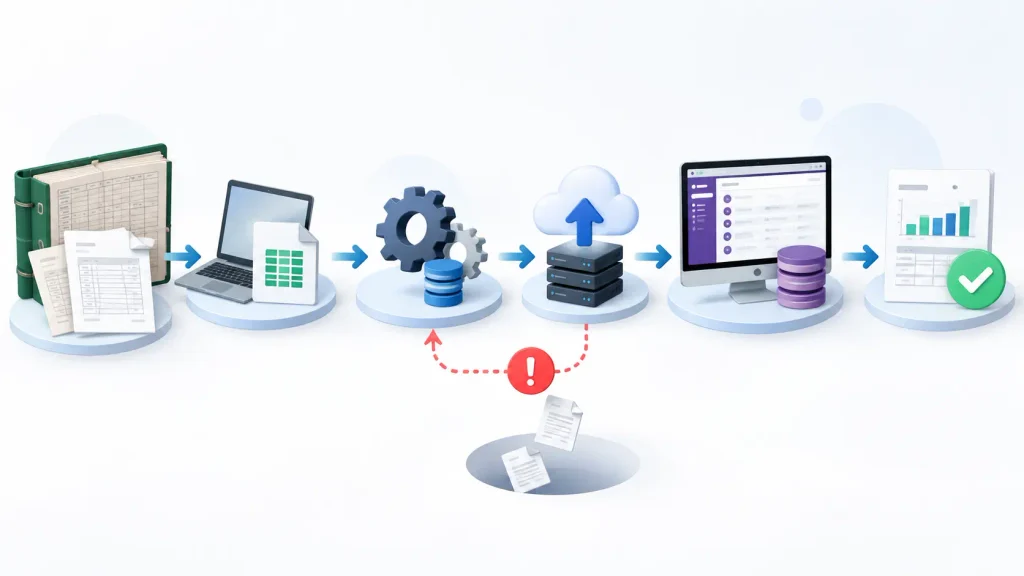
Tally Source → Exported Data → Transformation/Mapping → Odoo Import → Odoo Record → Accounting Result
Compare the expected data with the actual result at each stage. This identifies the first point where the migration output differs from the source requirement.
The gap can then be isolated to migration scope, source export, data mapping, import failure, or the resulting Odoo accounting record.
An import completing successfully does not confirm that the required Tally data was migrated correctly.
Was the Missing Data Included in the Migration Scope?
Missing Tally data may simply be outside the migration scope. The migration may have been limited to specific masters, opening balances, current-period transactions, outstanding documents, or selected historical records.
Compare the required migration scope with what was actually exported:
Required Data → Tally Export → Migrated Data
If the required records were not included in the Tally export, changing Odoo import settings will not restore them.
The important check is whether the data expected in Odoo was actually present in the source data prepared for migration. This separates a scope or export gap from an Odoo import problem.
Could Data Mapping Be Causing the Missing Records?
Correctly exported Tally data can still produce missing or incorrect records in Odoo when the source fields are not mapped to the appropriate Odoo records.
Check the mapping between Tally ledgers, customers, vendors, products, journals, taxes, and the corresponding Odoo records.
A mapping problem can cause a record to:
- fail during import,
- link to the wrong Odoo record,
- be assigned to the wrong account or journal, or
- remain incomplete after migration.
Account and Ledger Mapping
A Tally ledger must correspond to the appropriate Odoo account. An incorrect mapping can place transactions in the wrong accounting structure or prevent them from being imported as expected.
Customer and Vendor Mapping
Tally customers and vendors must be linked to the correct Odoo partner records. Inconsistent names, codes, or identifiers can leave transactions unlinked or associated with the wrong partner.
Journal and Tax Mapping
Invoices and accounting transactions also depend on the correct journal and tax mapping. Incorrect mappings can leave transaction data incomplete even when the source records were successfully exported.
The key check is whether each required Tally record has a clear and correct destination in Odoo.
Is the Missing Data Actually an Opening-Balance Problem?
An opening balance and the transactions behind that balance are not the same migration data.
A customer outstanding amount in Odoo may be represented as an opening receivable balance or through the individual open customer invoices that make up that balance.
These values should not be counted twice. Odoo’s migration guidance warns that importing an opening trial balance together with the related open invoices or bills can produce duplicated receivable or payable values when the transition is not handled correctly.
Check whether the missing or unexpected amount was migrated as:
Opening Balance → Open Transactions → Both
The investigation should confirm which accounting data was transferred and whether the resulting Odoo balance correctly represents the source data.
How Do You Validate Tally-to-Odoo Migration Results?
A migration is not complete just because the records appear in Odoo. The migrated data should be compared with the Tally source to confirm that the required records, transactions, balances, and relationships were transferred correctly.
Master Data
Compare customers, vendors, products, ledgers, and accounts between Tally and Odoo. Check for missing records, duplicates, or incorrect mappings.
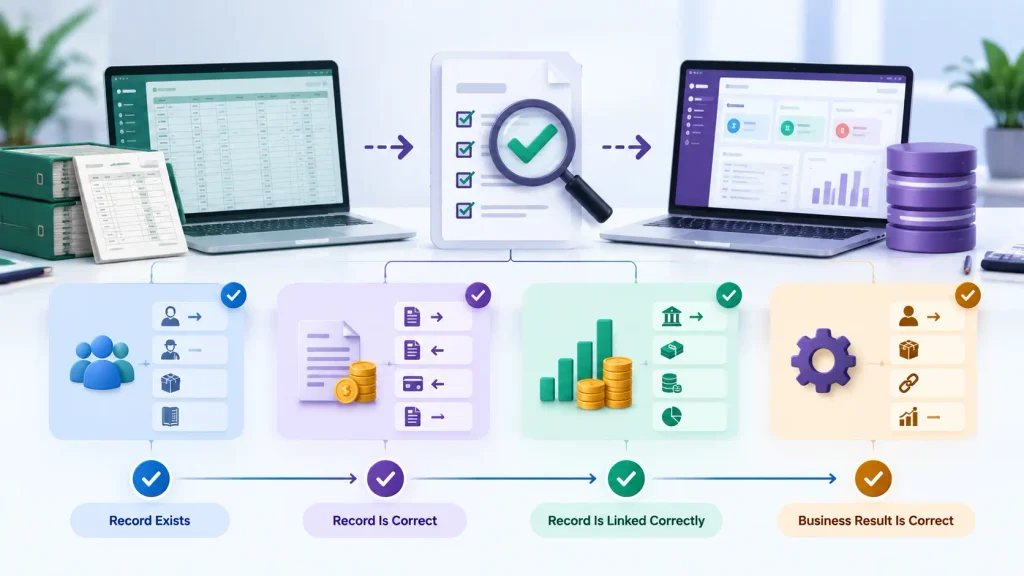
Transactions
Validate invoices, bills, payments, receipts, and journal entries to confirm that the required transaction data and relationships were preserved.
Balances
Compare key receivable, payable, bank, cash, inventory, and tax balances between Tally and Odoo. Opening balances should also be checked against the related migrated records.
Business Process
Confirm that the migrated records function correctly in Odoo. A customer should not only exist as a contact; its related accounting information should also be correctly connected.
The validation should move from:
Record Exists → Record Is Correct → Record Is Linked Correctly → Business Result Is Correct
This confirms whether the migration actually produced the expected Odoo result.
When Does Tally-to-Odoo Migration Require Professional Support?
Professional support becomes relevant when missing or incorrect data affects multiple records, accounting periods, companies, or repeated migration attempts.
Common signs include large groups of missing records, incomplete customer or vendor transactions, incorrect opening balances, unreconciled ledger balances, GST or tax data gaps, duplicate records, or incorrect account and company mapping.
At that point, the issue should be reviewed across migration scope, data mapping, Odoo Accounting configuration, opening balances, transaction imports, and reconciliation rather than corrected record by record.
For businesses moving from Tally to Odoo, an Odoo migration service can help validate source data, map records to Odoo, identify migration gaps, and resolve migration issues before they affect accounting operations.
Frequently Asked Questions
The missing information may not have been included in the migration scope, may not have been exported, may have failed during import, or may have been mapped incorrectly. Compare the source Tally data, migration file, and resulting Odoo records to identify where the gap occurred.
Customer master data and historical transaction data are separate migration components. A customer can be migrated successfully while its related invoices are not transferred. Check the migration scope, invoice export, and partner/accounting mapping.
Yes. Opening balances and historical transactions are different migration data. Validate the opening balance against the related open invoices, bills, and other migrated accounting records to ensure the values are represented correctly.
Conclusion
Missing Tally data after migration to Odoo should be traced to the point where the expected data differs from the migrated result.
The gap may originate from migration scope, source export, data mapping, import failures, opening balances, or incorrect record relationships.
The practical approach is:
Tally Data → Export → Mapping → Import → Odoo Records → Accounting Validation
When these issues repeatedly affect accounting data, the migration should be reviewed across data mapping, Odoo Accounting configuration, migration scope, and reconciliation rather than corrected manually record by record.
For businesses moving from Tally to Odoo, an Odoo migration service can help validate source data, map records correctly, identify migration gaps, and resolve issues before they affect accounting operations.

