

An Odoo Manufacturing Order can show required components as not available even when the components appear in inventory. The issue may not be a simple stock shortage. Availability can depend on the required quantity, stock location, existing reservations, component transfers, Bill of Materials (BoM), and manufacturing workflow.
The key is to determine why Odoo cannot make the required component quantity available to the Manufacturing Order. Checking only the on-hand quantity or making a manual inventory adjustment may not address the actual cause.
The investigation should follow the component from BoM requirement → quantity → inventory → location → reservation → transfer → manufacturing readiness to identify where the availability process is failing.
What Does “Components Not Available” Actually Mean in Odoo?
An Odoo Manufacturing Order uses the Bill of Materials (BoM) to determine the components and quantities required for production. The availability status depends on whether the required quantity can be made available to the Manufacturing Order, not simply whether the product exists somewhere in inventory.
A component can therefore appear in stock while remaining unavailable to the MO. The cause may involve insufficient available quantity, existing reservations, stock location, pending component transfers, or the configured manufacturing flow.
The first step is to distinguish between an actual stock shortage and a manufacturing availability issue. This determines where the investigation should begin.
How Should You Investigate an Odoo Manufacturing Order With Unavailable Components?
The most reliable way to find the cause is to investigate the affected Manufacturing Order in a fixed sequence rather than immediately adjusting inventory or changing the MO.
Start with the specific component that Odoo has marked as unavailable. Check its required quantity, available quantity, location, reservation status, and any related component transfer.

The objective is to identify the first point where the expected availability does not match the actual manufacturing requirement.
If only one component is unavailable, focus on that component first. Once the point of failure is identified, you can determine whether the issue comes from inventory availability, reservation, location, transfer, BoM configuration, or manufacturing workflow.
Compare Required Quantity With Available Quantity
Start by comparing the quantity required by the Manufacturing Order with the quantity currently available for that manufacturing demand.
The component may appear in inventory, but part or all of that quantity may already be reserved for another demand. As a result, the physical on-hand quantity can be higher than the quantity actually available to the affected MO.
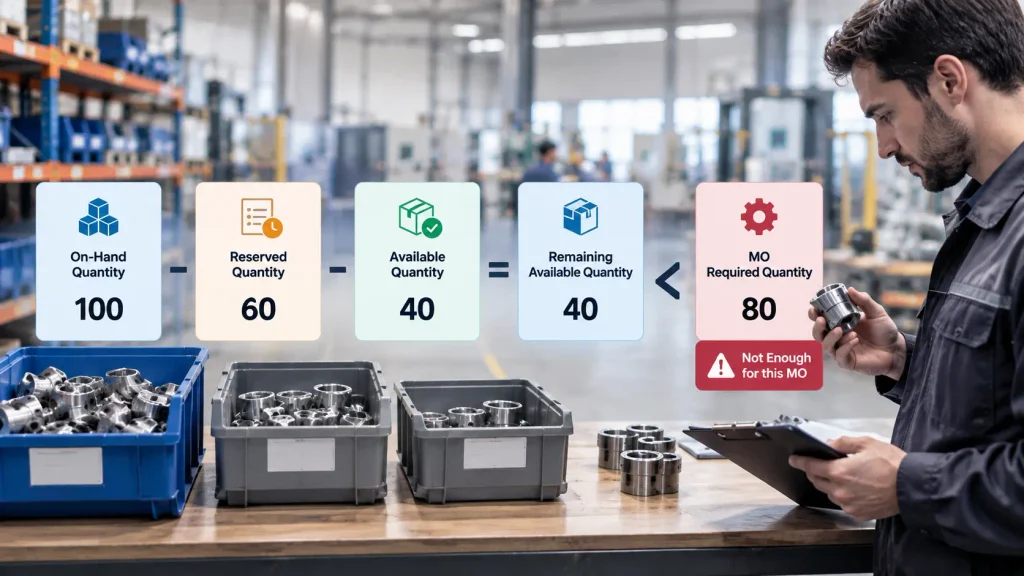
Required Quantity → Available Quantity → Reserved Quantity → Remaining Available Quantity
If the remaining available quantity is lower than the MO requirement, the component cannot fully support that production order.
This distinction is important because on-hand inventory alone does not explain manufacturing availability. The investigation needs to establish how much of the component is actually available for the affected MO.
Could the Bill of Materials Be Causing the Problem?
The Bill of Materials (BoM) defines the components and quantities required to manufacture the product. If the Manufacturing Order does not reflect the expected component requirement, the BoM should be checked before changing inventory or production quantities.
Verify that the MO is using the correct BoM and product variant, and confirm that the required component and quantity match the intended manufacturing process.
This is particularly important when a product has multiple BoMs or variants. A mismatch at the BoM level can make the Manufacturing Order appear to have an availability problem when the underlying issue is the production requirement itself.
Does Manufacturing Readiness Affect Component Availability?
Yes. The Manufacturing Readiness setting on the BoM determines when a Manufacturing Order can be considered ready based on component availability.
Odoo supports readiness based on:
- When all components are available
- When components for the first operation are available
The selected option affects whether an MO must wait for every required component or can begin when the components needed for the first operation are available.
Therefore, when component availability appears inconsistent with the expected production status, check the Manufacturing Readiness setting on the relevant BoM before changing inventory or modifying the MO.
When Does This Require Odoo Configuration Help?
A single unavailable component does not necessarily indicate an Odoo configuration problem. However, professional support becomes relevant when the same issue repeatedly affects Manufacturing Orders or when the configured manufacturing workflow does not match the actual production process.
Common signs include components that are physically available but repeatedly unavailable to MOs, reservation or transfer behavior that does not match production priorities, BoM or manufacturing-readiness settings that produce unexpected results, or manufacturing workflows that do not align with warehouse operations.
At that point, the issue should be investigated across Manufacturing, Inventory, Purchase, BoM, and warehouse configuration rather than treating each blocked Manufacturing Order as an isolated stock problem.
Frequently Asked Questions
Having stock in inventory does not necessarily mean the required quantity is available to the specific Manufacturing Order. Check the required quantity, available quantity, location, reservations, and related transfers to determine why the component cannot be used for that MO.
Yes. A component can exist physically in inventory while the required quantity is unavailable to the current MO because part or all of the stock has already been reserved for another demand.
Different Manufacturing Orders can have different quantities, BoMs, reservations, component availability, or workflow conditions. Comparing a working MO with the affected MO can help identify the difference causing the availability problem.
Conclusion
When an Odoo Manufacturing Order shows components as not available, the cause is not always a simple stock shortage. The required quantity may be unavailable to the MO because of inventory availability, reservations, location, transfers, BoM configuration, or Manufacturing Readiness.
The most reliable approach is to identify where the component availability process stops matching the Manufacturing Order requirement, rather than immediately changing stock quantities or production data.
When the same issue repeatedly affects Manufacturing Orders, the problem should be reviewed at the Odoo Manufacturing and Inventory configuration level rather than corrected order by order.
For businesses facing recurring production availability issues, an Odoo ERP implementation and configuration review can help identify gaps in BoM structure, inventory flow, reservations, warehouse configuration, and manufacturing workflows.

