

Does your Profit and Loss report load normally, but opening its General Ledger drill-down takes several minutes—or ends in a timeout? The delay can interrupt transaction verification and slow down financial reviews.
The problem may lie in the report’s execution rather than the entire Odoo system. Potential causes include expensive SQL queries, large accounting datasets, record-rule overhead, or report-processing issues. The actual cause depends on the affected environment and must be established through diagnosis.
Odoo 19 users have reported slow General Ledger drill-downs and Partner Ledger timeouts. These reports establish that users have encountered the problem, but they do not prove a single cause across all installations.
The first step is to identify where the delay occurs before changing database settings, access rules, or custom code.
Identify Exactly Where the Delay Occurs
If the Odoo 19 General Ledger is slow, first determine whether the delay occurs when opening the report or retrieving transaction details. This distinction helps narrow the investigation before changing database settings or application code.
| Observed behaviour | What to investigate |
| Summary loads quickly, but account drill-down is slow | Transaction queries and report processing |
| Entire report loads slowly | Report computation, database workload, and server resources |
| Longer date ranges cause significant delays | Data volume and query execution |
| Report times out | Server logs, database execution, and request duration |
| Only certain users experience the problem | Access rights, record rules, and report filters |
| Problem started after an upgrade or customization | Recent code and configuration changes |
These symptoms indicate where to investigate; they do not establish the root cause.
Run a controlled comparison: Open the report, record its loading time, and then open an account’s transaction details. Keep the company, user, date range, and filters consistent. This helps identify which operation requires further investigation.
Investigate the Size of the Accounting Dataset
A General Ledger report retrieves accounting transactions according to the selected period and filters. When a database contains years of transaction lines, the amount of data processed may contribute to slower report generation. However, transaction volume alone does not establish the cause.
In Odoo, accounting transaction lines belong to the account.move.line model, stored in PostgreSQL’s account_move_line table.
Check these three factors:
- Transaction volume: Determine whether the delay is associated with accounts containing many transaction lines.
- Reporting period: Compare loading times for shorter and longer date ranges, keeping other filters consistent.
- Database workload: Examine CPU, memory, storage activity, and SQL execution time while reproducing the problem.
If a longer reporting period significantly increases execution time, investigate how the report retrieves and processes additional records. Use SQL profiling and query analysis to determine whether the bottleneck comes from inefficient queries, data retrieval, or another part of the reporting process.
Do not add indexes or change accounting data based on transaction volume alone. Any optimisation should be supported by diagnostic evidence and preserve financial accuracy.
Check Whether PostgreSQL Queries Are Slowing Down the General Ledger
If the General Ledger takes several minutes to load, determine whether PostgreSQL is spending that time executing queries or whether the delay occurs elsewhere in Odoo. Do not add indexes or change database settings until the slow operation has been identified.
Profile the SQL Queries
Odoo 19 provides a built-in profiler that records SQL queries and their associated stack traces. A developer can use it to identify expensive queries and trace them back to the application code that triggered them.
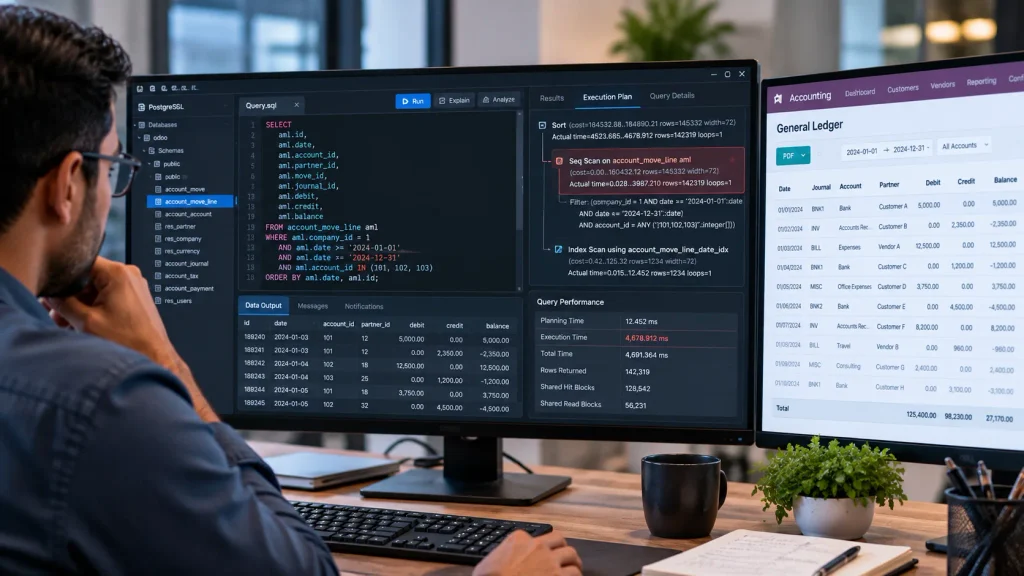
Check whether:
- One query consumes most of the execution time.
- Similar queries execute repeatedly.
- The delay comes from SQL execution or other application processing.
A high query count alone does not prove poor performance; one expensive query can take longer than hundreds of inexpensive queries.
Examine the PostgreSQL Execution Plan
For an identified slow query, a developer can inspect its execution plan using EXPLAIN. Where appropriate, EXPLAIN (ANALYZE, BUFFERS) provides actual execution and buffer information.
Caution: EXPLAIN ANALYZE executes the query. Expensive statements should be assessed carefully before running them against a production database.
The execution plan helps determine whether the query scans excessive records, uses an inefficient access path, or performs expensive joins. The findings—not assumptions—should guide the next step.
Should You Add an Index?
Only when the evidence supports it. An appropriate index may improve data retrieval, but indexes also consume storage and add overhead to database writes.
Use this sequence:
Profile the request → identify the slow query → examine its execution plan → evaluate a targeted correction → measure the result.
This approach helps avoid unnecessary database changes and keeps the investigation focused on the actual performance bottleneck.
Investigate Record Rules and Access Restrictions
Does the General Ledger load quickly for one user but slowly for another? If both users run the same report with identical filters, review their access rights and applicable record rules.
Odoo record rules restrict which records users can access. Their conditions can affect the SQL queries generated for accounting reports. An Odoo community discussion has also documented slow accounting-report execution after record rules were applied, although this does not establish them as the cause of every slow General Ledger.
What should the developer check?
- Compare the applicable record rules for the affected users.
- Inspect the generated SQL to determine whether access conditions introduce expensive filtering.
- Use Odoo’s profiler to establish whether the affected queries account for a significant portion of the delay.
Do not disable accounting access restrictions as a performance fix. If a rule contributes to the delay, review its domain and query impact while preserving the required data-access controls.
Check Custom Modules and Recent Code Changes
Custom Odoo modules can affect General Ledger performance through additional SQL queries, expensive Python calculations, or inefficient report-processing logic. However, a slow report does not automatically indicate a customisation problem.
Check what changed before the slowdown began. Review recent Odoo upgrades, accounting module changes, custom report modifications, and Python code updates.
If custom code is suspected, use a suitable test environment to isolate the relevant changes while keeping the reporting conditions consistent.
A developer should examine whether the affected code executes repeated database queries inside loops or retrieves records unnecessarily. Odoo’s performance guidance recommends batching operations where appropriate to reduce repeated queries.
Importantly, one Odoo 19 user reported that the General Ledger drill-down remained slow even after testing without custom modules. If removing or isolating a suspected customisation does not improve performance, investigate other causes rather than repeating the same test.
The objective is to identify the code responsible for the delay without removing functionality unnecessarily.
Use the Odoo Profiler to Locate the Bottleneck
If the General Ledger remains slow, use Odoo’s profiler to identify where the request spends its time.
Odoo 19 provides SQL and Periodic collectors. The SQL collector records queries and their execution context, while the Periodic collector samples application activity to help identify where processing time is spent. The SQL collector adds overhead, particularly when many small queries execute.
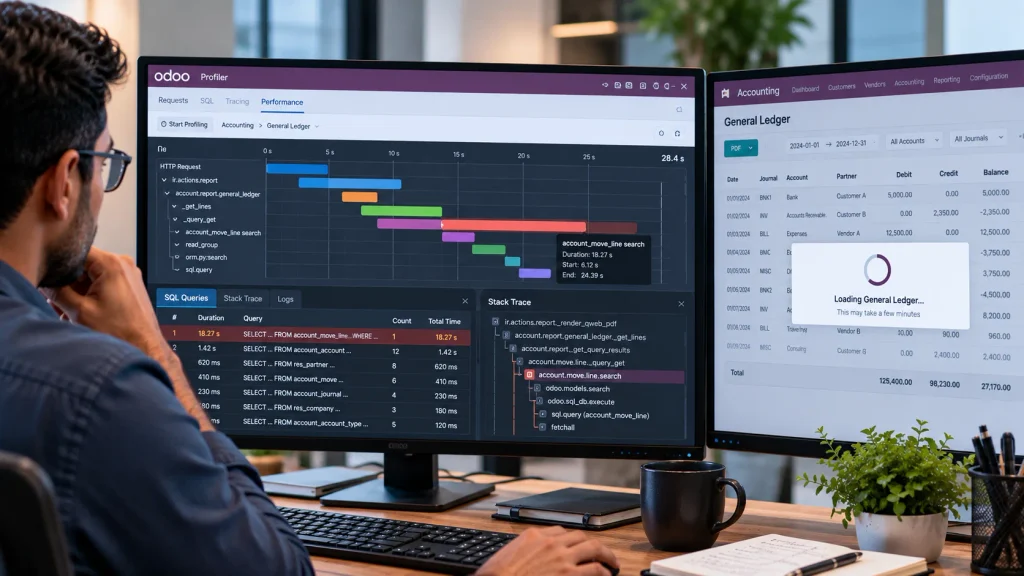
How to Use the Profiler
- Reproduce the delay: Use the same company, user, date range, and report filters.
- Capture the request: Enable profiling in a supported environment and reproduce the slow operation.
- Inspect the results: Look for expensive SQL queries, repeated database calls, or application methods consuming significant time.
Test a correction: Make one evidence-based change in a test environment and repeat the measurement.
The profiler helps narrow the investigation, but its output does not automatically establish the root cause. Compare results under consistent conditions and verify that any optimisation preserves accounting accuracy and access restrictions.
Odoo Online has limitations on using the integrated profiler, so check the official documentation for the options available in your environment.
Check the Accounting Report Configuration
Not every slow accounting report requires database tuning or code changes. Certain report settings can affect how accounting information is grouped or processed.
An Odoo forum discussion about a slow Partner Ledger report recommends reviewing the Prefix Groups Threshold setting. However, that recommendation concerns the Partner Ledger and should not automatically be applied to the General Ledger.
Before changing a setting, confirm that it applies to the affected report, record its current value, and test the proposed adjustment in a suitable non-production environment. Compare loading times and verify the report’s output before considering the change for production.
Do not apply configuration changes based solely on a forum recommendation. The setting must be relevant to the affected report, and the performance improvement must be verified.
Investigate Browser-Side and Report-Rendering Problems
Does the General Ledger stop opening after you use Unfold All? The problem may involve browser-side report state rather than slow database queries.
A reported Odoo 19 Enterprise issue describes large accounting reports exceeding the browser’s sessionStorage quota after many report lines are unfolded. The resulting QuotaExceededError can prevent the report from rendering when reopened. This is a documented issue, not proof that every Odoo 19 installation is affected.
What should you check?
Open the browser’s developer tools and look for storage-related errors when reproducing the failure. If the error matches the reported issue, a developer can investigate the stored report state. Carefully targeted cleanup may restore access, but clearing session data can affect other session-specific information.
If the error persists, the underlying report initialisation logic may require a code-level correction.
Do not assume every slow or unresponsive General Ledger is a PostgreSQL problem. Identify whether the delay occurs during database execution or before the report renders.
When Should You Escalate the Issue?
If the General Ledger continues to time out after initial checks, or the cause remains unclear, further investigation may require access to server logs, SQL execution plans, or Odoo application code.
Seek technical assistance when accounting reports remain unusable, database queries show significant performance problems, or a proposed correction could affect financial accuracy or access restrictions.
The investigation should identify the affected operation, establish the underlying cause, and verify that the correction improves performance without compromising accounting data.
If the problem involves wider ERP configuration or implementation, explore Odoobots’ Odoo ERP Implementation Company page to learn about its implementation services.
Frequently Asked Questions
The General Ledger may need to retrieve and process detailed accounting transactions. Compare the initial report with its drill-down and use profiling to identify where the delay occurs.
Possibly. An index can improve performance when the query and execution plan support its use. Identify the slow query before considering database changes.
Provide your Odoo version, hosting environment, affected report, reporting period, approximate loading time, and relevant error logs. Profiling results can help identify the bottleneck.
Conclusion
A slow Odoo 19 General Ledger requires a diagnosis based on evidence, not assumptions. Identify where the delay occurs, examine the relevant performance data, and verify the correction before making changes to the database or application.
If the problem persists or requires changes to accounting logic, database queries, or ERP configuration, professional technical investigation can help identify the bottleneck while preserving financial accuracy.
For businesses reviewing their broader ERP implementation and configuration, explore Odoobots’ Odoo ERP Implementation Company page.

