Why Does Odoo.sh Replace Staging Databases?
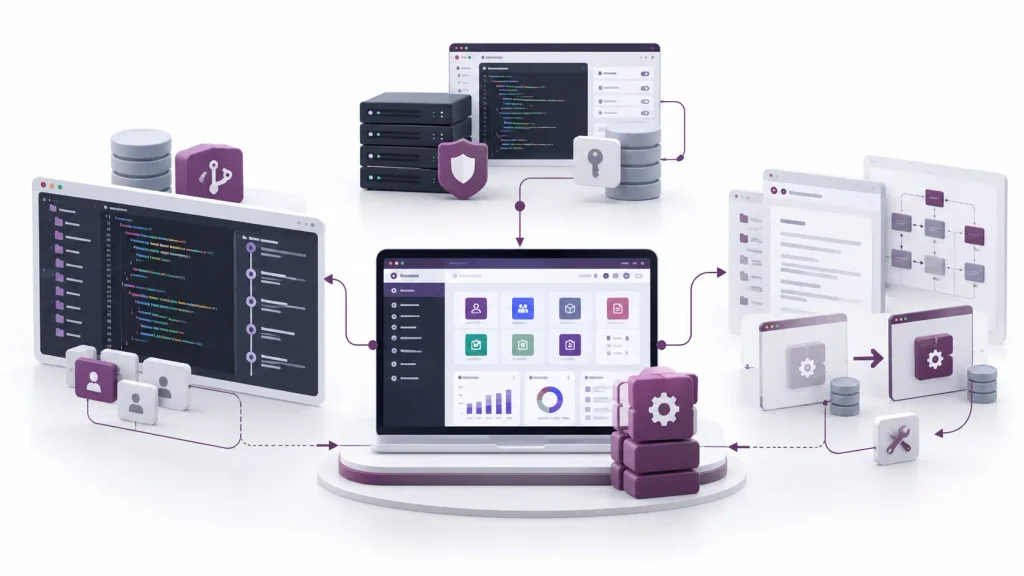
You configure a module, create test records, adjust settings and verify a workflow in your Odoo.sh staging environment. Everything works as expected. Then you push another commit, a new build starts, and the changes you made in the previous staging database are gone.
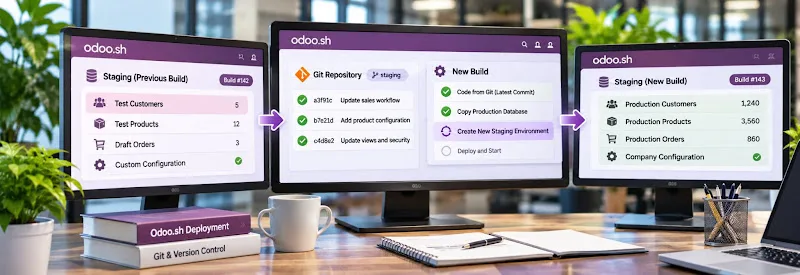
This is not necessarily a database failure. Odoo.sh uses a fresh production database copy for each new staging build instead of reusing the database from the previous build.
The important distinction is between changes stored in the Git repository and changes saved only in the staging database. Understanding how these two environments work helps developers preserve customizations, maintain repeatable tests and avoid losing configuration work during deployment.
Why Do Odoo.sh Staging Changes Disappear After a New Build?
Odoo.sh staging environments are designed to test code against data that closely reflects the current production database.
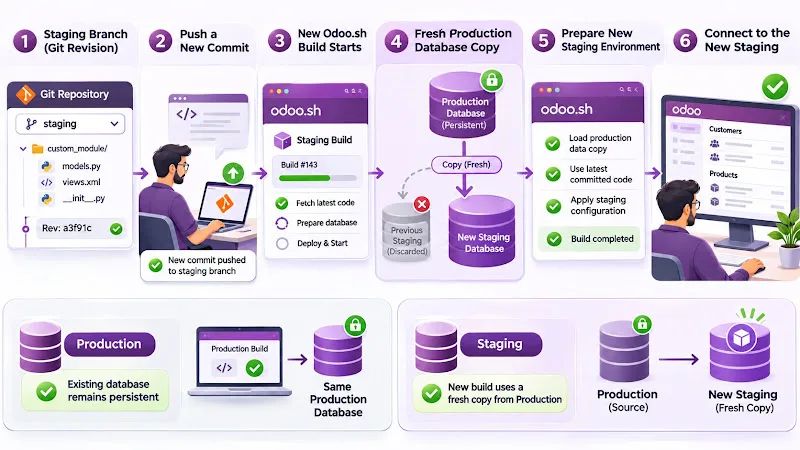
When a new revision is pushed to a staging branch, Odoo.sh creates a new build using a fresh copy of the production database. The database from the previous staging build is not reused.
This explains why test records, manually created configuration and other database changes can disappear after a new build.
What happens during a new staging build?
The process follows this sequence:
- Your staging branch contains a particular Git revision.
- You push another commit to that branch.
- Odoo.sh starts a new build using the updated revision.
- It creates a fresh copy of the production database.
The copied database is prepared for staging and loaded using the staging branch's code.
- You connect to the new staging environment.
The new environment therefore contains the production database state used for that build, not the additional records or settings created only in the previous staging database.
Odoo.sh deliberately follows this approach so developers can test new code against a recent production dataset without carrying forward old staging experiments.
Important: This behaviour is specific to staging builds. Production builds work differently: new production revisions are loaded against the existing production database rather than a fresh staging-style copy.
What Happens to Your Changes During a New Build?
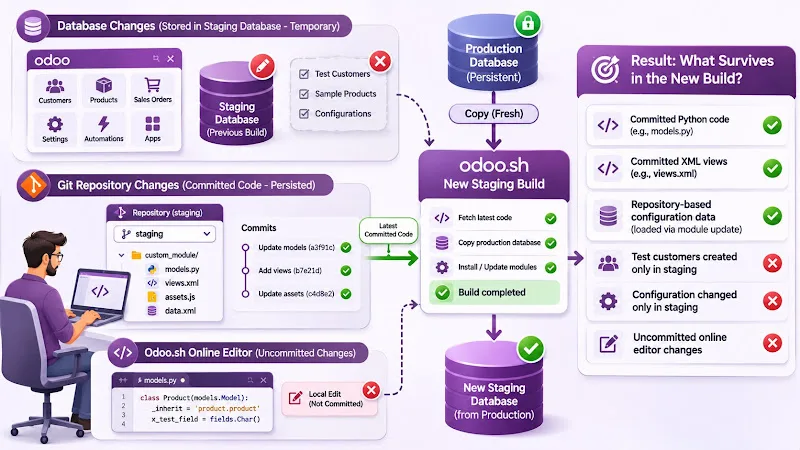
Not every change disappears. The result depends on where the change was stored.
Odoo.sh separates the source code in your Git repository from the database associated with each build.
- Understanding this distinction is essential when investigating lost staging changes.
Database changes
Changes made directly through the Odoo backend are stored in the staging database.
Examples include:
- Creating test customers, products or sales orders.
- Changing company or application settings.
- Configuring automated actions through the interface.
- Installing or uninstalling applications in the staging database.
- Modifying records directly during functional testing.
- These changes are not automatically transferred to the next staging database.
If the same configuration or test records are not present in production or represented through the repository's code and data files, they will not automatically appear in the next build.
Git repository changes
- Code committed and pushed to the staging branch is different.
The new build uses the latest revision of that branch. Therefore, committed Python files, XML views, JavaScript assets and other repository files are available to the new build, subject to successful installation and module updates.
However, editing source files directly through the Odoo.sh Online Editor does not automatically make those changes permanent. Odoo's documentation explicitly states that local edits are not propagated to new builds; they must be committed to the source code.
Where are your changes stored?
Change
Storage location
Available in the next staging build?
Python code committed to Git
Repository
Yes
XML views committed to Git
Repository
Yes
Test customer created in staging
Staging database
No
Configuration changed only in staging
Staging database
No
Uncommitted Online Editor changes
Build environment
No
Configuration implemented through repository data files
Repository and module update
Yes, when loaded correctly
The key principle is simple: a new build uses the latest committed code and a fresh production database copy. It does not preserve the previous staging database's independent changes.
How Do Production, Staging and Development Builds Differ?
Odoo.sh provides three different branch stages. Each serves a different purpose, and understanding their database behaviour prevents incorrect assumptions about data persistence.
Feature
Production
Staging
Development
Main purpose
Run business operations
Test changes against production-like data
Develop and test code
Database creation
Initial database created for production
Fresh production database copy for each new staging build
New database created from scratch
Data source
Persistent production database
Production database copy
Demo data
New revision
Loads the updated code against the current production database
Creates a fresh production database copy
Creates a new development build and database
Unit tests
Not run as part of normal production updates
Not performed
Run by default
Data persistence
Persistent business database
Temporary testing database
Temporary development database
Why does staging use production data?
Staging allows developers to examine whether new code works with actual business structures, existing records and production-like configurations.
- However, the copied database is neutralized before testing.
Odoo.sh disables or modifies several integrations to prevent staging activity from affecting real operations. These include:
- Outgoing emails, which are intercepted.
- Scheduled actions, which are generally deactivated.
- Payment-provider credentials, which are removed or put into test mode.
- Shipping-provider configurations, which are deactivated or switched to test mode.
- Certain external synchronization services and tokens.
This prevents a staging test from accidentally sending real customer emails or initiating live payment and shipping operations.
Why is development different?
Development builds create new databases with demo data and run unit tests by default.
They are intended for developing modules and checking code before testing against production data.
A useful workflow is to develop and test code in development, then move the changes into staging to verify their behaviour against a production database copy.
How to Preserve Configuration and Code Changes
If you have made important changes in staging, decide whether they belong in the Git repository or need to be transferred into the production database.
Simply merging the staging branch into production does not transfer the staging database's configuration or test records. The merge transfers source-code changes.
Preserve custom code through Git
For Python models, XML views, controllers and other custom module files, work in your repository rather than relying on temporary Online Editor modifications.
A typical workflow is:
- Modify the relevant module files.
- Review the changes locally.
- Commit the changes to the correct Git branch.
- Push the commit to GitHub.
- Allow Odoo.sh to create the new build.
- Inspect the build logs and verify the updated functionality.
- This ensures the new build receives the committed source-code revision.
Preserve module configuration through XML data files
Some configuration changes can be represented as XML data records inside a custom module.
For example, when a customization requires predefined configuration records or modified views, developers can implement those changes through module data files rather than creating them manually in staging.
When a module change requires an update to be triggered automatically, increase its version in __manifest__.py.
Odoo.sh can then perform the module update when the updated revision is deployed.
Odoo's branch documentation recommends using XML data files and module version updates to make configuration changes reproducible and traceable through Git.
Transfer configuration that must remain database-managed
- Not every business setting should be converted into XML data.
Some configurations are intentionally managed through the Odoo interface. In those cases:
- Document the changes made during staging.
- Identify the corresponding production configuration.
- Apply the required changes in production through the appropriate process.
- Verify the result after deployment.
Do not assume that merging a staging branch copies its database settings into production.
The objective is to make important changes reproducible without treating a temporary staging database as the permanent storage location for business configuration.
How to Manage Test Data Without Losing It
Staging environments are useful for testing against production data, but they are not designed to preserve every experiment across builds.
If your testing process depends on the same customers, products, transactions or configurations each time, make the test setup repeatable.
Keep reproducible test data separately
For development and automated testing, use appropriate module demo data, test files or controlled data-loading mechanisms.
This allows developers to recreate the required test conditions instead of depending on records created manually in a temporary database.
Keep test data separate from real customer information and avoid introducing test records into the production environment.
Record staging-only configuration changes
- Maintain a record of important settings changed during functional testing.
For each change, document:
- Which application or configuration was modified.
- Which setting or record was changed.
- Why the change was necessary.
- Whether it must be reproduced in production.
- Whether the change should be implemented through module data files.
This is particularly important when multiple developers and testers work on the same staging branch.
Do not use staging as permanent storage
Odoo.sh does not automatically back up staging and development databases as it does production.
The Odoo 19 documentation provides a manual backup option for staging databases, but these should not be treated as long-term storage. Staging databases are also automatically deleted after one month under the documented staging lifecycle policy.
Before an important staging operation, check the available backup options in your project's Backups tab. Keep important test instructions, configuration definitions and source-code changes outside the temporary database.
How to Troubleshoot Disappearing Odoo.sh Staging Changes
When information disappears after a new build, identify its original storage location before attempting recovery.
- Use the following checks.
Check 1: Identify the build event
- Open the Odoo.sh project and inspect the staging branch's build history.
Determine whether the database was replaced after:
- A new Git commit.
- A manual rebuild.
- A branch operation that generated a new staging build.
- The staging database's expiry.
- This helps establish why a different database is now available.
Check 2: Compare the Git revisions
- Open the latest build and inspect its associated Git revision.
- Confirm that the expected commit is included in the build.
If the missing change was Python code, an XML view or another repository file, check whether it was committed and pushed before the build started.
Check 3: Determine whether the missing change was database-only
If the missing item was a test customer, configuration value, installed application or manually created record, determine whether it existed only in the previous staging database.
A fresh production database copy will not contain staging-only records unless they were also present in production or recreated through the relevant deployment process.
Check 4: Review module update requirements
If the code was committed but the expected configuration or view is not visible, check whether the module update was triggered.
Review:
- The module's __manifest__.py.
- Its declared dependencies.
- XML data-file references.
- Module installation and update logs.
- Any errors reported during build creation.
A successful build status alone does not prove that every intended configuration change was loaded.
Check 5: Recover only what is necessary
If important staging records disappeared, check whether an available manual backup or database dump can recover them.
Do not assume the previous staging database can always be restored. Staging databases do not receive the same automatic backup guarantees as production.
Once the required information is recovered, move reproducible code and configuration into the appropriate repository or documented deployment process.
The priority is to prevent the same loss from happening during the next build.
Frequently asked questions
Does every new Odoo.sh staging build create a fresh database?
Yes. Each new staging build generated after a new revision uses a fresh copy of the production database. The previous staging database is not reused.
Will merging my staging branch into production transfer my database changes?
No. Merging transfers source-code changes from the repository. Configuration changes and records created only in the staging database are not automatically transferred to production.
Can I keep an Odoo.sh staging database permanently?
Staging databases are intended for temporary testing. Under the documented policy, they are automatically deleted after one month. They are also not automatically backed up, so do not use them as permanent data-storage environments.
Conclusion
Odoo.sh staging changes disappear after a new build because the platform creates a fresh production database copy rather than carrying forward the previous staging database.
The important distinction is between database changes and repository changes. Test records and manually adjusted staging settings are temporary, while properly committed source code remains part of the branch revision used for subsequent builds.
For a reliable development workflow, keep custom code in Git, make required configuration changes reproducible, maintain controlled test data and avoid relying on staging databases as permanent storage.
This approach makes Odoo.sh builds easier to reproduce and reduces the risk of losing important development and testing work.