Can Odoo 19 Sign a Quotation After Its Price Changes?
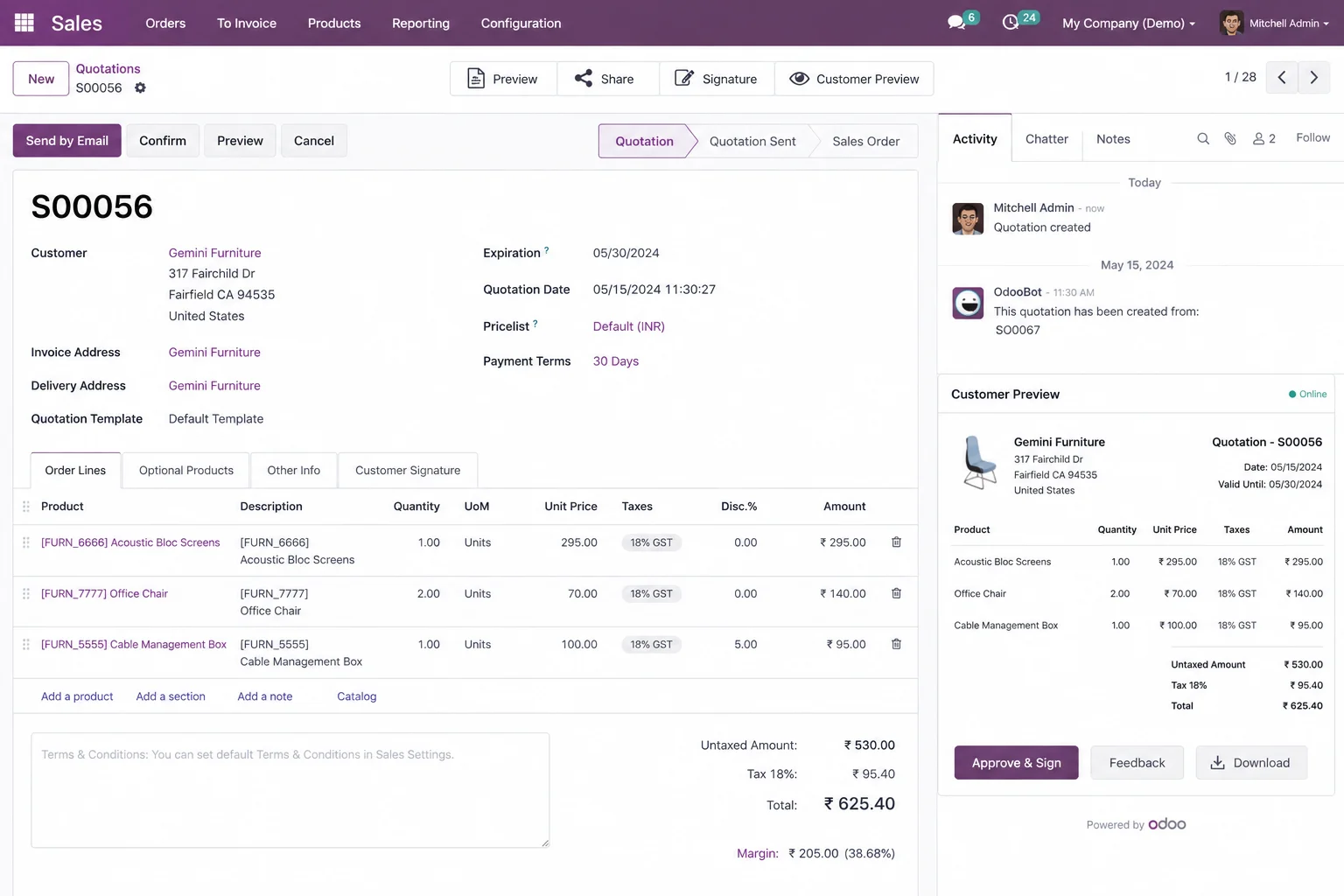
A customer opens an Odoo quotation, reviews the total and proceeds to sign it. Before the signature is submitted, a salesperson changes the quotation price in the backend. The customer continues using the already-open portal page and signs the quotation without seeing the updated amount.
The result can be a discrepancy: the signing dialogue displays the original price, but Odoo confirms the quotation using the updated backend amount. The PDF stored with the signed order may consequently show a different total from the amount presented to the customer during signing.
This behaviour was reported and reproduced on Odoo 19 Runbot in November 2026. It raises an important technical question: does Odoo bind a customer’s signature to the exact quotation content displayed at the time of acceptance, or does it sign the latest version of the backend record?
Understanding this distinction matters for businesses using online quotation confirmation, sales teams that frequently revise prices, and developers maintaining Odoo’s Sales and customer-portal workflows.
What Happens When a Quotation Price Changes?
Odoo Sales supports online quotation confirmation through the customer portal. When Online Signature is enabled, customers can review a quotation, provide their electronic signature and accept the order without manually returning a signed document. The setting lives under Sales → Configuration → Settings → Quotations & Orders → Online Signature.
The reported issue occurs when the quotation changes after the customer has already opened its portal page. The sequence is:
- A salesperson creates and sends a quotation.
- The customer opens the quotation through the portal.
- The portal displays the original quotation total.
- The customer leaves the page open without signing.
- The salesperson changes the unit price in the backend and saves the quotation.
- The customer returns to the original browser tab.
- The customer selects Accept & Sign.
- The signing dialogue continues to display the previously loaded amount.
- Odoo processes the signature and confirms the updated backend quotation.
The discrepancy is between two different states of the same quotation: the information already rendered in the customer’s browser, and the current information stored in Odoo.
This is not simply a product-pricing calculation problem. The updated amount can be entirely correct in the backend while the customer’s active portal page continues to display previously loaded quotation information.
How the Odoo 19 Quotation Signing Issue Was Reproduced
The GitHub report provides a reproducible sequence using Odoo 19 Runbot build 132339750, running the Community edition with demo data and installed modules.
| Condition | Value in the report |
|---|---|
| Online Signature | Enabled |
| Online Payment | Disabled |
| Customer quotation | One product line |
| Original unit price | $100 |
| Tax rate | 15% |
| Original quotation total | $115 |
| Price after backend change | $200 (total $230) |
The customer opened the quotation through its portal access link and the browser displayed a total of $115. While that page remained open, the salesperson changed the unit price from $100 to $200 in the backend, making the updated total $230.
When the customer selected Accept & Sign in the original browser tab, the signing dialogue still displayed $115. After the signature was submitted, Odoo confirmed the order using the updated backend quotation, and the signed PDF attached to the order showed $230.
The report also describes the chatter entries: the original quotation was created, the customer viewed it, the backend price was changed, Odoo sent an order-confirmation email, and the order was marked as signed and converted into a Sales Order.
The important detail is that the signed PDF represented the updated backend record, although the customer-facing signing dialogue had displayed the original amount.
Scope: this report was opened on 13 November 2026 and remained open when checked on 16 November 2026. It is a specific reproduced scenario — not proof that every Odoo 19 installation behaves this way.
Why Does the Portal Display an Outdated Amount?

The reported technical analysis points to a difference between the quotation data rendered in the browser and the record processed by the server when the customer accepts it.
The portal page retains previously rendered data
When the customer first opens the quotation, Odoo generates the customer-facing page from the quotation’s current data. The displayed product lines, prices and totals belong to that page rendering. If a salesperson later modifies the quotation in the backend, the existing browser page does not become a newly rendered version by itself, so the customer can continue interacting with information that no longer represents the latest record.
The signing request does not identify the displayed version
The reported analysis identifies the signature request as sending the customer’s name and signature. It does not include a fingerprint identifying the exact quotation content that was displayed when the signing dialogue opened.
That distinction matters: the server cannot use the request alone to establish that the quotation is unchanged since it was presented. The reported Odoo 19 flow uses the portal_quote_accept method, which checks whether the quotation can be signed and then processes the current record.
The signed PDF is generated after the record changes
After processing the signature, Odoo confirms the order and generates the PDF from the updated record. The archived signed document can therefore contain the new quotation amount rather than the amount displayed in the customer’s original signing dialogue.
The concern is not limited to an outdated browser display. It also concerns whether the document Odoo retains represents the exact version presented to the customer.
How to Reproduce and Investigate the Issue

A controlled reproduction tells you whether the discrepancy exists in your own environment. Use a test database, not an active production quotation.
Step 1: Configure online signatures
Open Sales → Configuration → Settings, enable Online Signature under Quotations & Orders and save. For the reported conditions, keep Online Payment disabled.
Step 2: Create a quotation
Create a quotation with a customer, a product line, a unit price and an applicable tax. Save it and open its customer-portal preview.
Step 3: Open the portal in a separate browser session
Access the quotation through its customer portal link. Record the displayed product price and total, and keep the tab open without refreshing.
Step 4: Change the quotation in the backend
Return to the backend as the salesperson, open the same quotation, modify its unit price, save, and confirm the backend total has updated.
Step 5: Continue signing from the original portal tab
Go back to the customer’s original tab and select Accept & Sign without refreshing. Check the amount shown in the signing dialogue before submitting. In the reported scenario it continued to show the previously loaded amount.
Step 6: Inspect the resulting order and signed document
Compare the values and timestamps across the confirmed Sales Order total, the order’s chatter history, the signed PDF attachment, the order-confirmation email attachment, and the amount shown in the signing dialogue. The objective is to establish whether all three — customer-facing amount, backend quotation and archived document — represent the same quotation version.
If the test does not reproduce the behaviour, investigate the installed Odoo build, custom modules, portal modifications and signing workflow before drawing conclusions.
How to Reduce the Risk of Signing an Outdated Quotation
Until the behaviour is verified and addressed in your environment, apply controls around quotation revisions.
Reopen the updated quotation before acceptance
When a quotation changes after it has been shared, make sure the customer reviews the updated version. An already-open portal page is not proof that the customer has seen the latest quotation. Ask them to reopen or refresh it and verify the current price, taxes and total.
Resend revised quotation details
When pricing or commercial terms change materially, communicate the revision through the updated quotation rather than relying on a page the customer opened earlier.
Verify the final order after signing
Compare the accepted quotation details against the resulting Sales Order and its signed document, paying attention to:
- Product descriptions and quantities.
- Unit prices and discounts.
- Tax configuration.
- Currency and quotation total.
- Payment terms.
A difference between the displayed signing amount and the final signed document should be investigated before downstream sales operations proceed.
Preserve the records when a discrepancy is found
Do not overwrite or remove the signed attachment to make the records look consistent. Preserve the original quotation, chatter history, confirmation email and signed PDF, record the timestamps, and escalate to your Odoo administrator or technical team.
These controls reduce operational risk. They do not replace a server-side correction that ties signatures to the exact document presented for acceptance.
What Should Developers Investigate and Correct?

For technical teams the central requirement is to bind the signature to a specific version of the quotation. The GitHub report proposes document-based validation rather than relying only on the latest state of the sale.order record.
Validate the quotation before accepting the signature
When the portal prepares the signing dialogue, the system should retain an identifiable representation of the quotation content shown to the customer. At acceptance, the server should compare the current content with the presented version across the commercially relevant fields:
- Product and service lines, and their descriptions.
- Quantities and units of measure.
- Unit prices and discounts.
- Tax values.
- Currency and totals.
- Payment terms.
If those values changed since the document was presented, the server should reject the signature request and require the customer to review the updated quotation.
Do not rely only on the quotation write date
A record timestamp helps identify changes, but it is not a complete representation of the quotation’s commercial content. The report specifically notes that quotation lines can be updated without necessarily changing the parent order’s write_date, so validation has to account for order-line data rather than checking the parent record alone.
Preserve the document the customer actually signed
The attachment on the signed order should represent the same version presented during acceptance. Generating a new PDF from the latest backend record after confirmation does not establish that the customer reviewed those updated terms before signing. A robust implementation retains the presented document, or an equivalent immutable snapshot, and associates the signature with that version.
Test the complete acceptance workflow
A correction should be tested against changes made after the customer opens the portal page — unit-price modifications, quantity changes, discount updates, tax changes, currency changes and payment-term changes — with Online Signature both with and without Online Payment. The final test should confirm that Odoo either signs the exact version presented to the customer, or prevents acceptance and requests a refreshed review.
This document-binding approach is an engineering direction described in the issue report. It is not an existing Odoo 19 configuration option or an officially released fix.
Frequently asked questions
Does refreshing the Odoo quotation page resolve the outdated price?
Refreshing the portal page should request the current quotation data from the server. It is a useful operational safeguard when a quotation has changed, but it does not independently prevent a later backend change from occurring during the signing process.
Does this issue affect every Odoo 19 installation?
No. The GitHub report documents a specific reproduction on Odoo 19 Runbot. It does not establish that every Odoo 19 deployment, configuration or customized Sales workflow is affected.
Why does the signed PDF show a different amount?
In the reported sequence, Odoo generates the signed PDF from the updated backend record after processing the customer’s signature. The signing dialogue, however, continues to display the amount loaded before the backend modification.
Is there an official fix for this Odoo 19 issue?
The GitHub issue was still open, with no linked pull request shown when checked on 16 November 2026. Administrators should verify the status of the issue against their installed Odoo build before assuming that a correction is available.
Conclusion
An Odoo quotation should not be treated as unchanged simply because a customer has already opened its portal page.
The reported Odoo 19 issue shows how a backend price modification can create a discrepancy between the amount displayed during online signing and the amount stored in the resulting Sales Order and signed PDF.
For sales teams, the immediate priority is making sure customers review the latest quotation before acceptance, and investigating discrepancies using the original records. For developers, the deeper requirement is document-version validation: the signature should stay associated with the exact quotation content presented during acceptance, not a subsequently modified backend record.