

Odoo CRM contains the lead, but the Lead → Opportunity conversion is not completing.
The lead may remain unchanged after Convert to Opportunity, return a conversion error, or produce an opportunity that is not visible in the expected pipeline. Creating another opportunity manually can create duplicate CRM records while leaving the original conversion problem unresolved.
The key issue is:
Where does the Lead → Opportunity workflow stop?
The failure can involve lead configuration, the conversion action, salesperson or sales team assignment, similar-record handling, pipeline visibility, or customized CRM logic.
This guide traces the conversion workflow, identifies the actual failure point, explains the relevant fix, and shows how to verify that the opportunity has been created and placed correctly in the CRM pipeline.
How Does Odoo Convert a Lead Into an Opportunity?
When a lead is ready to enter the sales pipeline, Odoo follows this basic path:
Lead → Convert to Opportunity → Opportunity → CRM Pipeline
From the lead, the Convert to Opportunity action opens the conversion workflow. Odoo then processes the lead into an opportunity and applies the relevant salesperson, sales team, customer, and existing-record information.
After conversion, the result should be an Opportunity that can be found in the CRM pipeline.
So, when the conversion is not working, check which point is failing:
Lead exists → Conversion starts → Opportunity is created → Opportunity appears in the pipeline
If the lead remains unchanged, the conversion returns an error, or the opportunity is not visible afterward, that specific stage needs to be investigated.
Why Is My Odoo Lead Not Converting to an Opportunity?
A failed Lead → Opportunity conversion can come from different points in the CRM workflow. First identify whether the conversion does not start, returns an error, creates an existing/merged record, or succeeds but the opportunity is not visible.
Lead or CRM Configuration Does Not Match the Expected Workflow
Check whether Leads are enabled under:
CRM → Configuration → Settings → Leads
Also check the relevant sales team’s configuration and confirm that the record is actually a Lead, not an Opportunity.
If the CRM is configured to work directly with opportunities, the expected Lead → Opportunity workflow may differ from what the user sees.

The Conversion Action Is Not Being Completed
Opening the conversion workflow does not create the opportunity by itself.
Check the conversion window and confirm that the action is set to:
Convert to opportunity
Then complete the conversion using Create Opportunity.
If the conversion window provides a merge option, check whether an existing opportunity should be used instead of creating another record.
A Similar Lead or Opportunity Already Exists
Odoo can identify similar CRM records.
If Similar Leads is available, review the existing records before creating another opportunity.
Check:
Lead → Similar Leads → Existing Lead/Opportunity
If the existing record represents the same sales opportunity, determine whether the lead should be merged rather than converted into a separate opportunity. This prevents a duplicate CRM record from being created while the original lead remains unresolved.
The Conversion Returns an Error
If Odoo displays an error during conversion, use the error message as the starting point instead of repeatedly attempting the conversion.
Check the lead’s:
- Probability
- Salesperson
- Sales Team
- Customer information
- Conversion action
Some Odoo versions also have documented conversion conditions that can produce an error, so the exact Odoo version and error message should be checked before changing CRM configuration.
The Opportunity Was Created but Is Not Visible
A lead disappearing after conversion does not necessarily mean the conversion failed.
Open:
CRM → My Pipeline
Then review the active search and filters.
Check:
- Salesperson
- Sales Team
- My Opportunities
- Pipeline stage
- Archived records
- Other active filters
If the opportunity was assigned to another salesperson or sales team, it may not appear in the current user’s pipeline view.
Customization Is Interfering With the Conversion
If the standard conversion workflow works but the customized database does not, investigate the customization layer.
Check for:
- Custom CRM modules
- Odoo Studio changes
- Automated actions
- Server actions
- Custom access rules
- Modified CRM views
- Required custom fields
- Integrations that modify leads or opportunities
If the problem started after a customization or module change, test that layer before changing the standard CRM configuration.
How Should You Investigate an Odoo Lead Conversion Problem?
Do not change multiple CRM settings at once. First reproduce the conversion problem and identify the exact point where the workflow stops.
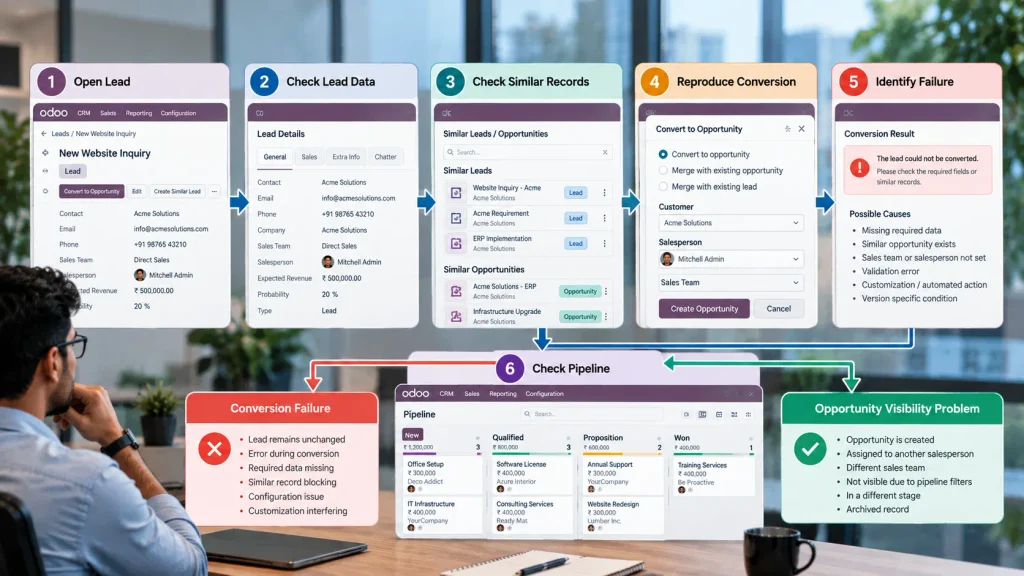
Step 1: Open the Lead
Go to:
CRM → Leads
Open the lead that is failing and confirm that it is the correct record.
Check that you are working with a Lead, not an opportunity that has already been created.
Step 2: Check the Lead Before Conversion
Review the current values for:
- Salesperson
- Sales Team
- Probability
- Customer
- Contact
- Company
Do not change the values yet. The purpose is to establish the configuration that exists when the conversion fails.
Step 3: Check Similar CRM Records
If Similar Leads is available, inspect the related records.
Check whether:
- A similar lead already exists
- An opportunity already exists
- The records should be merged
- The current lead should be converted separately
This helps distinguish a failed conversion from a conversion that should use an existing CRM record.
Step 4: Reproduce the Conversion
Click:
Convert to Opportunity
Then check the conversion wizard.
Confirm:
Conversion Action → Convert to opportunity
Review the salesperson, sales team, and customer information, then complete the conversion.
Step 5: Identify Exactly What Happens
Classify the result before changing any configuration:
| What happens | What to investigate |
| Conversion workflow does not open correctly | Configuration, access, view, or customization |
| Conversion returns an error | Lead data, configuration, or customized workflow |
| Conversion completes but no opportunity is visible | Pipeline filters, assignment, or record visibility |
| An existing CRM record is involved | Similar lead/opportunity or merge handling |
This prevents unrelated CRM settings from being changed without identifying the actual failure point.
Step 6: Check the Pipeline
After a successful conversion, go to:
CRM → My Pipeline
Remove unnecessary filters and search for the opportunity.
Then verify:
- Salesperson
- Sales Team
- Pipeline stage
- Active filters
- Archived status
If the opportunity exists but is assigned to another salesperson or team, it may not appear in the current pipeline view.
The goal is to determine whether the problem is conversion failure or opportunity visibility before moving to the fix.
How Can You Fix an Odoo Lead That Is Not Converting?
The fix depends on the point where the Lead → Opportunity workflow stops.
| Problem found | Correct action |
| Leads are not enabled | Enable Leads in the CRM configuration |
| Relevant sales team is not configured for Leads | Review the team’s Lead configuration |
| Wrong conversion action | Select Convert to opportunity and complete the conversion |
| Similar opportunity already exists | Review the existing record and merge when appropriate |
| Conversion returns an error | Resolve the condition identified by the error before retrying |
| Opportunity exists but is not visible | Remove restrictive pipeline filters and check salesperson/team assignment |
| Wrong salesperson or sales team | Correct the assignment and verify pipeline visibility |
| Problem started after customization | Test the customized workflow, access rules, automated actions, or custom modules |
Do not create another opportunity manually just to bypass a failed conversion. That can introduce duplicate CRM records while leaving the original conversion problem unresolved.
After correcting the identified condition, repeat the Lead → Opportunity conversion and verify that the resulting opportunity appears in the correct CRM pipeline with the expected salesperson, sales team, and customer information.
How Do You Verify the Opportunity Was Created Correctly?
Fixing the conversion error is not the final step. Verify the resulting opportunity before treating the Lead → Opportunity workflow as resolved.
Check the following:
| Check | What to verify |
| Conversion result | Confirm that the lead conversion completed and produced the expected opportunity. |
| Opportunity | Confirm that the opportunity exists in the CRM pipeline. |
| Salesperson | Verify that the opportunity is assigned to the intended salesperson. |
| Sales Team | Confirm that it belongs to the correct sales team. |
| Customer | Check that it is linked to the correct existing or newly created customer. |
| Pipeline visibility | Remove restrictive filters and confirm that the opportunity appears in the expected pipeline view. |
| Similar records | Check that the conversion did not create an unnecessary duplicate opportunity. |
If all of these checks are correct, the Lead → Opportunity workflow has been restored without simply bypassing the original conversion problem.
When Should You Get Odoo CRM Support?
A single lead failing because of an identifiable configuration or record condition can usually be isolated by checking the Lead → Opportunity conversion workflow.
Broader CRM investigation is justified when:
- Multiple leads cannot be converted.
- Conversion fails only for a specific sales team.
- Conversion started failing after customization.
- Custom required fields prevent opportunity creation.
- Automated actions modify lead data during conversion.
- Opportunities are created but repeatedly assigned or displayed incorrectly.
- Different users receive different conversion results.
- The standard conversion workflow works in one environment but fails in the customized database.
These patterns indicate that the problem may extend beyond the individual lead. The underlying cause can involve CRM configuration, access rules, automated actions, custom modules, or integrations and should be investigated at the database or workflow level.
Frequently Asked Questions
Check the Leads configuration, sales team configuration, conversion action, lead data, similar records, and any error generated during conversion. If the conversion succeeds but the opportunity is missing from the pipeline, check filters and salesperson assignment.
First check CRM → My Pipeline, remove active filters, and verify the salesperson and sales team assigned to the opportunity. If the opportunity was created successfully but is not visible, the issue may be pipeline filtering or record assignment rather than conversion itself.
Yes. During lead conversion, Odoo can identify similar leads or opportunities and provide an option to merge with an existing opportunity instead of creating a separate record.
Yes. Custom fields, access rules, automated actions, custom modules, or modified CRM workflows can interfere with the standard conversion process. If the problem began after customization, those changes should be investigated before modifying the standard CRM configuration.
Conclusion
An Odoo Lead → Opportunity issue should be resolved by identifying the exact point of failure in the conversion workflow—not by creating another opportunity or changing unrelated CRM settings.
Lead → Conversion → Opportunity → Pipeline
Once the failed point is corrected, the expected result is a properly created opportunity with the correct assignment, customer information, and pipeline visibility.

