

You receive stock, validate the receipt, check the product valuation, and expect to find a new journal entry in Accounting. Nothing appears.
That does not automatically mean Odoo 19 is failing.
In Odoo 19, inventory valuation and accounting entries are no longer synchronized through a journal entry for every stock movement. Inventory can update the stock quantity and valuation immediately, while Accounting updates inventory value according to the configured valuation method and the related invoicing or closing process.
This can be especially confusing after an Odoo 18 → Odoo 19 upgrade. In earlier versions, perpetual inventory accounting could generate accounting entries for individual stock movements. Odoo 19 changed this approach to generate fewer accounting entries, with invoice-level accounting and the closing process handling the remaining inventory-value differences.
The important question is therefore not simply:
“Why is there no journal entry?”
It is:“Should this inventory movement create a journal entry under my Odoo 19 configuration?”
How Does Odoo 19 Handle Inventory Valuation and Accounting?
Odoo 19 tracks the value of physical inventory in the Inventory app as goods move into and out of stock. Receipts increase inventory value, while deliveries decrease it. With FIFO or AVCO, Odoo recalculates product valuation as stock movements occur.
Accounting works differently.
The Accounting app does not necessarily create a separate journal entry for every receipt, delivery, or other stock movement. The accounting treatment depends on the configured inventory valuation method and accounting standard. Odoo 19 supports Periodic and Perpetual valuation, with different timing for when inventory-related accounting is updated.
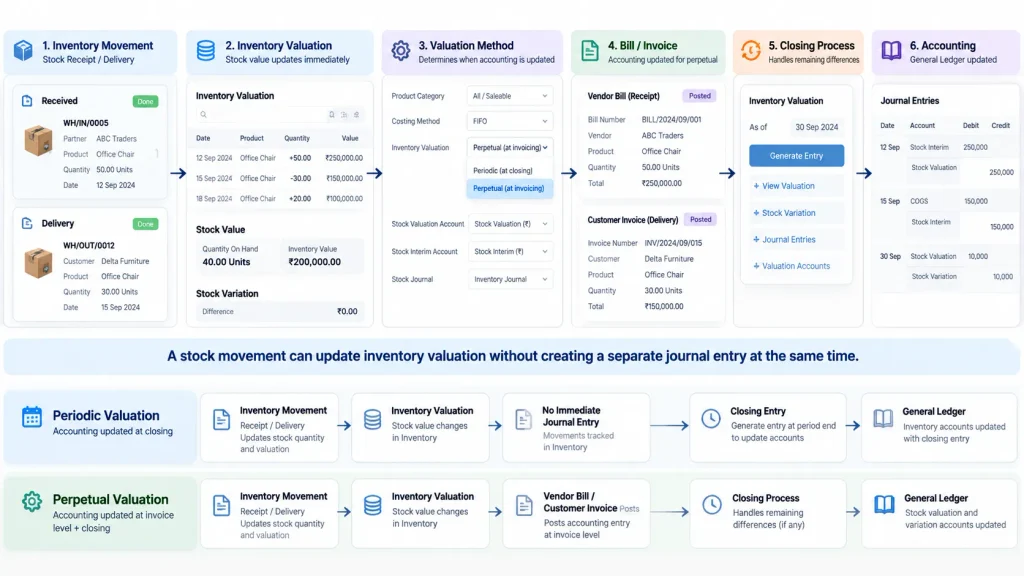
Inventory Movement → Inventory Valuation
while the accounting impact follows the configured valuation process:
Periodic → Closing Entry → General Ledger
Perpetual → Invoice / Bill + Closing Process → General Ledger
This is why a stock movement can appear immediately in Inventory while there is no separate journal entry for that movement at the same time. The difference between Inventory and Accounting valuation is tracked as Stock Variation in the Inventory Valuation report.
What Changed From Odoo 18 to Odoo 19?
This is one of the main reasons existing Odoo users question the missing accounting entries.
Before Odoo 19, the Perpetual accounting method posted real-time accounting entries for individual stock movements. This could create a large number of journal items in Accounting. In Odoo 19, the Perpetual method affects the stock valuation account at the invoice level, while the closing entry manages remaining differences between inventory values and accounting records. This reduces the number of journal entries and simplifies the General Ledger.
An Odoo 18 user may therefore expect:
Receipt → Stock Move → Journal Entry
but see a different flow in Odoo 19:
Receipt → Inventory Valuation
with accounting handled through the configured invoicing and closing process.
This change is already causing confusion among Odoo 19 users who compare stock-movement accounting with their Odoo 18 experience. One recent community discussion specifically asks why receipts and deliveries no longer appear as automatic accounting entries in Odoo 19.
When Is No Accounting Entry Expected — and When Is It a Problem?
The absence of a journal entry is not automatically an error.
Expected behavior
A stock receipt or delivery can update inventory valuation without creating a separate accounting entry for that movement at the same time.
With Periodic (at closing) valuation, inventory movements are tracked in the Inventory app, while the accounting value is updated through the closing process. With Perpetual (at invoicing) valuation, accounting is updated when vendor bills or customer invoices are posted, with the closing process handling remaining differences between inventory and accounting.
Potential configuration problem
Investigate further when the accounting result expected from the configured workflow does not occur.
For example:
- a posted vendor bill does not produce the expected inventory accounting impact
- a customer invoice does not create the expected COGS or inventory accounting treatment
- inventory valuation and the General Ledger remain inconsistent after the required closing process
- the configured valuation account or journal is incorrect
- product-category valuation settings override or conflict with the intended company configuration
The key is to compare the observed result with the configured valuation method and accounting workflow, not simply with how Odoo 18 behaved.
Which Odoo 19 Configuration Should You Check?
When the accounting result genuinely looks wrong, start with the Inventory Valuation configuration.
At the company level, review:
Inventory Valuation → Periodic / Perpetual
Inventory Cost Method → Standard Price / FIFO / AVCO
Valuation Account
Variation Account
Journal
Odoo 19 also allows inventory valuation and costing settings to be overridden at the product-category level, so checking only the company-level configuration may not reveal the cause.
For example, two product categories in the same company can use different costing or valuation configurations and therefore produce different accounting results.
For a focused investigation, compare the company-level settings with the affected product category, then trace the actual inventory operation and its related vendor bill or customer invoice.
Company Configuration → Product Category → Inventory Operation → Bill / Invoice → Accounting Result
How Do You Check Whether Odoo 19 Inventory Accounting Is Working Correctly?
Do not start by assuming that every stock movement should have a journal entry.
Inventory Movement → Product Category → Valuation Method → Inventory Valuation → Related Bill / Invoice → Accounting
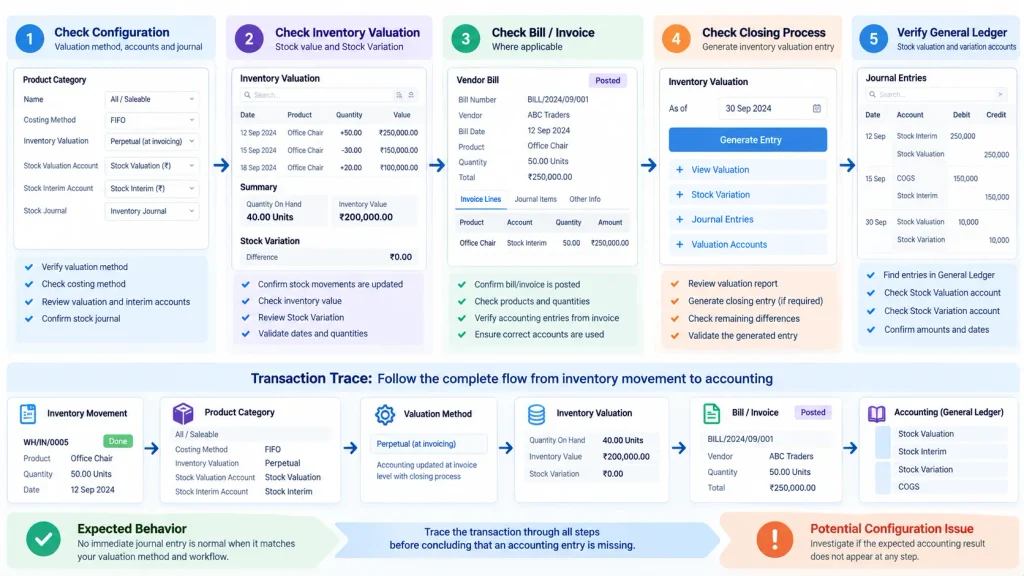
Then compare the expected accounting result with what Odoo actually recorded.
The Inventory Valuation report provides the accounting-side view. Its Stock Variation section shows the difference between the posted inventory value and the stock valuation recorded in the Inventory app.
When a stock-closing entry is required, open:
Accounting → Review → Inventory Valuation → Generate Entry
Review the draft entry and post it when appropriate. This updates the Stock Valuation and Stock Variation accounts in the General Ledger.
The diagnostic sequence is:
Check Configuration → Check Inventory Valuation → Check Bill / Invoice Where Applicable → Check Closing Process → Verify General Ledger
This helps distinguish an expected Odoo 19 result from a genuine accounting configuration problem.
How Do You Fix Incorrect Inventory Accounting in Odoo 19?
Once you identify the cause, correct the underlying configuration or accounting workflow rather than recreating journal entries for individual stock movements simply because the process differs from Odoo 18.
If the valuation method is inappropriate, review it against the company’s accounting requirements.
If the product category configuration is wrong, correct the applicable costing and valuation settings at the category level.
If the valuation or variation account is incorrect, update the accounting configuration and test the result with a controlled transaction.
If a required stock closing entry has not been generated, review the Inventory Valuation report and generate the appropriate entry. Odoo 19 uses the closing process to synchronize inventory valuation with Accounting where required.
For an Odoo 18 → Odoo 19 migration, review any remaining Stock Interim balances separately. Odoo 19 provides an upgrade process to rebalance non-zero Stock Interim accounts into the Stock Valuation account. This should be validated in a test database before applying the correction to the live system.
The objective is:
Correct Configuration → Test Transaction → Review Valuation → Verify Accounting
When Should You Get Odoo Inventory & Accounting Implementation Support?
A missing journal entry becomes an implementation issue when the accounting result is consistently inconsistent across product categories, companies, valuation methods, warehouses, or invoice workflows.
Specialist support becomes useful when:
- Odoo 18 and Odoo 19 produce unexpected accounting differences after migration
- inventory valuation does not reconcile with the General Ledger
- product categories use inconsistent valuation configurations
- closing entries produce unexpected balances
- Inventory, Sales, Purchase, Manufacturing, and Accounting produce inconsistent results across the same workflow
- custom modules or integrations affect stock or accounting transactions
At that point, the issue is no longer just a missing journal entry. The question becomes whether Inventory and Accounting are configured to produce the intended financial result across the complete business workflow.
Need help reviewing Odoo 19 inventory and accounting configuration?
Our Odoo ERP Implementation Company team can review inventory valuation, product-category accounting, costing methods, closing processes, and connected Sales, Purchase, Manufacturing, and Accounting workflows to identify configuration gaps and correct the underlying setup.
Frequently Asked Questions
Odoo 19 does not necessarily create a separate accounting entry for each stock movement. Depending on the configured valuation method, Accounting updates inventory valuation through invoicing and/or the stock-closing process.
Yes. A stock movement can immediately update inventory valuation even when the corresponding accounting entry does not exist yet. Whether an accounting entry should appear at that point depends on the company’s valuation method and accounting workflow.
Odoo 19 changed the Perpetual inventory accounting approach. Instead of generating accounting entries for every stock movement, it uses invoice-level accounting together with the closing process, resulting in fewer journal items.
When a stock-closing entry is required, open Accounting → Review → Inventory Valuation, review the valuation report, and select Generate Entry. The resulting entry updates the Stock Valuation and Stock Variation accounts in the General Ledger.
Conclusion
In Odoo 19, not seeing a journal entry for an individual inventory movement does not automatically mean something is wrong.
The correct result depends on the company’s valuation method, accounting setup, related invoices or bills, and closing process. Start by checking the configuration and Inventory Valuation report instead of comparing every stock movement with the accounting behavior of Odoo 18.
The right question is not:
“Where is the journal entry?”
It is:
“How should this inventory movement affect Accounting under my Odoo 19 configuration?”

