

An Odoo 19 API integration can fail even when the ERP system is working correctly. Common causes include authentication errors, insufficient access rights, incorrect endpoints, invalid request payloads and failures in custom business logic.
Odoo 19 introduces the JSON-2 external API, which allows external applications to interact with Odoo models and methods through the /json/2 endpoint. Its authentication and request requirements must be implemented correctly for the integration to work.
This guide explains how to diagnose Odoo 19 API integration errors, identify their root causes and apply appropriate fixes without making unnecessary changes to a working ERP system
Identify the Exact API Error Before Changing the Integration
An HTTP status code and error response help identify why an Odoo 19 API request failed. The cause may involve authentication, access permissions, request formatting or server-side processing.
Check the HTTP Status Code
| HTTP status | Possible meaning | What to investigate |
| 400 Bad Request | Invalid or malformed request | JSON structure and parameters |
| 401 Unauthorized | Authentication failure | API key and Authorization header |
| 403 Forbidden | Access or permission restriction | User permissions and record rules |
| 404 Not Found | Requested route or resource not found | Server URL, endpoint, model and method |
| 422 Unprocessable Content | Request rejected during validation | Error response and validation requirements |
| 500 Internal Server Error | Server-side processing failure | Exception details and custom code |
Note: These status codes are diagnostic clues, not definitive explanations. Verify the actual response and Odoo’s behaviour before deciding on a fix.
Inspect the Response Body
Odoo’s JSON-2 API returns structured error information that may include name, message, arguments, context and debug. These fields help developers investigate the failure.
Check the following:
- Exception name: Identifies the reported error type.
- Error message: Explains the immediate failure.
- Validation details: May reveal incorrect or missing parameters.
- Access-related information: Helps investigate permission restrictions.
- Debug information: May provide additional details about the failure.
Protect API keys, sensitive business data and internal debugging information. Do not expose them in public logs or support requests.
Identify the underlying cause before changing the integration.
Fix Odoo 19 JSON-2 API Authentication Failures
An invalid or expired API key, an incorrect Authorization header or an outdated application configuration can prevent an external application from authenticating with Odoo 19.
JSON-2 uses bearer-token authentication. The API key must be supplied in the HTTP Authorization header.
Example request headers:
POST /json/2/res.partner/search_read HTTP/1.1
Host: your-odoo-domain.com
Authorization: bearer YOUR_API_KEY
Content-Type: application/json
The example illustrates the request headers; a complete request also requires an appropriate JSON body.
Why Authentication Fails
Common causes include:
- An incorrectly copied, expired or revoked API key.
- A missing or incorrectly formatted Authorization header.
- An outdated API key in the application’s configuration.
- A request sent to the wrong Odoo environment.
How to Diagnose the Problem
- Verify the API key: Confirm that it belongs to the intended Odoo user and remains valid.
- Check the Authorization header: Ensure the bearer scheme and API key are transmitted correctly.
- Verify application configuration: Confirm that the deployed application uses the intended key from its secure configuration.
- Test independently: Send a controlled request using a secure API client to distinguish authentication problems from application-level failures.
- Replace compromised keys: Revoke exposed credentials, generate a replacement and update the integration securely.
Odoo API keys have defined lifetimes, so verify their validity as part of troubleshooting. Never expose API keys in source repositories, logs or screenshots.
Follow the Principle of Least Privilege
Avoid sharing administrator credentials across integrations. A dedicated integration user with only the permissions required for its operations provides better access control and limits the impact of compromised credentials.
Resolve API Access Denied and Permission Errors
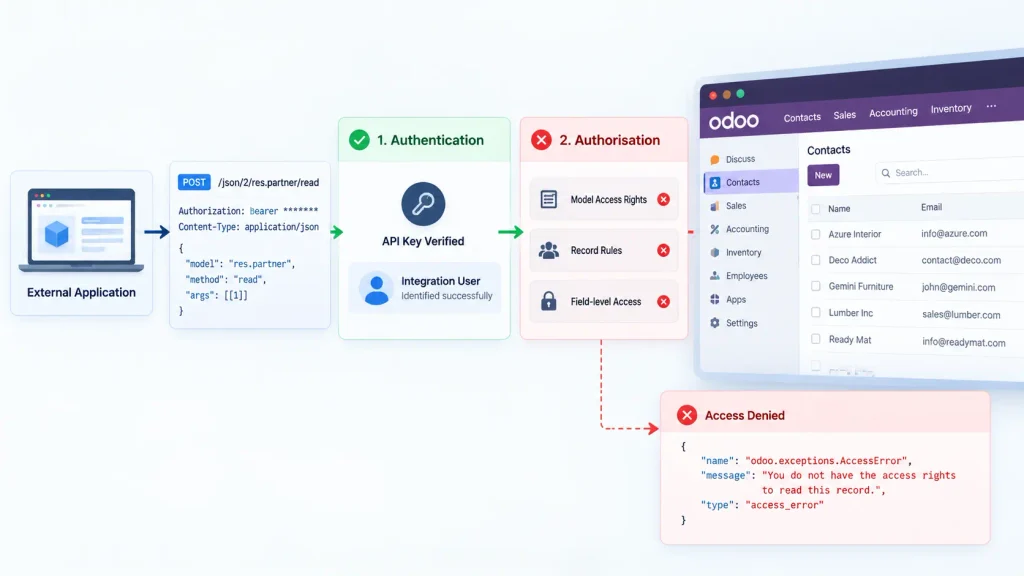
Authentication identifies the user; authorisation determines what that user can access or do. An authenticated Odoo 19 JSON-2 request can still fail because of insufficient permissions.
Odoo applies its standard security mechanisms, including model access rights, record rules and field-level restrictions.
Common Causes of Access Failures
- Insufficient model access rights: The integration user lacks permission to perform the requested operation, such as creating an invoice.
- Record rules: The user can access a model but cannot access particular records because of company, ownership or other restrictions.
- Field-level restrictions: The user can access a record but cannot read or modify a particular field.
How to Investigate Permission Errors
- Identify the model and method used by the failing request.
- Confirm which Odoo user the API key belongs to.
- Check the user’s model access rights, record rules and relevant field restrictions.
- Test the request again after making the necessary permission changes.
Avoid granting administrator access simply to resolve an API error. Give the integration user only the permissions required for its intended operations, and check the complete workflow when multiple models are involved.
Troubleshoot Incorrect Endpoints and Request Payloads
An incorrect endpoint, invalid JSON body or mismatched method parameters can prevent an Odoo 19 JSON-2 request from working.
Check the endpoint
JSON-2 uses this endpoint pattern:
/json/2/<model>/<method>
Example:
/json/2/res.partner/search_read
Verify the server address, technical model name, method and target environment. A model’s display name may differ from its technical identifier.
Validate the request headers
JSON-2 requests require the appropriate Authorization and Content-Type: application/json headers. Depending on the deployment’s database configuration, the X-Odoo-Database header may also be necessary.
Validate the JSON body
Check for:
- Missing or incorrectly named parameters.
- Invalid data types or malformed JSON.
- Incorrect record IDs.
- Parameters that do not match the selected method.
- Values that violate field requirements or business validations.
Check the method signature
Odoo methods accept specific parameters, and available models and methods depend on the installed modules and database.
Use the database-specific /doc page to inspect available API operations. For custom methods, check the implementation to confirm the expected parameters and behaviour.
Investigate Database and Environment Mismatches
An Odoo 19 API request may reach the correct server but target the wrong database or environment. This can cause authentication failures, missing models or unexpected application behaviour.
Common Causes
- An outdated server URL or incorrect environment configuration.
- A missing X-Odoo-Database header when the deployment requires it.
- Incorrect database routing through a reverse proxy.
- An integration user or custom module missing from the target database.
How to Diagnose the Issue
- Verify the destination URL and intended database.
- Check whether the deployment requires the X-Odoo-Database header.
- Confirm that the expected models, methods and custom modules exist in the target database.
- Verify that the integration user and API key belong to the intended environment.
Odoo’s database-routing requirements depend on the server configuration, so check the actual deployment before changing request headers.
Safety precaution: Use read-only requests wherever possible while diagnosing environment mismatches. Avoid destructive tests against production data.
Diagnose Business Logic and Custom Module Failures
An Odoo 19 JSON-2 request can fail even when authentication and request formatting are correct. Common causes include missing required values, unmet workflow conditions, business constraints and exceptions in custom methods.
Check Business Rules and Required Fields
Verify the following:
- Required fields and expected data types.
- Relationships between records.
- Company-specific restrictions.
- Workflow conditions and module constraints.
- Custom validations and automated actions.
Valid JSON does not guarantee that the supplied business data satisfies Odoo’s requirements.
Inspect Custom Methods
If a custom method raises an exception, review its expected parameters, dependencies and business logic. Reproduce the failure in a controlled environment and inspect the relevant server-side error.
Avoid suppressing exceptions by changing standard Odoo behaviour without understanding the consequences. Corrections must preserve business rules and data integrity.
Check Transaction Behaviour Before Retrying
Odoo JSON-2 executes each API call in its own SQL transaction. Successful calls are committed, while failed calls are rolled back. Separate API calls do not share a single transaction.
This matters when an integration performs multiple dependent operations. If one call succeeds and a later call fails, the earlier changes may already be committed. Retrying the entire sequence without checking the current state can create duplicate records or inconsistent business data.
For related operations that must succeed or fail together, consider a suitable server-side method that performs them within one transaction.
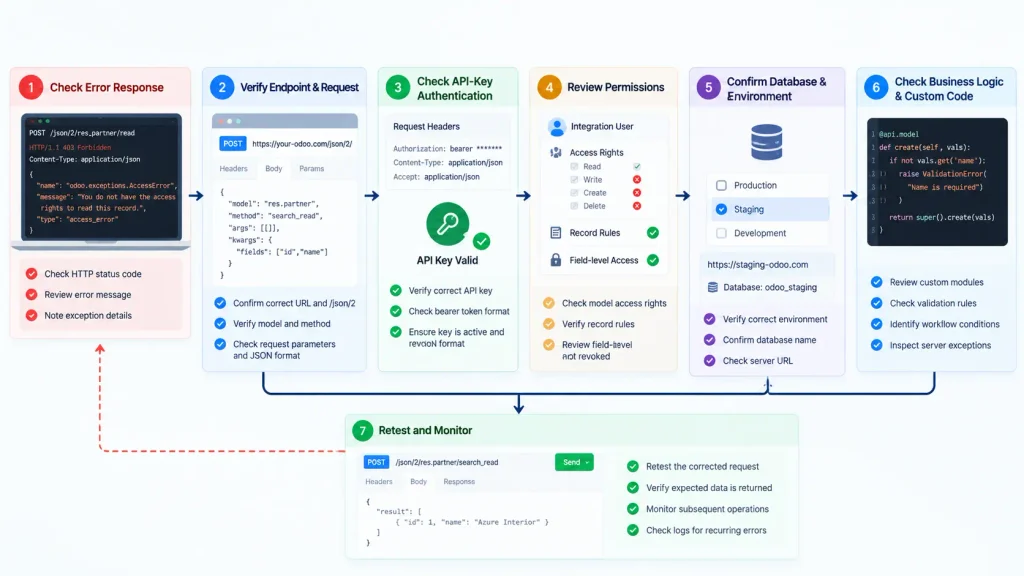
Diagnose Integration Failures Systematically
Use this checklist to verify the fix after identifying the likely cause of an Odoo 19 JSON-2 API failure.
| Step | Diagnostic action | Expected outcome |
| 1 | Reproduce the failed request in a controlled environment. | Confirm the original problem. |
| 2 | Apply the relevant correction and retest the request. | Verify that the error is resolved. |
| 3 | Test related operations and check existing records. | Detect unexpected changes or duplicate records. |
| 4 | Monitor subsequent requests and error responses. | Identify recurring failures. |
Maintain Diagnostic Logs
Record timestamps, the target environment, endpoint, HTTP status and relevant error messages. Never log API keys, passwords or unnecessary sensitive business data.
Handle retries carefully. Verify whether a write operation has already completed before repeating it. This helps prevent duplicate records and inconsistent business data.
When Does an Odoo API Integration Need Development Changes?
Not every Odoo 19 API integration failure requires custom development. Incorrect credentials, missing permissions and invalid request parameters can often be resolved through configuration.
Development support may be necessary when:
- A custom method fails despite a valid request.
- Related business operations require coordinated processing.
- The integration needs stronger validation or duplicate-request protection.
- Custom modules interfere with the expected behaviour.
- Existing integration code needs adaptation to the target API.
- Error handling cannot distinguish recoverable failures from permanent errors.
Businesses facing these issues alongside wider ERP configuration or customisation requirements can explore our Odoo ERP implementation services.
Before requesting development changes, document the failed request, expected behaviour, actual error and troubleshooting steps already completed. This helps the technical team identify the root cause and avoid unnecessary modifications.
Conclusion
Odoo 19 JSON-2 API failures can result from authentication problems, access restrictions, incorrect requests, database mismatches or custom business logic. Identifying the root cause helps prevent unnecessary configuration changes and protects existing business data.
Reliable API integration requires more than a successful request. It must also preserve data integrity, enforce appropriate access controls and handle failed operations safely.
Resolve configuration issues first. Consider custom development when the integration’s logic, transaction handling or error management requires changes.
Frequently Asked Questions
Odoo 19 may return 401 Unauthorized if the API key is invalid, expired or revoked, or the bearer-token Authorization header is incorrect. Verify the key and request header first.
Authentication does not guarantee permission to perform every operation. Check the integration user’s model access rights, record rules and field-level restrictions.
Yes. Custom methods, validation rules or workflow conditions can cause requests to fail. Inspect the server-side exception and relevant custom code to identify the cause.

