Changing the Price After a Partial Invoice in Odoo

Half the job is invoiced. Then the price changes — a revised scope, a renegotiated rate, a rate card that moved mid-contract. You open the sales order to correct the unit price, and Odoo will not let you touch it.
This is not a permissions problem and it is not a bug. It is Odoo refusing to let the sales order and the ledger disagree, and the way out is to add a document rather than edit one.
Why the field is locked
A sale order line carries both the commercial agreement and a running tally of what has happened to it: price_unit, product_uom_qty, qty_delivered and qty_invoiced.
Once qty_invoiced is above zero, part of that line has already become a posted customer invoice. A posted invoice in Odoo is an accounting entry. It sits in the general ledger, it has been given to the customer, and in most jurisdictions it carries a sequential number that cannot be reused.
If Odoo let you quietly change the unit price on the order at that point, you would have an order saying one thing and a ledger saying another, with nothing recording which is correct or when it changed. The lock is deliberate.
The three ways out
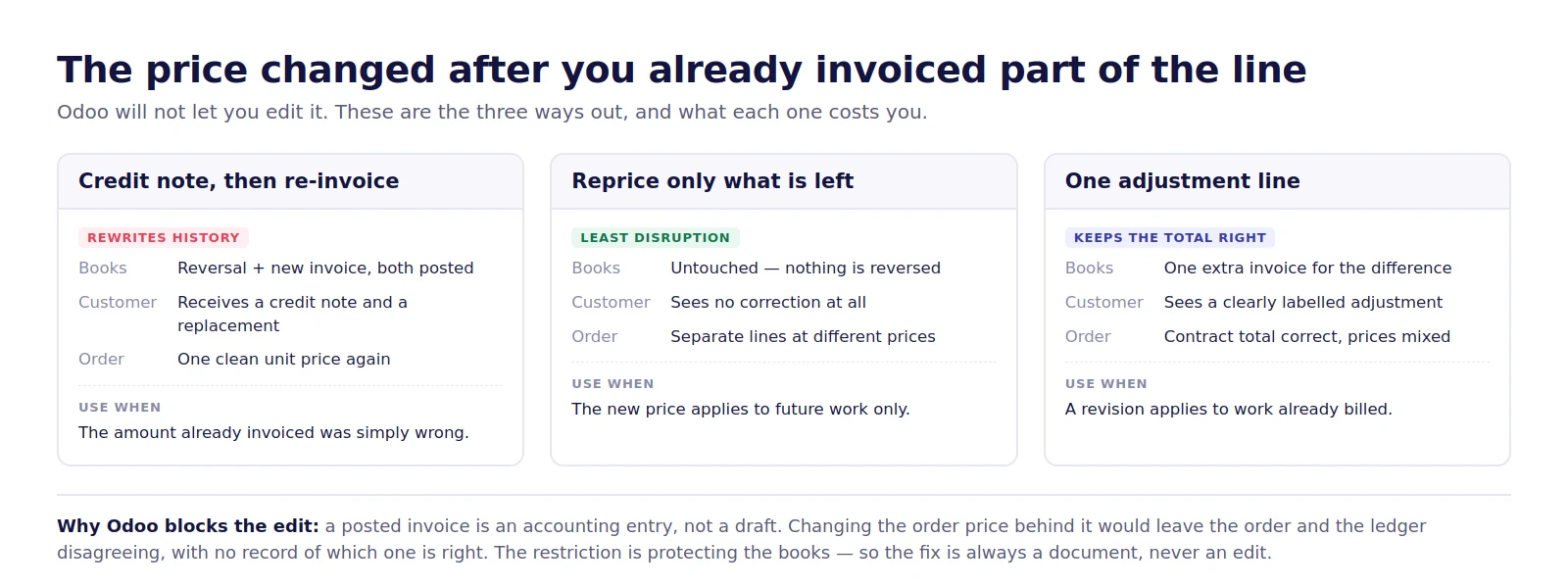
1. Credit note, then re-invoice
Reverse the posted invoice with a credit note, correct the price on the order line, and invoice again at the new figure.
This is the only option that leaves the order with one clean unit price. The cost is that the customer receives a credit note and a replacement invoice for work they have already been billed for, and your invoice sequence now carries a reversal. Use it when the amount you invoiced was simply wrong — a typo, the wrong rate card, the wrong currency.
Do not use it to make a forward-looking price change look tidy. Reversing a correct invoice to re-issue it at a new price misstates what was agreed at the time it was raised.
2. Reprice only what is left
Leave the invoiced portion exactly as it is. Reduce the quantity on the original line to what has already been billed, and add a new line for the remaining quantity at the new price.
Nothing is reversed, the customer sees no correction, and the books do not move. The order now shows the same product on two lines at two prices — which is not untidy, it is accurate. Those really were two different prices, agreed at two different times.
This is the right answer most of the time, because most price changes apply to work not yet done.
3. One adjustment line
Keep the original lines untouched and add a single line for the difference — positive for an increase, negative for a reduction — labelled for what it is, and invoice it on its own.
The contract total comes out right, the customer gets one clearly named adjustment instead of a reversal, and the audit trail shows exactly when the revision happened. Use it when the new price applies to work that has already been billed and both sides have agreed to settle the difference.
Which one to pick
Three questions settle it:
- Was the invoiced amount wrong, or is the price changing from now on? Wrong means a credit note. Changing from now on means option 2 or 3.
- Does the change apply to work already billed? If yes, option 3. If it applies only to what is left, option 2.
- Has the customer already paid? A paid invoice makes a credit note considerably more work — the payment has to be unreconciled and re-applied. That alone usually rules out option 1.
Phase billing: the problem is usually the model
There is a pattern behind most of these cases. The order was written as one line with a quantity — one design service, quantity 1, invoiced 50% then 50% — when the work is actually a sequence of phases that each carry their own price and their own sign-off.
Modelled that way, every repricing collides with the invoiced half, because there is only one price field for the whole engagement.
Modelled as one line per phase, it does not. Concept, schematic design, tender package and site supervision each become their own line with their own price. Phase one is invoiced and frozen. Phase three can be repriced without touching anything, because nothing has been invoiced against it yet.
Odoo supports this directly: set the service product's invoicing policy to milestones or to delivered quantities, and bill each phase as it is signed off. Architecture practices, engineering consultancies, construction contractors and agencies all hit the same wall for the same reason, and the fix is structural rather than a workaround at invoice time.
What to check before you change anything
- Payment status. Is the invoice paid, partly paid or open? This changes the cost of every option.
- Delivered quantity. If
qty_deliveredis ahead ofqty_invoiced, some work is billable right now at whichever price you settle on. - Analytic account. On project work the revenue is usually tracked against an analytic account. Check that a credit note or an adjustment line carries the same analytic distribution, or your project profitability silently drifts.
- Tax. An adjustment line needs the same tax treatment as the original. Under GST, a price revision on an already-invoiced supply normally needs a credit or debit note rather than a standalone line — confirm the treatment with whoever signs your returns.
- What the customer was told. The document trail should match the conversation. If the revision was agreed in writing, reference it on the adjustment line.
Frequently asked questions
Conclusion
Odoo locks the unit price on a part-invoiced line because the invoice behind it is already in the ledger. The question is never how to unlock the field — it is which document records the change honestly.
A credit note when the invoice was wrong. A new line when the price applies to work still to come. An adjustment line when it applies to work already billed. And if this keeps happening on the same kind of contract, the order is modelled as one line when it should be modelled as phases.